
Front of house: reservations, a waiting list and seating — the recipe
A restaurant's host takes bookings on the phone, keeps walk-ins waiting in order, tells a party its table is ready and seats it. The till already keeps a table's running order (the open check) and the floor's tables; what it does not keep is the evening before the party sits down. This recipe gives the host a diary of bookings and a waiting list in iVendNext Desk, holds a table against two bookings at once, records a no-show, ties a booking to the sale that took its deposit, and seats a party by opening its table's check through the till's open-check door, so the server finds the table on the floor with the party's size.
Reference implementation: samples/s55_front_of_house/.
When to use it. A store with Table Service on its register (full service, a bar that takes bookings, a hotel's restaurant). The tables are the till's own floor: Retail Floor Section and Retail Floor Place, set up in Desk. A deposit is the till's own customer advance. A booking platform or a messaging provider of your own comes on top (Make it your own, below).
The four rules, here. No code runs inside the retailer's iVendNext. One address is called, your service, and only when the host presses one of the buttons. The service opens a check only through the till's door (check_open), as the app's own user, with the two rights front of house asks for: open a check and see the checks. A guest's name, phone, customer and notes are fields only the host role reads, so they never reach your service: the app's user can neither read them nor search on them.
What the host and the server see
| A reservation after Book: the table held from 20:00 to 21:30 for 4 | 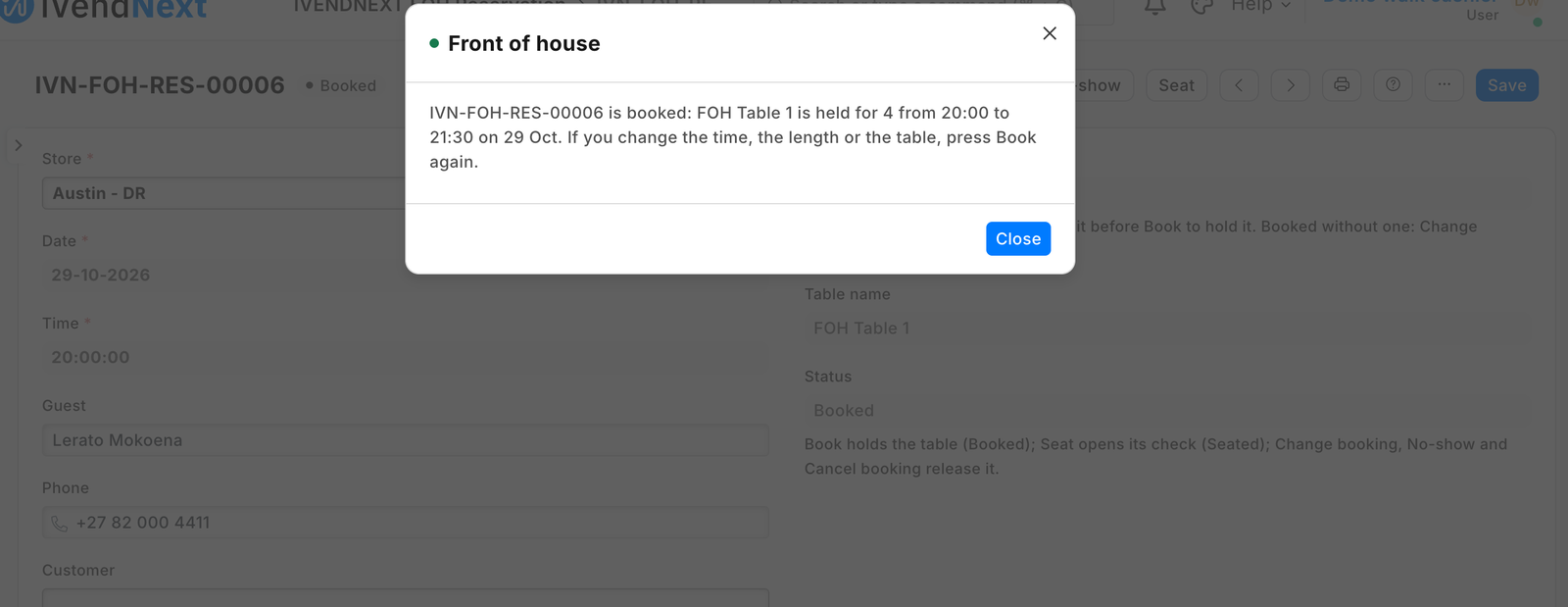 |
| A second booking for the same table, refused, naming the first | 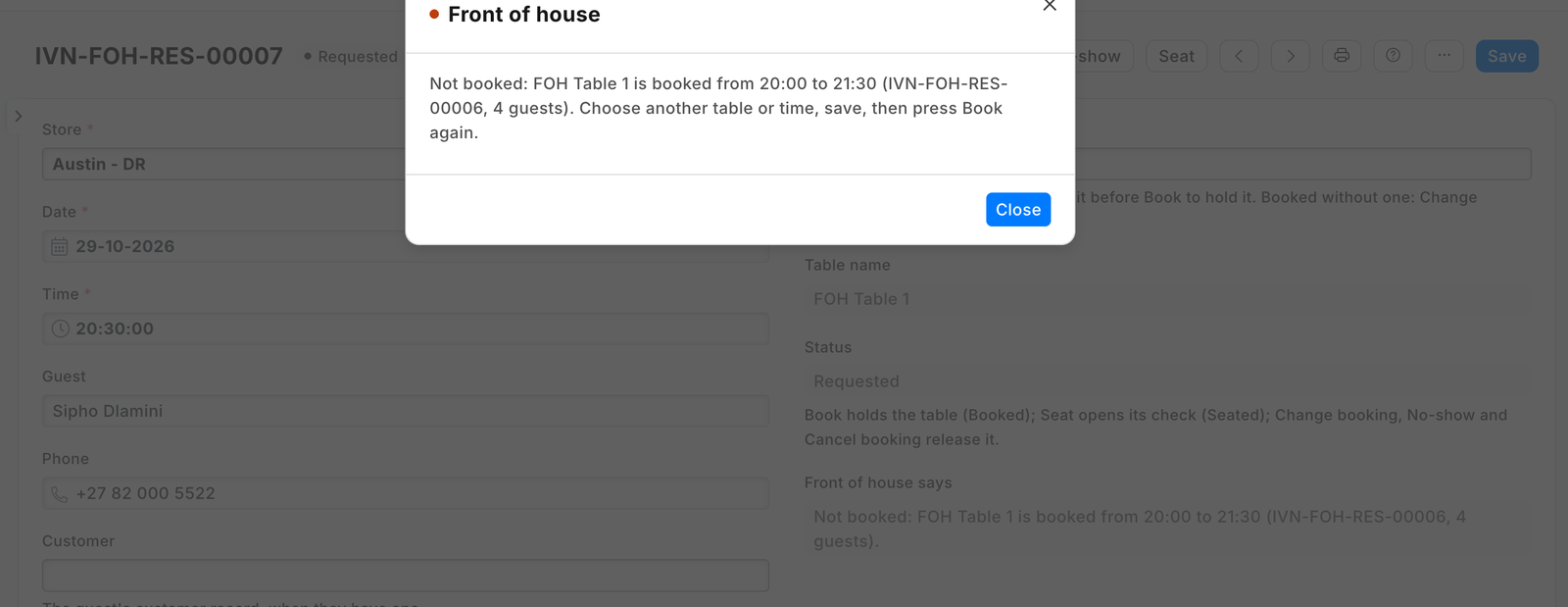 |
| After Seat: the booking seated, its check open on the till | 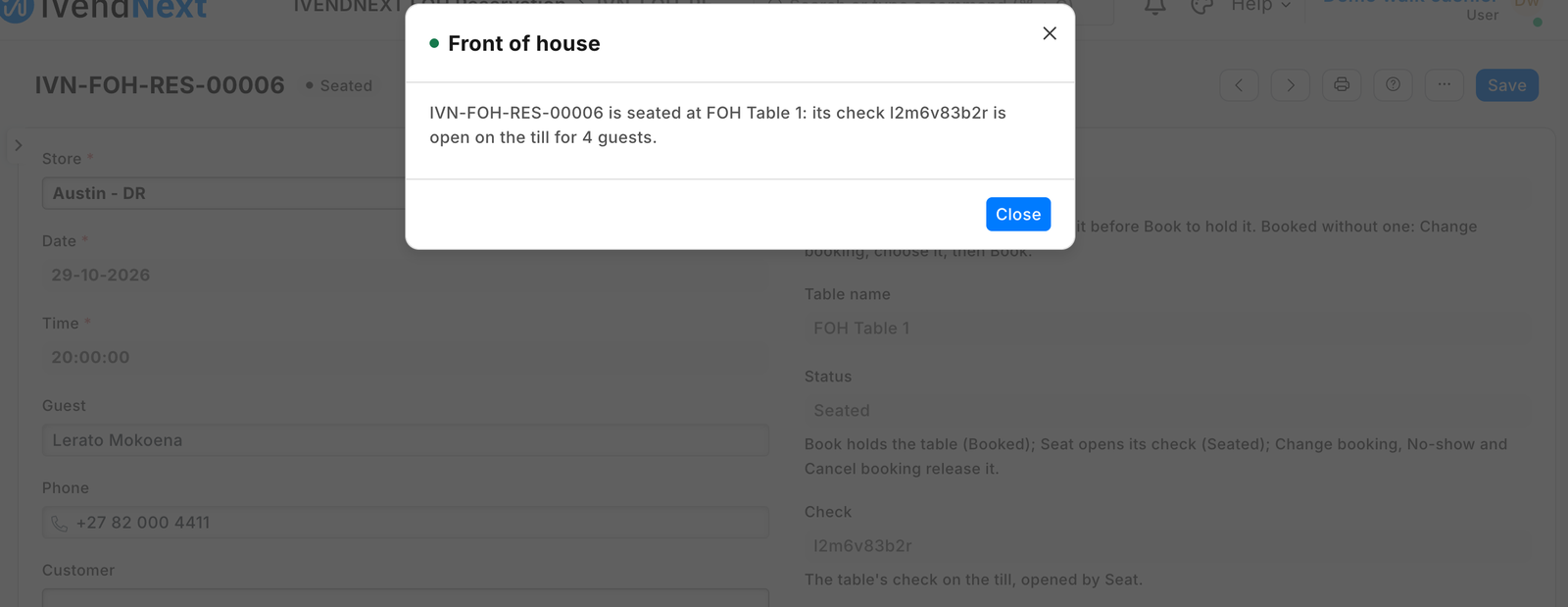 |
| The till's floor: the seated party's table, its check open with the party's size | 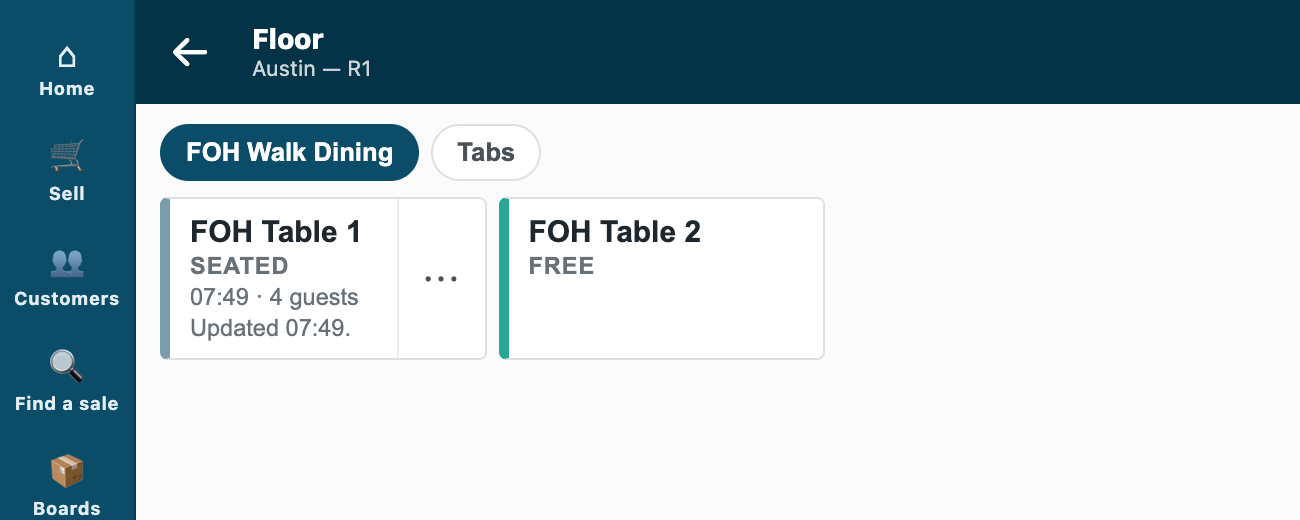 |
| The waiting list: walk-ins in the order added; Table ready sends the guest an SMS; Seat | walked on the programme bench (no SMS provider on the demo site) |
Steps
Settings
- Install the manifest. It adds the settings (one per company, with a row per store), the reservation, the waiting-list entry, the roles PP FOH Host and PP FOH Integration, six buttons and their five services (off), and the feed registration that makes the app's own user (
pp_foh@integration.invalid, from POS 2.1.0.667; leave the feed off). - Give the app's user its store and its key, in this order, on its User record: keep Is Desk User, tick Is POS User, choose a Shift Profile, link a Retail Permission with Open Checks: open a check and see the checks only; add one row to the store access table (the store and its register, Table Service on); Save; then Generate Keys. Without Is POS User the save drops the store row and the till answers "You are not assigned to this outlet." Never give it write on Floor Section: that is every check verb, a comp included.
- On PP FOH Settings, one row per store: the same register the app's user holds there, the usual booking length (90 minutes to start), whether a table with an open check may take a second check, and the No-show deposit rule (Keep it or Return it).
- Give PP FOH Host to the hosts and managers, with Read on Retail Floor Place and Select on Warehouse, POS Invoice and Customer (Role Permissions Manager); consent to the five services and switch the six buttons on; press Connect again on the app's package record if the site could not reach the app.
Reservations
- The host makes a reservation and saves it: it reads Requested. Book holds its table: no other Booked booking of that table may overlap it, each from its start for its length (a booking running past midnight included); a seated party holds its table by its open check. A clash is refused with the other booking's number and time, and the reservation stays Requested. Once Booked, the form keeps the time, the length and the table read-only: Change booking releases the hold so they can change, and Book holds the new ones (a change made through the list's Edit or the API is checked only at the next Book or Seat). The diary is the list with its Date filter set to the day: it sorts by time.
- Seat opens the party's check at its table: the table must not be booked for someone else within the party's stay, and must have no open check (unless the store's row allows a second). The check carries the party's size, the booking's number as its reference (
source_ref) and label, and the deposit's amount when it took one; it has no server until the first till writes to it. The reservation reads Seated with the check's number. - No-show marks it a no-show and writes the store's deposit rule on it; Cancel booking frees the table. Before you remove the app, pay or close every check it opened: the uninstall removes the app's user, and a check it opened can then no longer be changed.
Waiting list
- The host adds a walk-in: the party, a name and phone, the wait quoted. Setting Table ready sends the guest an SMS through the retailer's own Notification (on PP FOH Waitlist Entry, Value Change on Status, the condition
doc.status == "Table ready" and doc.phone, channel SMS, the receiver by document fieldphone; SMS Settings set to the retailer's provider). Seat, with a table chosen, opens its check as for a booking.
A deposit
- The cashier takes the deposit at the till as the guest's advance (Customers, Take a payment; by default a guest who owes on account has that settled first and only the rest is the deposit; the cashier can set those bills aside); the host names that sale on the reservation, which shows its amount. Nothing applies an advance when the table pays: at the table's payment the cashier puts the guest on the sale and charges the deposit's part On account (the cashier needs take a payment on account, and the guest a buyer tax registration where the market asks for one), the rest as usual; when the day closes the sale joins the guest's invoice, and the accountant allocates the deposit's Payment Entry to it in Payment Reconciliation.
What the retailer does
Day to day the host presses the five buttons and the server works the table at the till as before. The app never adds a dish, moves, merges, closes, voids, comps or prints a check, and never takes a payment: those are a person's decisions, at a till.
Limits
- The guard runs when Book and Seat are pressed, never on a plain save: a booking changed after Book is checked again only when Book is pressed again.
- Nothing marks a booking late by itself; the host presses No-show.
- At a table the floor names a check by its place, so the booking's number and deposit are read on the check, not the floor tile.
- A check moved or merged at a till after Seat keeps its first number on the reservation.
- Opening a check needs a connection: nothing here works offline.
Technical notes
- One check per press, even when an answer is lost. Under the company's press stamp, the service checks the table (its bookings, the floor), then writes a fresh key (a UUID) and the exact call on the record, calls
check_open, and only then lifts the stamp: a stored key always means the checks passed. A press that finds a key sends the same call again: the door returns its first answer for the same key and arguments, and writes nothing twice. A first send the till refuses opened nothing, so its key is cleared; a refused retry keeps its key (its first send may have opened the check); a lost answer keeps it. - No guest data leaves. The guest's fields carry
read_rolesandwrite_rolesof PP FOH Host and System Manager (the field limit of POS 2.1.0); the app's own role is not among them, so the record API leaves them out of every answer to its user. The Desk button sendsnameonly. The call that opens the check names nosuggested_customerand noserver. - The status is the app's. The reservation's status and the app's own fields carry
write_rolesof the app's role and System Manager: a host cannot set Booked without the guard. Once Booked,read_only_depends_onkeeps the slot's fields read-only in the form (the list's bulk Edit and an API write are not held by it). - No version history. Neither record type tracks changes: a Version diff would carry a guest's field to anyone who reads the record.
- One press at a time per company. Book and Seat stamp the company's settings with the shop's own
modifiedcheck while they read the table's bookings, so two hosts never hold one table twice; a stamp older than a minute has lapsed. - Refusals in the host's words. The till's refusals come back by their stable codes; the service names what to fix for
ProfileNotAssignedError(and the other assignment codes),TableServiceOffError,PermissionErrorandDeviceRequiredError, and passes the till's own words for any other.
Make it your own
A partner usually adds a booking platform's link (its bookings written as reservations through the record API, the guard pressed by the service), the retailer's SMS provider (SMS Settings, never the app), a reminder Notification before a booking, and the store's own deposit words. Start with python3 tools/manifest/start.py s55_front_of_house --prefix "ACME FOH".