
What you can use: API endpoints, record types, fields and screens
The developer's map. One page answers the questions a developer asks before building on iVendNext: which API endpoints can my app call, which record types and fields can it read and write, what does iVendNext call on my service, what can a manifest add, and which screens can I make? Each part is a table that links to its detail, and each is built from the kit file that defines it: when a name or a quoted sentence leaves its source, the site's build fails until the map follows.
The four parts: (a) iVendNext endpoints your app calls · (b) endpoints iVendNext calls on your service · (c) what a manifest can add · (d) screens you can add · and every record type with its fields.
Calls go three ways. Your service calls iVendNext's endpoints at the retailer's own address, with your app's key (part a). iVendNext calls your service's endpoints at your one address, signed with that retailer's secret (part b). And your service may call an outside system with that retailer's own account for it, which iVendNext never sees. Everything inside the retailer's iVendNext is data your manifest declares (part c), never code.
(a) iVendNext endpoints your app calls
Every API endpoint your service calls on a retailer's iVendNext: the record calls, the iVendNext methods, the event feed and reports. Built from api/openapi.yaml and api/README.md.
Records: read and write any record type
Every record call is the same few addresses for every record type, /api/resource/⟨Record Type⟩. The calls the samples make, each with its parameters and answers on the API reference; every record type with its fields on its own page (all record types).
| Call | Address | What it does | Record type |
|---|---|---|---|
GET |
/api/resource/Sales%20Invoice |
List booked sales — the reconciliation pull filters on modified after a watermark |
Sales Invoice |
GET |
/api/resource/Sales%20Invoice/{name} |
Read one sale with its lines | Sales Invoice |
GET |
/api/resource/POS%20Invoice |
List till sales (POS Invoices) | POS Invoice |
GET |
/api/resource/POS%20Invoice/{name} |
Read one till sale with its lines | POS Invoice |
GET |
/api/resource/Item |
List items — e.g. fields=["name","item_group"] and a name in [...] filter |
Item |
GET |
/api/resource/Item/{name} |
Read one item | Item |
GET |
/api/resource/Customer |
List customers | Customer |
GET |
/api/resource/Warehouse |
List stores and stock locations (warehouses) | Warehouse |
GET |
/api/resource/Serial%20No |
List serial numbers — e.g. by item_code or status |
Serial No |
GET |
/api/resource/Serial%20No/{name} |
Read one serial number | Serial No |
GET |
/api/resource/Serial%20and%20Batch%20Bundle/{name} |
Read the serial numbers a sale or stock line moved (its entries) |
Serial and Batch Bundle |
GET |
/api/resource/Stock%20Entry |
List stock movements | Stock Entry |
POST |
/api/resource/Stock%20Entry |
Create a stock movement — with docstatus 1 it is created and booked in one call |
Stock Entry |
GET |
/api/resource/Stock%20Entry/{name} |
Read one stock movement — its lines name the Serial and Batch Bundle that holds their serials | Stock Entry |
POST |
/api/v2/document/Stock%20Entry/{name}/method/submit/ |
Book (submit) a draft stock movement — the two-step alternative | Stock Entry |
GET |
/api/resource/Comment |
List comments on a record — how a service finds its own earlier comment | Comment |
POST |
/api/resource/Comment |
Write a comment on a record — visible to staff on that record in iVendNext Desk | Comment |
GET |
/api/resource/POS%20Profile |
List till profiles and the selling warehouse each sells from | POS Profile |
GET |
/api/resource/POS%20Profile/{name} |
Read one till profile — its warehouse is where a till sale takes stock from |
POS Profile |
GET |
/api/resource/Bin |
Read stock balances (iVendNext's own figures) — actual_qty per item and warehouse |
Bin |
GET |
/api/resource/{record_type} |
List records of a type the partner's manifest installed (e.g. PP BLN Item In Bin) |
any record type |
POST |
/api/resource/{record_type} |
Create a record of a manifest-installed type | any record type |
GET |
/api/resource/{record_type}/{name} |
Read one record of a manifest-installed type, with its child rows | any record type |
PUT |
/api/resource/{record_type}/{name} |
Change fields on one record — a child table sent here replaces its rows, so send the existing rows too | any record type |
iVendNext methods
Calls other than records, each POST (or GET to read) to /api/method/ivendnext_mpos.api.v1.⟨name⟩: the engine's own functions under iVendNext names, with the same rights and answers. The list and what to watch for: api/README.md. From is the first POS build that has the method; the first list is every build with the partner API.
| Method | From | What it does |
|---|---|---|
scan_barcode |
the first list | Find the item a barcode, serial number or lot number belongs to, as the till's scan finds it. |
get_item_details |
the first list | Price one line as the shop prices it: the item's rate, discounts and taxes for a customer, price list, store and quantity. |
price_check |
the first list | Both in one call: the scan, then the price of what it found (nothing found: no price). |
apply_workflow |
the first list | Move a record to its workflow's next state, as a user pressing the workflow's button, with that user's rights. |
submit |
the first list | Submit (book) a saved draft record. A till sale at a register with a partner's check in scope is refused here: book it from a till. |
bulk_update |
the first list | Change several records in one call, each with the caller's rights. |
get_count |
the first list | Count the records of a type that match your filters, without reading them. |
get_password |
the first list | Read a password field of a record. Only a user with System Manager may: your app's own user is refused. |
get_docinfo |
the first list | A record's comments, attachments, assignments and change history, as its page in Desk shows them. |
add_comment |
the first list | Write a comment on a record, shown on its page in Desk. |
generate_keys |
the first list | Make a new API key and secret for a user. The retailer's administrator uses it to give a user a key; it replaces the old secret. |
get_logged_user |
the first list | The user your call runs as: check whose key you hold. |
get_versions |
the first list | The versions of the apps installed on the site, to check a feature's build before you use it. |
get_role_permissions |
the first list | Read the rights each role has on a record type. |
add_role_permission |
the first list | Add a role's row of rights on a record type. |
update_role_permission |
the first list | Change one right of a role's row on a record type. |
reset_role_permissions |
the first list | Put a record type's rights back to the product's own. |
run_report |
POS 2.0.0.654 | Run one of the retailer's reports by name, with its filters (report_name, filters), and read its columns and rows as Desk shows them. Watch for: a call that names another user reads as that user, and a report the retailer switched off is refused. |
prepare_report |
POS 2.0.0.654 | Queue a background run of a prepared report (such as Stock Balance); it answers the run's record name (a Prepared Report), which you read when it is done. Watch for: it checks no right. |
get_gift_card_status |
POS 2.0.0.654 | One gift card's status as the till reads it, by its number (gift_card_no): its balance, whether it has expired, whether a payment has used it. A Gift Card record names no customer: find a customer's cards in your own records. |
material_request_to_stock_entry |
POS 2.0.0.654 | A stock movement built from a submitted request for goods, as Desk's Create menu builds it, unsaved: you save it. |
sales_order_to_delivery_note |
POS 2.0.0.654 | A delivery note built from a submitted order, as Desk's Create menu builds it, unsaved: you save it. |
sales_order_to_sales_invoice |
POS 2.0.0.654 | A sale built from a submitted order, as Desk's Create menu builds it, unsaved: you save it. |
get_batch_qty |
POS 2.0.0.654 | A lot's quantity in a store, or a store's lots of an item with stock. |
payer_coverage |
POS 2.1.0.666 | On a draft Sales Invoice in Desk: the customer's covers, then what one cover pays, sealed into the invoice. |
payer_bill_back |
POS 2.1.0.666 | Bill a claim the payer rejected back to the customer; it answers the journal booked, once per sale, claim and reason. |
check_open |
POS 2.1.0.667 | Open a check at a place, or a tab or pre-order named by its label; it answers the check at version 1. |
check_add_lines |
POS 2.1.0.667 | Add lines to an open check, with no price: the shop prices the check when the table pays at a till. |
check_change_line |
POS 2.1.0.667 | Change an unsent line nobody is paying, such as its quantity, choices or note (your own lines, or any line with the right to change any). |
check_remove_line |
POS 2.1.0.667 | Remove a line not yet sent to the kitchen and that nobody is paying. |
check_move |
POS 2.1.0.667 | Move a check to another place, or to a tab's label. |
check_move_lines |
POS 2.1.0.667 | Move some lines to another check. |
check_merge |
POS 2.1.0.667 | Merge a check into another. |
check_split_line |
POS 2.1.0.667 | Split part of a line's quantity off. |
check_transfer_server |
POS 2.1.0.667 | Hand a check to another server, at a shift's handover. |
check_edit |
POS 2.1.0.667 | Change a check's covers, label, suggested customer or service mode (the mode only until a line has gone to the kitchen). |
check_close |
POS 2.1.0.667 | Close a check with no open line. |
check_mark_sent |
POS 2.1.0.667 | Send: the unsent lines (or the named ones) go to their kitchens on the till's kitchen tickets. |
check_void_line |
POS 2.1.0.667 | Void a whole line the kitchen already has (the kitchen's manager right); a VOID ticket tells the kitchen to stop. |
check_comp_line |
POS 2.1.0.667 | Take a line off the check free (the Manager preset's right); it is never on the sale. |
check_get |
POS 2.1.0.667 | Read one check with its lines; locks nothing. |
floor_status |
POS 2.1.0.667 | The store's sections, places with their status (free, seated, ordered, paying) and tabs. |
check_preview |
POS 2.1.0.667 | The shop's own price of the open lines at your register, computed when asked, never stored. |
check_claim |
POS 2.1.0.667 | A till's own, when a check is paid. Refused to your app whatever it is granted. |
check_release |
POS 2.1.0.667 | A till's own, when a check is paid. Refused to your app whatever it is granted. |
check_note_pending |
POS 2.1.0.667 | A till's own, when a check is paid. Refused to your app whatever it is granted. |
check_clear_pending |
POS 2.1.0.667 | A till's own, when a check is paid. Refused to your app whatever it is granted. |
check_break_claim |
POS 2.1.0.667 | A till's own: end another till's payment of a check. Refused to your app whatever it is granted. |
check_print |
POS 2.1.0.667 | A till's own: the printed check for the table. Refused to your app whatever it is granted. |
The event feed and the other calls your app makes
| Address | What it does | More |
|---|---|---|
/api/method/ivendnext_mpos.api.feed.events |
The event feed: your app's oldest events not yet done, oldest first. | details |
/api/method/ivendnext_mpos.api.feed.done |
The event feed: mark up to 500 of your events done. | details |
/api/method/ivendnext_mpos.api.feed.failed |
The event feed: mark one event failed, with your note; it comes back on the next read. | details |
/api/method/ivendnext_mpos.api.page.submit |
A partner page's answer: your server posts the cashier's choice, signed, and the till applies it. | details |
/api/method/ivendnext_pay_remote.api.callback |
A payment connector's callback: the result of a payment your connector started. | details |
Reports and reading many records at once
- The retailer's own reports:
run_reportandprepare_reportabove; what to watch for: reading the retailer's reports. - Many records in one call (sale lines, totals and groups): read many records at once.
- Signing in: every call carries
Authorization: token ⟨api key⟩:⟨api secret⟩and runs as your app's own user (security and the handshake).
(b) Endpoints iVendNext calls on your service
One row per extension point, from its contract page in contracts/: when it fires, what it sends, what you answer, its time limit and what the cashier or user sees. How the extension points fit together, and how to ask for a new one: chapter 9.
Calls on your service
iVendNext calls your service's address over HTTPS, signed with that retailer's secret, at the moment named. Each cell is the contract page's own words.
| Extension point | When it fires | What it sends | What you answer | Time limit | What the cashier or user sees |
|---|---|---|---|---|---|
| Desk action | “It fires when a user presses it. The server then re-checks everything the button showed on the record as SAVED (never the form's copy)” | “Only then does it send exactly the declared fields to your service and judge your answer.” | “The answer — HTTP 2xx, a JSON object of at most 64 KB: a message” |
“3 seconds to answer unless the subscription allows more, 10 at most. No retry.” | “down, slow or unreachable — "⟨label⟩ did not answer in time. Check the record before you try again."” |
| Document check | “It fires when the document is submitted, from every door: the iVendNext Desk form or list, a data import, and the API.” | “what is sent with every call — the user's login (usually an email address) and language, the company, the record's type and name — the fields that leave the shop” | “The answer — HTTP 2xx, a JSON object of at most 64 KB, one of five:” … “allow” … “refuse” … “ask” … “approve” … “fill” |
“the time to answer (3 seconds unless raised, at most 10)” | “allow_and_flag (the default: the submit goes on and the log row is flagged), refuse (did not answer, so this document can't be submitted yet), or ask (did not answer. Submit anyway?)” |
| Partner capture | “On scan — when the cashier scans an item your filter names (its item group, a group below it, or an item field that is set), after the item is found and before its line goes on the sale.” | “line: its item_code, item_group, quantity, unit, batch, serial and the code scanned.” | “allow (nothing shown), confirm (a beep and a yes / no;” | “on scan or a quantity change 1.5 seconds unless raised, 3 at most · on customer add or select 3 seconds unless raised, 10 at most” | “"⟨label⟩ did not answer. The item can't be added until it does."” |
| Partner check | “It fires when the cashier presses Pay, before the payment sheet opens (stage: "sale"); before the refund choices open on every refund the till pays (stage: "return")” |
“The numbers are the server's, never the till's echo. Money is a whole number of minor units with the currency's own digits (currency_exponent: 2 for AED, 3 for KWD, 0 for JPY); quantity is in thousandths.” |
“allow it, allow it without some tenders, refuse it, ask the cashier a question, or call a manager.” | “3 seconds unless raised, at most 10 · at most 3 checks per POS Profile, 10 seconds together.” | “"⟨label⟩ did not answer. This sale can't be paid until it does. Try again, or get a manager."” |
| Partner fulfil | “iVendNext writes one Pending record per sold line inside the sale's own booking, then asks you after the booking commits.” | “the sale's number, the store, the till's POS Profile, the company, the currency, the language, the customer's id, and the line's item code, item group, unit, face value and amount” | “{"verdict": "issued", "ref": "GZ-77120", "lines": ["PIN 4821 0937 5521", "Valid until 16 Oct 2027"]}” | “a time to answer (5 seconds unless raised, at most 10)” | “The cashier sees Waiting for ⟨your label⟩'s code for ⟨item⟩, with Try again and Print without it.” |
| Partner page | “It fires when the cashier presses the page's key on the till, or when a Desk user opens the page” | “Your page learns who is looking at what from a signed, one-time, five-minute context in its address” | “on the till your server may answer once — a message, Sale Attribute rows, or both — which the cashier confirms like any till key” | “a page that has not loaded in 10 seconds” | “A page that does not load in 10 seconds shows "⟨label⟩ isn't answering." with Close; nothing is added to the sale.” |
| Payer | “On a sale to a named customer the cashier presses Payer; we ask your service which covers the customer holds (covers) and the cashier picks one (the only one is taken).” |
“We send the customer's record name, the date, the store, the POS Profile and the cashier.” | “you answer each line's two shares: yours and the customer's (coverage)” |
“the time to answer (at most 5 seconds; 3 when left empty)” | “a service that does not answer in time, errs, fails its signature or answers wrongly means no cover: "⟨label⟩ cannot be reached: the customer can pay it all, or hold the sale."” |
| The iVendNext Remote Gateway Contract | “Every call is a signed POST to https://<connector>/paygw/1/<verb>” |
“{v, site, reference, merchant, amount_minor, currency, currency_exponent, rail, device, payer{phone,email,name,party} (may be empty), payer_code?}” |
“An Answer (authorise, status): {v, site, reference, outcome, amount_minor?, currency, auth_ref?, correlation_id?, capture_state?, reason?, exists?, instrument?}” |
“every rail's authorise has the one 60 s deadline.” |
“A preview that times out, is refused or is malformed dims the wallet at the till for that sale; it never raises at the till.” |
| Remote till key | “It fires on a press, and only then: never before payment, never at booking, never on a schedule.” | “When the cashier presses it, the iVendNext POS server sends your service a read-only picture of the sale in progress.” | “You answer with a message for the cashier, Sale Attribute rows for the sale, values for its lines (Transaction Item Attributes), or any of them together.” | “time to answer 3 seconds unless raised, at most 10” | “"⟨label⟩ did not answer in time. Nothing was added to the sale."” |
| Wallet extension point | “The cashier taps the wallet's tile with a customer on the sale, sees the balance and the most this sale may use” | “{v, customer, customer_name, amount_due_minor, currency, currency_exponent, store, sale_ref, lang}” |
“{eligible, balance_minor, max_redeemable_minor, label, currency, otp_required, reason} within 3 s” |
“within 3 s” | “A wallet that cannot be used is dimmed with its reason ("Wallet isn't installed on this site.", "Add the customer first."), never hidden; a wallet that does not answer its preview says so in the opened sheet.” |
| Webhooks | “For a booked sale, that is Sales Invoice and POS Invoice on Submit” | “a body that names the record and when it changed, and nothing more” | none stated | none stated | none stated |
| The connect, after an install | “After the install, the retailer's site connects itself.” | “It sends your app its library key, its own address and the secrets the install made.” | “200 {"connected": "<site>"}” |
none stated | none stated |
Declared, not called
Nothing calls your service at run time. Some you declare as data in your manifest (save rules, field rules, list marks, register books, a fiscal reader, a sandboxed price module); some are records or settings the retailer makes in Desk (a scan source, a label layout, the receipt's lines); the print readers are what a print format may call; and the event feed and the open check are calls your app makes (part a). Each contract page says which. Each cell is the contract page's own words.
| Extension point | What you declare | When it applies | What the cashier or user sees |
|---|---|---|---|
| Event feed | “List the feed under registered_applications in your manifest: one feed per app, with every record type it follows in its events.” |
“The engine writes one event per document step a change runs, per registered application that follows that record type, after the change commits (a background job, so seconds later).” | “you pull, so a service that is down simply stops pulling. Your events wait, undone, for as long as you are away.” |
| Field rules | “Hide a field nobody uses, relabel it in the shop's own word, require it on a new customer, or show up to three more Item fields and three more Customer fields” | “They fire when the till lights up: the rules ride the theme the till reads at boot, and each screen asks them as it draws.” | “The new-customer sheet has no email field, and adding a customer without a phone at the till is refused with "Phone is required here."” |
| Fiscal reader | “A Retail Fiscal Reader tells the POS which POS Invoice fields hold that result and what each status value means, so a new country needs no release.” | “It fires when a submitted sale changes (the sale's own change hook, after every app's submit), and again whenever the till re-reads a sale that is still waiting” | “Down: the sale waits PENDING and the receipt is held.” |
| Label layout | “A Retail Label Layout is data: HTML with placeholders from a closed list.” | “It fires when the cashier presses Print label on an item's card or on a basket line (phone, counter and tablet alike)” | “The till fills it on the server and opens it in the device's own print dialog, so it prints on any printer the phone, tablet or counter can already reach.” |
| List mark | “A coloured label on a row of a shop's Desk list, shown when the row's values say so” | “The marks travel with the user's boot info (read at each Desk page load; the declarations themselves are one cached read)” | “to every Desk user who may read the record type — and only the marks whose every condition field the user may read.” |
| Open check | “Every verb is a call on the partner API: /api/method/ivendnext_mpos.api.v1.<verb>, POST (the two reads take GET too).” |
“The register's Table Service switch (POS Profile, off by default) turns the whole thing on.” | “The till's own floor reads floor_status again on each message, polls every 30 seconds while its live link is down, and says "Not live. Last updated 20:41." after 90 seconds without one.” |
| Pricing extension point | “answered by your sandboxed module (a WebAssembly function, see the partner check's section 6 and the Wasm kit). It may only take money off a line.” | “on the iVendNext POS server, after every promotion (item-level and whole-sale), on the promotion-adjusted line, before the line's tax is worked out” | “the basket line names it beside the promotion, "Member 5% −R 5.00", on the phone, the counter and the tablet” |
| Print template readers | “Two readers a print template may call do that, with the rights of the person viewing the print” | “Both readers read as the person viewing the print, the way a Desk list does” | “A refused call answers an empty list (or nothing) and the print renders.” |
| Receipt: the shop's own lines, WhatsApp, a checked layout | “Lines under the store's name (an address, a tax number, a slogan) and lines at the very end (a returns policy, a thank-you in a second language).” | “They print on every receipt of that register, on every print route and in the Print sheet's preview, in every frame.” | “The shipped receipt (mPOS Receipt)** prints the register's header and footer.” |
| Register books | “A book says which items it takes, which movements enter it, how its lines are numbered and corrected, and which columns it prints, with the source of each.” | “Each movement of an item a book takes writes one Retail Register Line per book it enters, per document row, per batch, in the same save as the document” | “the till checks before the tender and stops a basket that would go below zero, naming who settles it (a count of the book by its count role).” |
| Save rules | “A Retail Save Rule record names the record type (and the table, for a rule on rows), one of ten kinds, and whether a broken rule refuses the save or flags it to the Sales to review report.” | “It fires at every save of that record type — a Desk form, an import and an API write alike” | “pattern: "⟨Field⟩: use letters and digits only."” |
| Scan source | “declares that table once, and the till's scan finds the unit: its item, its batch, its serial, and whether it can be sold.” | “It fires only on a miss: an item barcode, a serial or a batch is found exactly as before and no source is read.” | “A source that cannot be read is logged and skipped, so a misconfigured table can cost a Not found, never a sale.” |
(c) What a manifest can add
Every kind of thing a manifest can install, from the manifest's own schema (package_manifest.v1.schema.json). How to write each: chapter 7 and the manifest recipe; check yours with python3 tools/manifest/validate.py manifest.json.
| You can add | Manifest key | What it is | An example |
|---|---|---|---|
| Your addresses | allowed_urls |
The addresses your service is reached at; the retailer sees them at install, and every call your app's points make goes only there. | sample S2 |
| Record types of your own | doctypes |
Your own record types, each with its fields, permissions and Desk form and list. A settings record is one of them with issingle. |
sample S1 |
| Fields on existing records | custom_fields |
A field your app adds to one of the retailer's record types, such as a warranty reference on a sale's line. | sample S2 |
| Changes to how your own fields show | property_setters |
A change to how a field your app added shows on one of the retailer's record types; never a change to the retailer's own fields, and never making a field mandatory, read-only or hidden. | sample S2 |
| Print formats | print_formats |
A printed layout of a record: a receipt, a label, a price list page. | sample S2 |
| Notifications | notifications |
An email or a system message sent when a record changes or on a date. | sample S27 |
| Workspaces | workspaces |
Your app's page in Desk, opened from the App library: its shortcuts, lists and reports. | sample S1 |
| Sale details | sale_attributes |
Extra details carried on a sale, such as a delivery number or a boarding pass. | sample S17 |
| Webhooks | webhooks |
A signed call to your service when a record changes. | sample S2 |
| Reports | reports |
A report on the retailer's records, built from a query you declare, run in Desk. | sample S22 |
| Number cards | number_cards |
A figure on a workspace, such as today's sales. | sample S41 |
| Dashboard charts | dashboard_charts |
A chart on a dashboard or workspace. | sample S41 |
| Dashboards | dashboards |
A page of number cards and charts. | sample S41 |
| List settings | list_settings |
The columns and order a Desk list opens with. | sample S11 |
| Workflows | workflows |
Approval states and the buttons that move a record between them, each limited to a role. | sample S11 |
| Naming rules | naming_rules |
How your records are numbered. | sample S11 |
| Connections links | links |
Your records listed under one of the retailer's, such as pick tasks under a sales order. | sample S16 |
| The event feed | registered_applications |
Your app's event feed, one per app: the record types it follows. The install makes your app's own user with it. | sample S16 |
| Till keys | remote_keys |
A key on the till that calls your service and shows its answer. | sample S2 |
| Sandboxed functions | extension_modules |
A certified WebAssembly module at an extension point that takes one (the check before payment and pricing). | an accepted sample of its contract |
| Extension points | extension_subscriptions |
Your service at one of the till's or Desk's extension points: a check before payment, a capture, a partner page, and the rest of part (b). | sample S16 |
| Desk buttons | desk_actions |
A button on a record's form or a list, which sends the record to your service and shows its answer. | sample S16 |
| Save rules | save_rules |
Rules the retailer's records must meet when saved, applied by iVendNext itself: required fields, limits, sums. | sample S40 |
| Fiscal readers | fiscal_readers |
Fields a fiscal service may read from a sale and write back, such as a signature. | an accepted sample of its contract |
| List marks | list_marks |
A coloured label on a row of a Desk list. | an accepted sample of its contract |
| Register books | register_books |
The books of a regulated-stock register, such as a controlled-drug register. | sample S41 |
| Roles | none: name them where they are used | Each role your manifest names (in its record types' permissions, workflows or Desk buttons) that starts with your prefix is made, empty, by the install, and removed at uninstall; the retailer gives it to people. With an event feed the install also makes your app's own user with the role ⟨PREFIX⟩ Integration. Rights on the retailer's own record types are the retailer's to grant (chapter 7; the app's user). |
sample S11 |
| Settings | doctypes, with "issingle": 1 |
One record of your app's settings, no list, edited by the retailer in Desk and read by your service at /api/resource/⟨type⟩/⟨type⟩ (chapter 7). |
an accepted sample of its contract |
The keys that describe the app itself, not something it adds: manifest_version, app, prefix, version, title, publisher, description.
(d) Screens you can add
The screens an app can show: on the till, in the back office (Desk) and on its own. Your JavaScript never runs inside our screens; your screens come through these doors (rule 4 of chapter 3).
| Where | The screen | What you can show | The door | The recipe | Picture |
|---|---|---|---|---|---|
| On the till | A sheet over the sale | Your page as a sheet over the sale, in the till's own look; it answers once, with a message and sale details | partner page | recipe | picture 1 |
| On the till | The till's message at a key | The till's own message from your service, with details added to the sale | till key | recipe | picture 2 |
| On the till | A sheet at the scan | The till's own sheet with your question, a refusal, a notice, or values on the line | capture | recipe | picture 3 |
| On the till | A sheet when a customer is added | The till's own sheet with a one-time code to enter, a refusal or a notice | capture | recipe | picture 4 |
| On the till | A sheet when a quantity changes | The till's own sheet with your question, a refusal that puts back the last allowed quantity, or a notice | capture | recipe | picture 5 |
| On the till | Extra fields | Up to three more item fields and three more customer fields on the till's screens, each called by the retailer's own word | field rules | recipe | picture 6 |
| On the till | A question or a refusal before Pay | A question, a refusal in your own sentence, or a manager's approval, before the sale is paid | check before payment | recipe | picture 7 |
| In Desk | A button and its dialog | A button on a form or a list; the inputs you declare in the native dialog; your answer in our dialog | Desk action | recipe | picture 8 |
| In Desk | Your own page | Your page inside Desk's page frame, with a signed one-time context | partner page | recipe | picture 9 |
| In Desk | Native screens for your records | A form, a list, reports and print for every record type your manifest installs, exactly as Desk draws its own | manifest | recipe | picture 10 |
| In Desk | Your workspace | Your app's page of shortcuts, lists and figures, opened from the App library | manifest | recipe | picture 11 |
| On its own | A standalone page | Your own app, with Sign in with iVendNext and links that open records in Desk | your own app | recipe | picture 12 |
Every picture is a screenshot taken on our test bench, of a kit sample unless its caption says otherwise. Find the moment first; the door follows. The whole story: chapter 13a, screens and user experience.
Picture 1
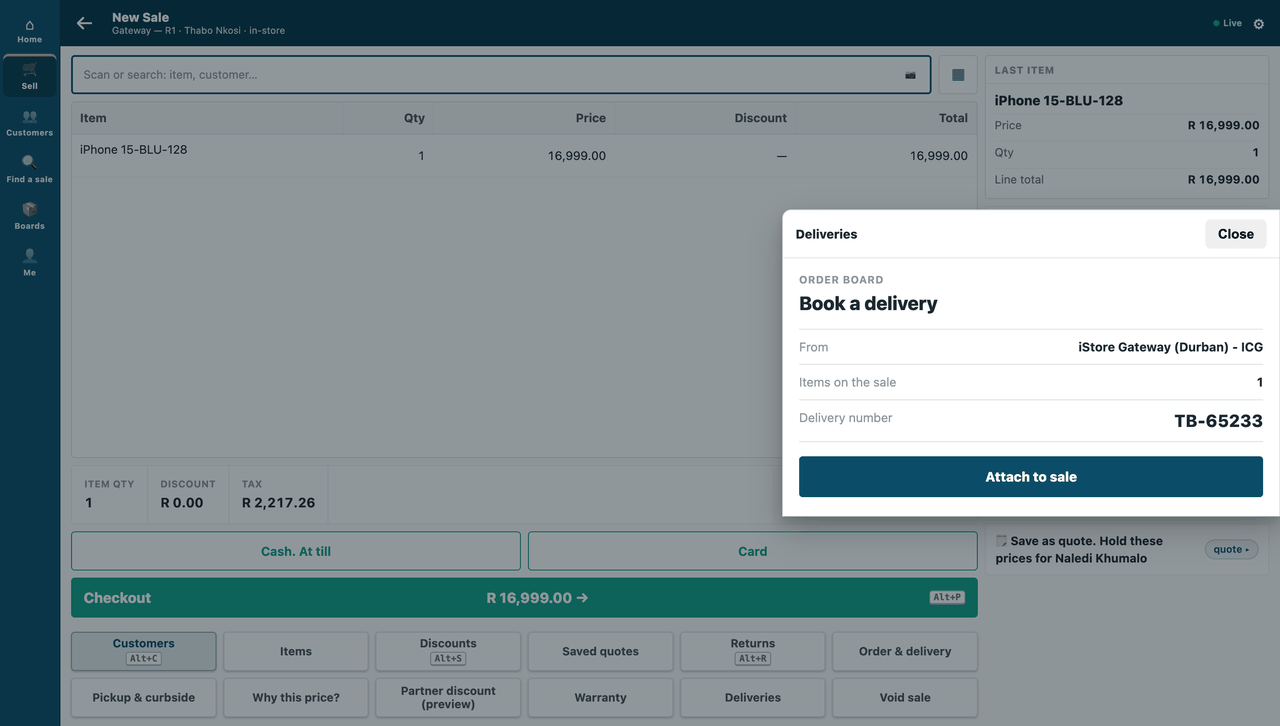
On the till, a sheet over the sale: sample S17.
Picture 2
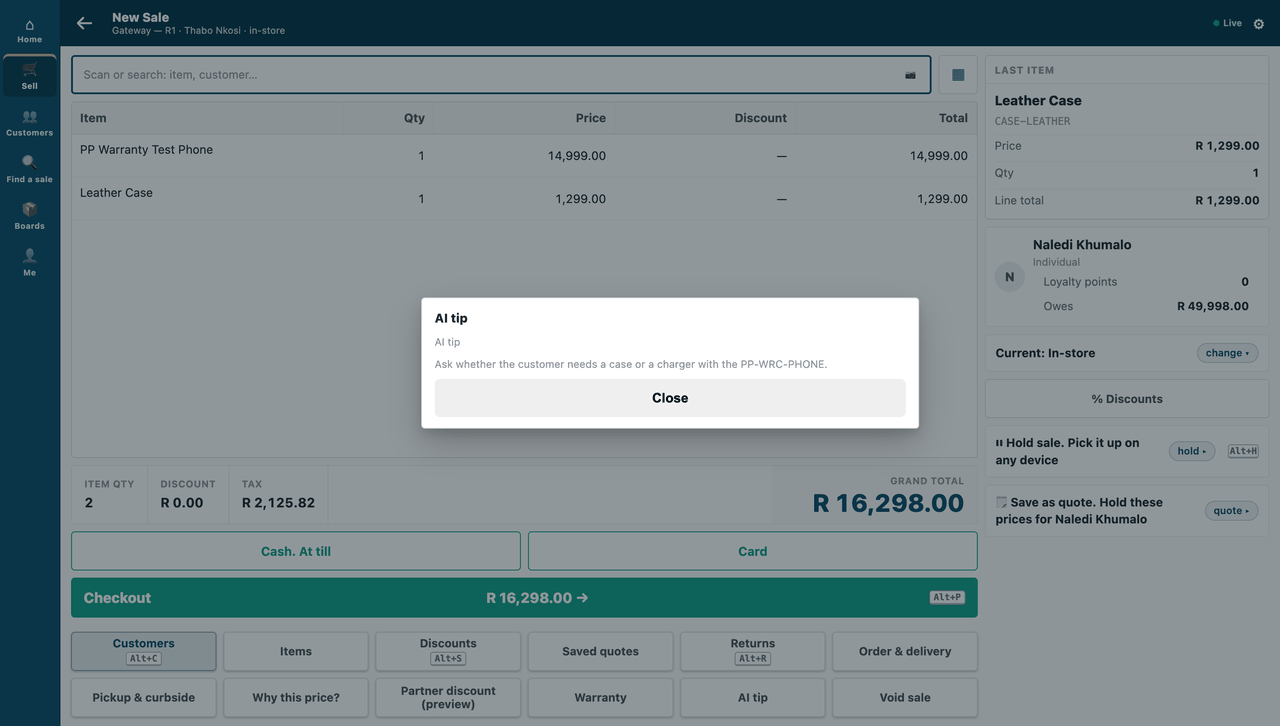
On the till, the till's message at a key: sample S6.
Picture 3
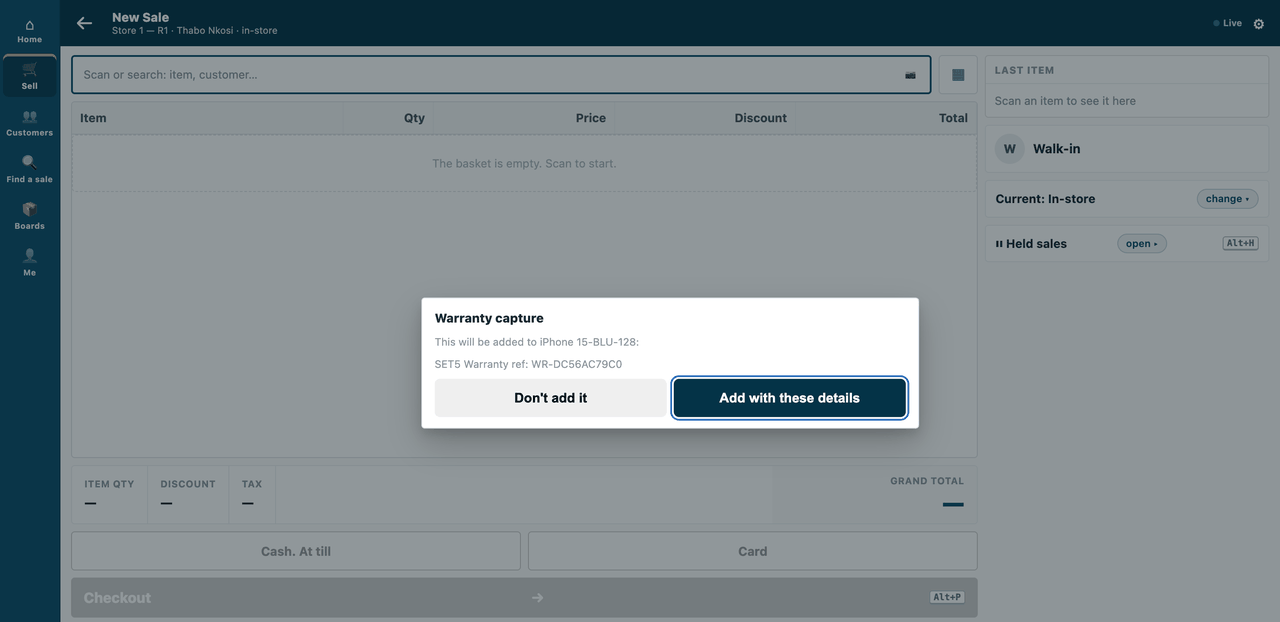
On the till, a sheet at the scan: sample S20.
Picture 4
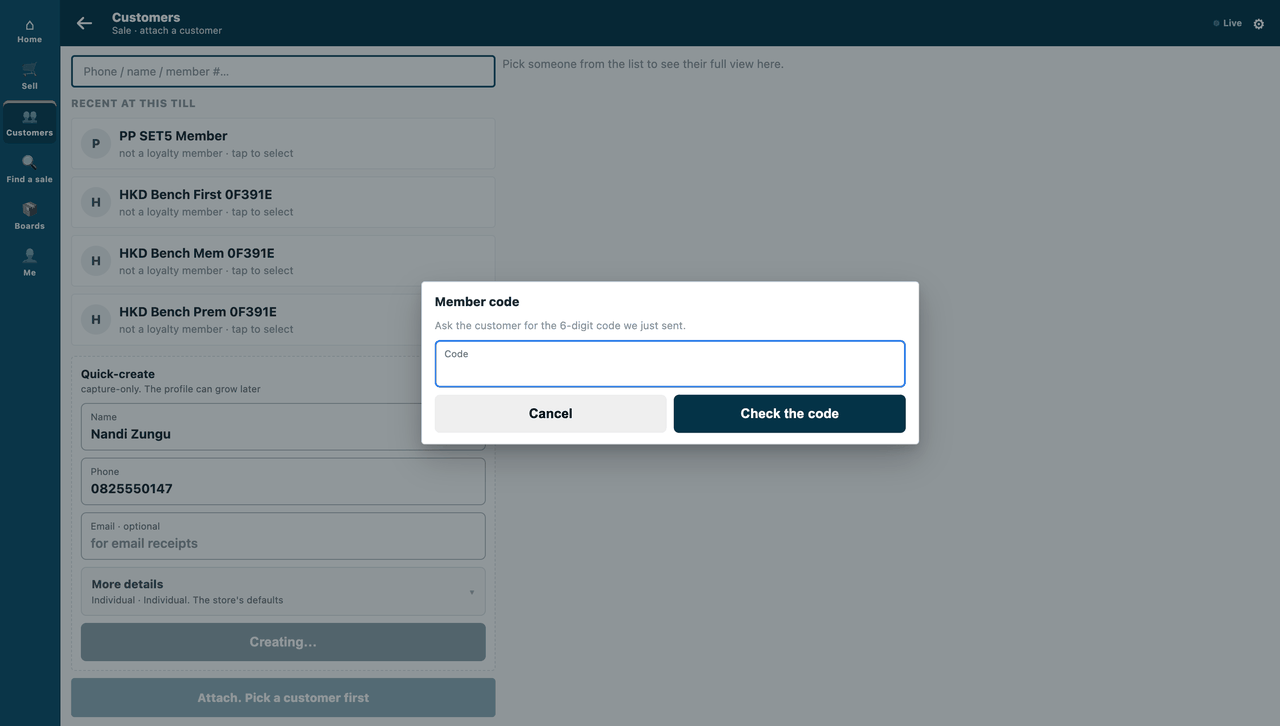
On the till, a sheet when a customer is added: sample S20.
Picture 5
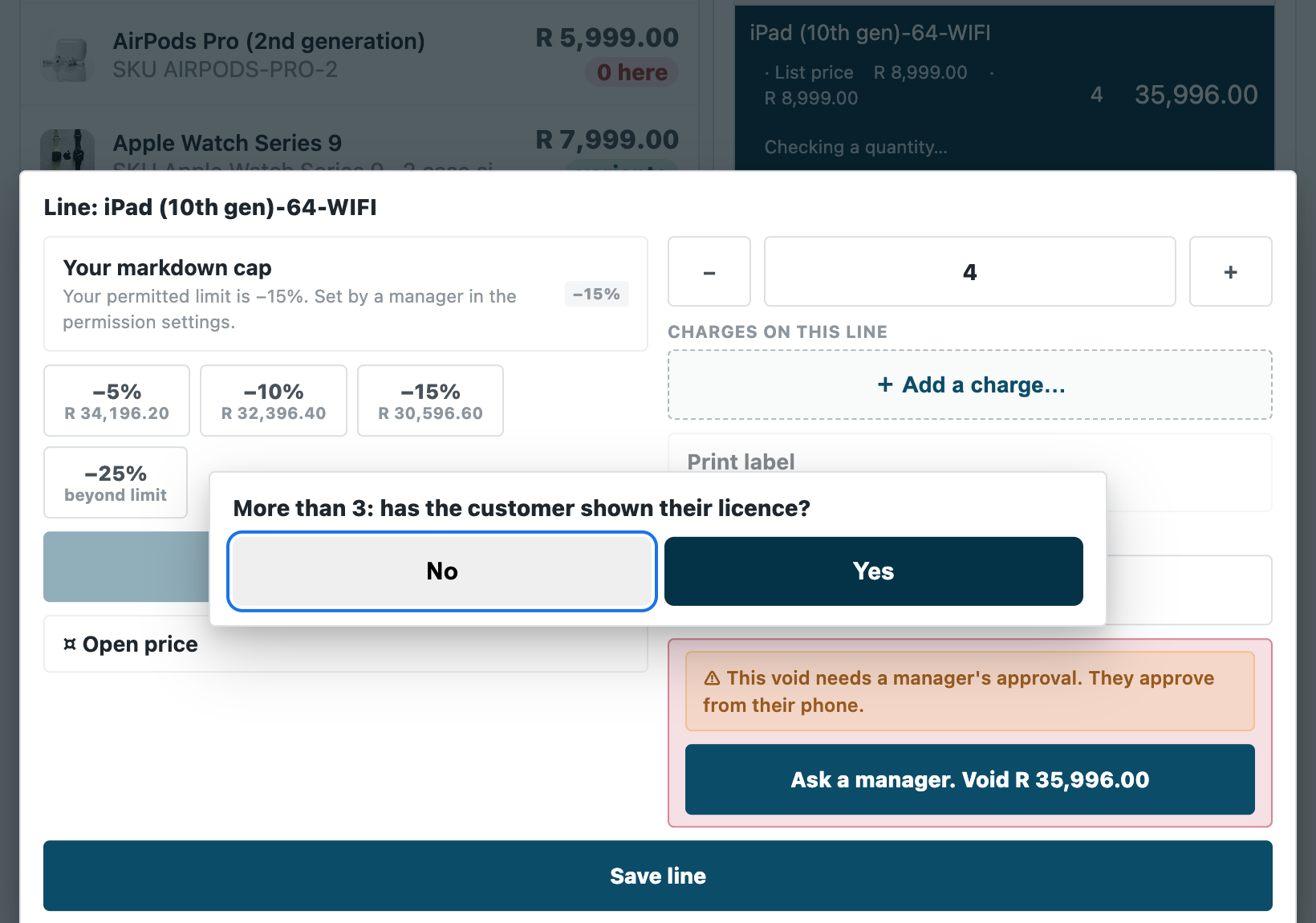
On the till, a sheet when a quantity changes: the product's own walk of the capture door (POS build 2.0.0.654, tablet frame); S20's quantity service asks through the same sheet.
Picture 6
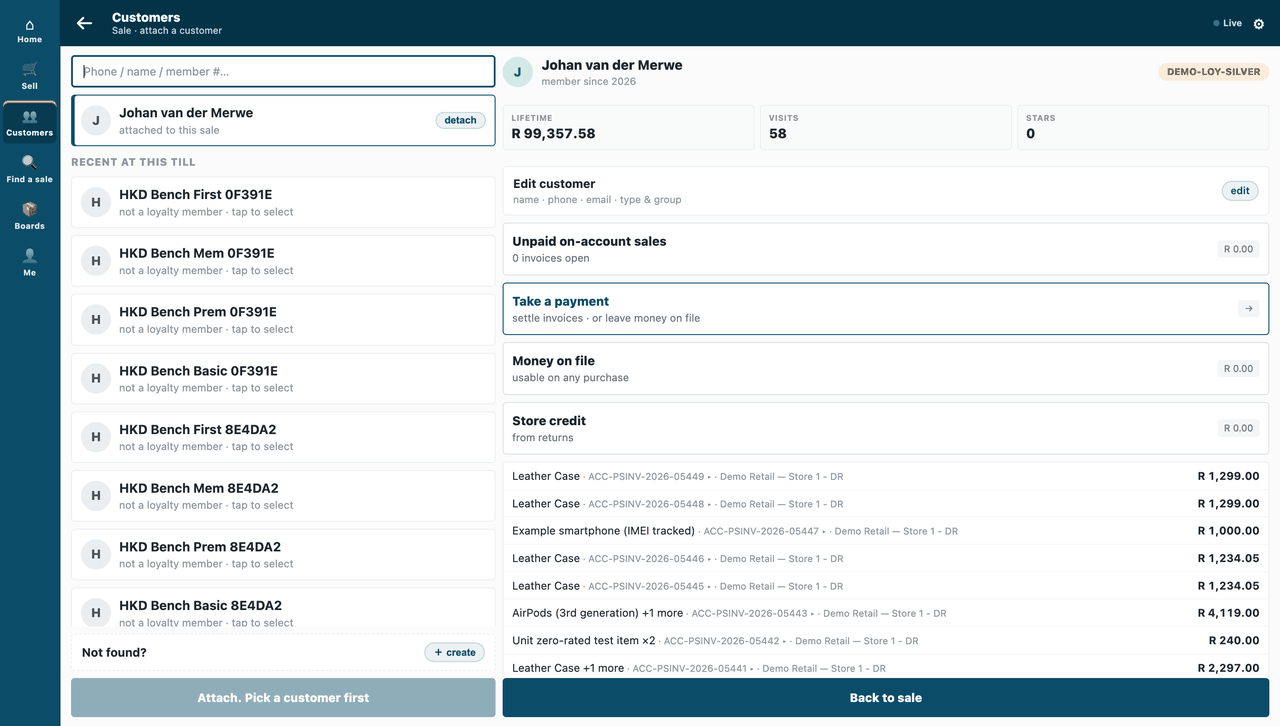
On the till, extra fields: sample S21.
Picture 7
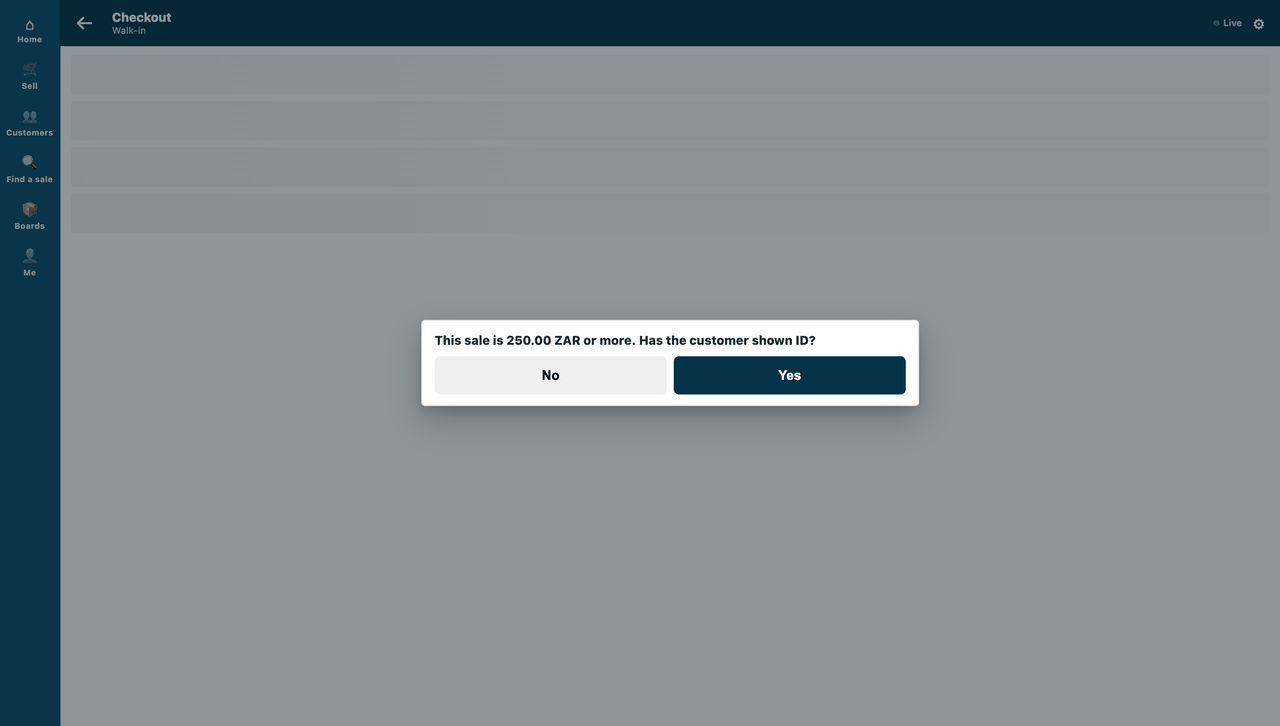
On the till, a question or a refusal before Pay: sample S18.
Picture 8
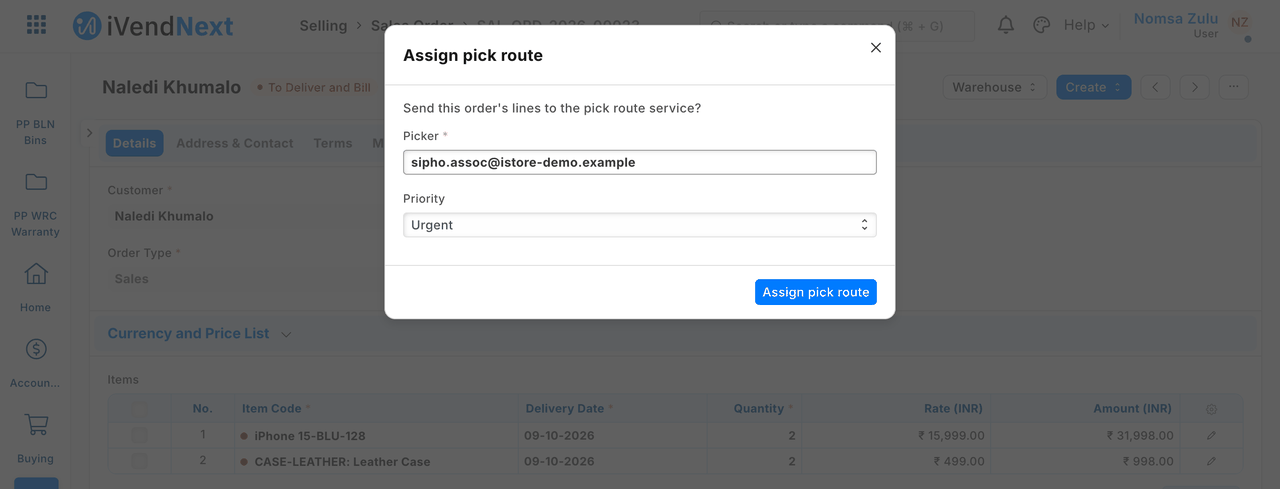
In Desk, a button and its dialog: sample S16.
Picture 9
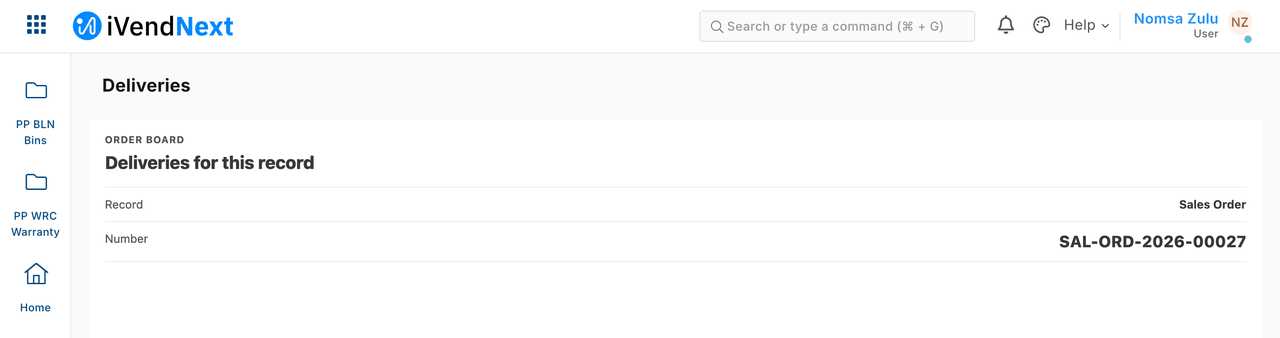
In Desk, your own page: sample S17.
Picture 10
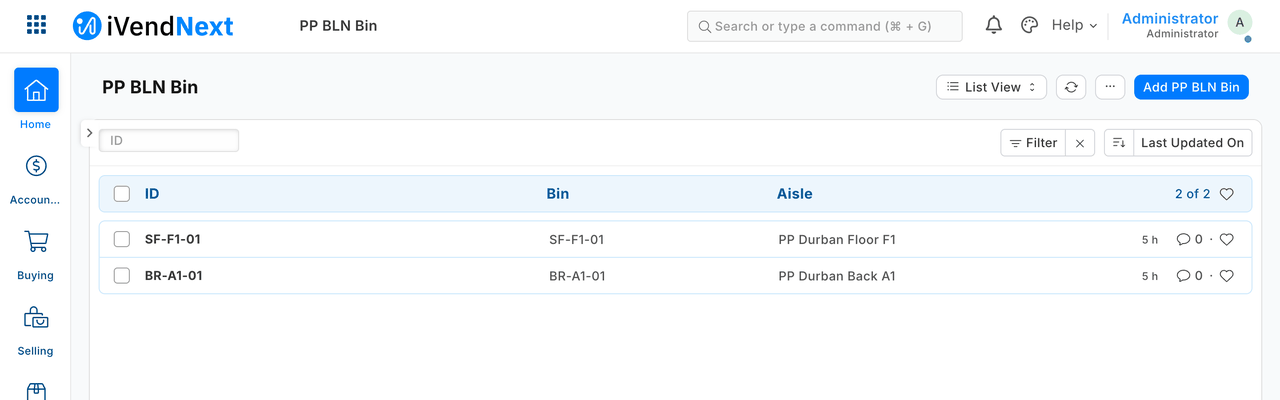
In Desk, native screens for your records: sample S2.
Picture 11
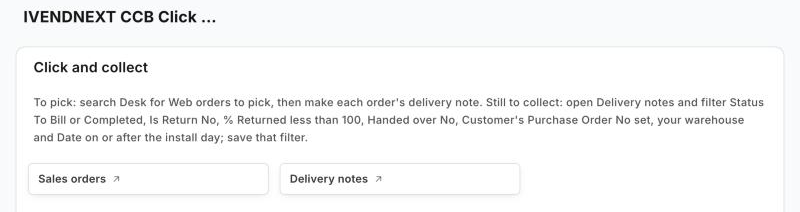
In Desk, your workspace: sample S33.
Picture 12
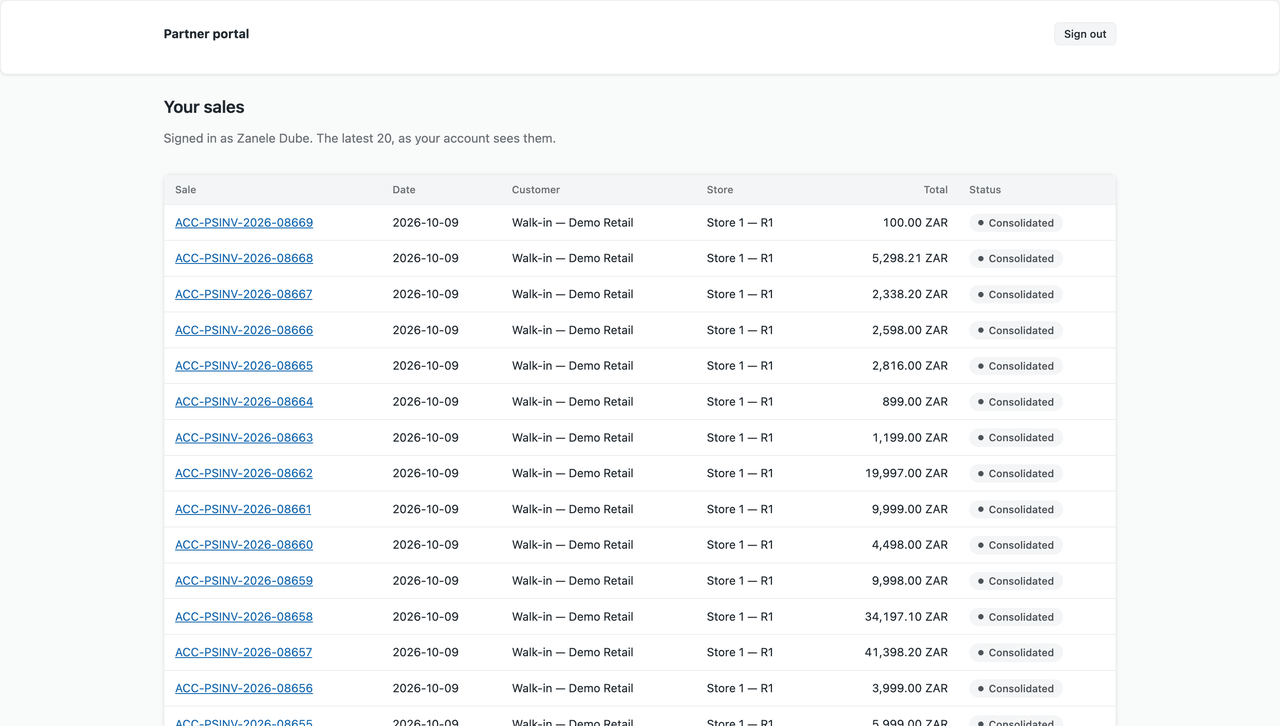
On its own, a standalone page: sample S13.
Record types and fields
Every record type an app commonly reads or writes, with each field: its type, whether it is required or read-only, and what it links to. Record types: what your app can read and write.
Next: Get started: your sandbox, your key and your first call.