
Customer code check: a one-time code before a customer's account is used — the recipe
A till puts any customer on a sale, and with them their loyalty points, store credit and account. Retailers ask for proof that the customer is at the counter: a code texted to the member's phone before their points are spent, an account customer's code before they buy on account. This recipe adds that from outside, through the capture on customer select: the retailer writes one rule per customer group in Desk; your service answers each pick of a customer of a group that asks with a code field, after writing the code to a record of your own that the retailer's own Notification texts to the number on the customer's record; and the retailer's server holds every door that takes payment until the code the customer reads out is right. It is for an iVendNext Partner, or the CitiXsys Consulting Team.
Reference implementation: samples/s48_customer_code_check/ — Customer code check.
When to use it. A customer's account must not be used by someone who only knows their name or number, and iVendNext sends text messages through its own SMS gateway. A partner wallet that asks its own code (wallet/1, otp_required) covers only that wallet's balance; this recipe covers the customer, whatever they pay with.
What the cashier sees
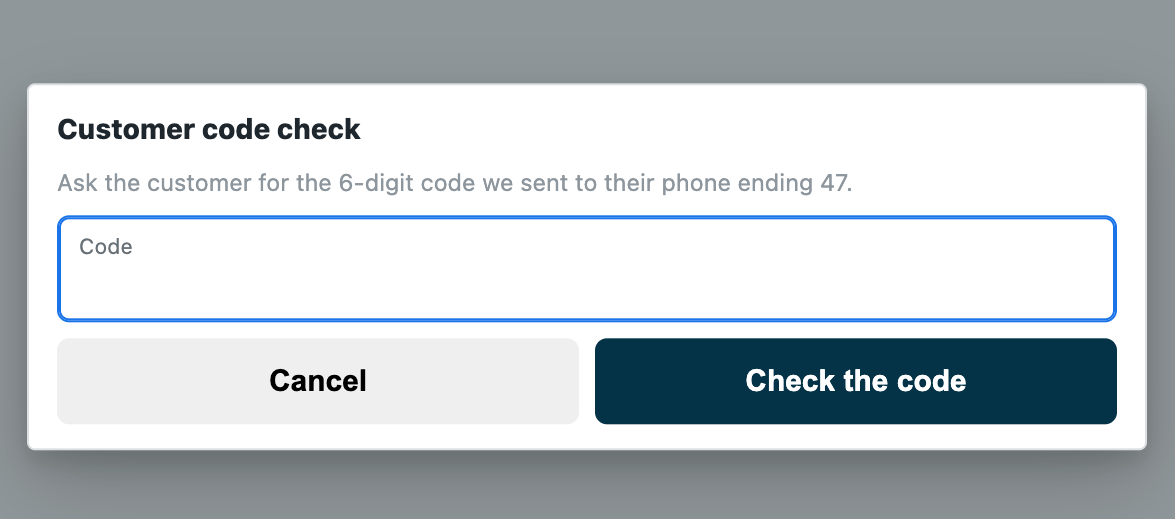
- A customer whose group asks: a code field with "Ask the customer for the 6-digit code we sent to their phone ending 47."; the right code keeps them on the sale.
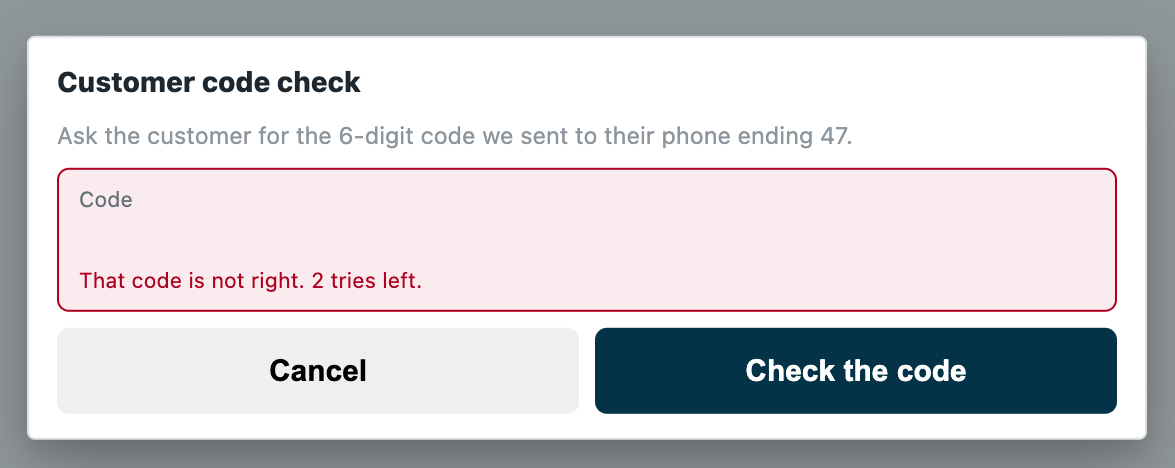
- A wrong code: your sentence and the till's "⟨n⟩ tries left."; the third ends the check.
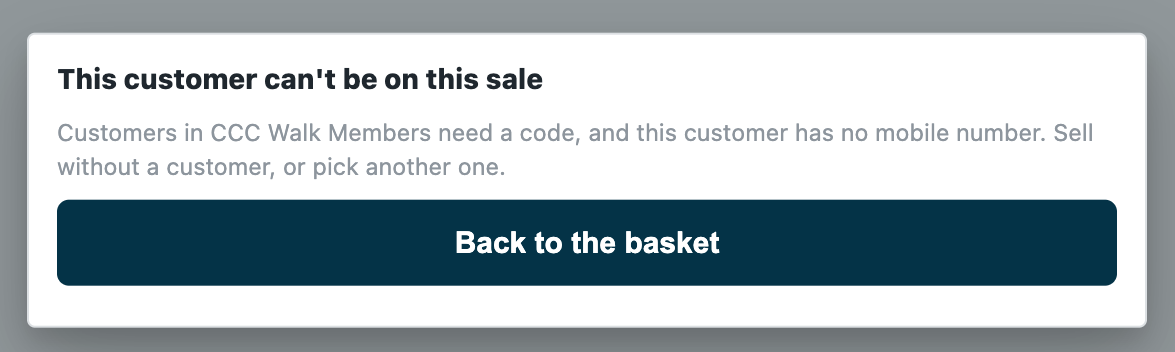
- A customer whose group asks, with no mobile number: off the sale with your sentence, or on, as the rule says.
- Any other customer, and the store's walk-in customer: on the sale, nothing shown.
Rules
-
Declare two record types and the capture in your manifest (
samples/s48_customer_code_check/manifest.json):<PREFIX> Rule, one record per customer group, named by it ("autoname": "field:customer_group", a Link to Customer Group, unique): Switched on, A code (a Select: Ask for a code or Never ask, so a group below one that asks can be let off), Without a mobile number (a Select: Take them off the sale or Let them on) and the cashier's words (a Data field of at most 120 characters). Give System Manager the rights to edit it and your integration role read only. Whoever keeps the rules needs Select on Customer Group for the rule's lookup (check that the retailer's System Manager has it: a site can remove it, and the lookup is then refused);<PREFIX> Code, one record per code, named by the till's code-check id ("autoname": "field:challenge"): the customer (a Link to Customer), their name,mobile(a Data field with the option Phone, which the retailer's Notification texts),code, the store, the POS Profile, the cashier,status(Sent or Used),sent_atandverified_at(whole seconds, UTC). Give it one permission row: your integration role's read, write and create. The install adds its own System Manager row, as every record type has: no cashier reads a code;- name the role
<PREFIX> Integration, so the install makes it; - one
capturesubscription with"settings": {"event": "customer_select"}at your service's address, and that address alone inallowed_urls: the pick and the code come to the same address; - a feed registration naming your one integration user (its description at most 140 characters, which iVendNext's install holds), so the retailer's Connect again hands that user's key to your service;
- a help address on each record type (a
documentationproperty setter).
-
Choose what happens when your service is down. Customer code check declares
allow_and_flag: an outage of your service never stops a store selling; the customer stays on and the sale is flagged on Sales to review. A retailer that must never let a customer on without their code changes its subscription torefuse, after Connect again has sent your user's key; every pick of a customer then waits on your service. A key withdrawn or a user disabled (401 or 403) is the retailer's iVendNext unreadable too: log it apart from an outage. -
Check every call with the capture's secret (
<app>:sub:<key>; the sample's key ison_select), and refuse a timestamp more than five minutes from yours, or longer than 12 digits. -
On a pick, read the rules and the group tree at the same time, with your integration user's key: the switched-on rules (
GET /api/resource/<PREFIX> Rule,fields["name","customer_group","ask","without_mobile","words"],filters[["enabled","=",1]],limit_page_length0) and the group tree (GET /api/resource/Customer Groupwith["name","lft","rgt"]). Keep them a minute. Each read has its own timeout, so reads in a row could outrun the capture's time to answer (the sample declares 5 seconds; the select allows 10). iVendNext gives your role a plain read on Customer Group; the two record types are the role's own. If either read fails, answer 503 (the down answer applies). You never need the customer record: the call carriescustomer.customer_groupandcustomer.phone, read by the retailer's server from the record. -
Find the rule that decides. The customer's own group's rule; else the nearest group above it with a rule: the groups whose span holds the group's (
lftbelow andrgtabove), the innermost first. No rule up the tree, or Never ask: allow. One rule decides, whole: a group's own rule replaces the rules above it. A customer whose group your kept tree does not know, while the retailer has rules, answers 503 and drops what you kept. -
Ask, or let on. Ask on every pick: the till spends a right code's pass when the sale books, so the next sale asks again, and a pass of your own would undo that. No mobile number (the first number the record's phone holds has fewer than six digits): refuse in words, or allow, as the rule says. Otherwise make a code from a secure source (six digits), write the code record first, and only then answer
{"verdict":"challenge","prompt":"…","length":6}. If iVendNext refuses the write, or it never reached iVendNext, answer 503. If it was sent whole and no answer came in time, still answer the challenge: saved, the code works; not saved, every code is refused until the check ends. Name the last two digits of the number in your prompt, so the customer can say that is not my number. -
On a code (
event: "verify", thechallenge_idand the code): read the record the id names. Not there (404), not Sent, empty, or older than ten minutes: refuse in words (the till usually speaks first: its own check ends at ten minutes and shows "This code check has ended.") The wrong code: refuse in words (the retailer's server counts the tries; three end the check). The right code, compared in constant time: write the record Used with the code cleared andverified_at, then answer{"verdict":"ok"}; if that write fails, answer 503. -
Tell iVendNext to lock the customer's group, and to decide about the phone. Your rule trusts the group the customer record holds and texts the number it holds, and the till's edit sheet lets a cashier change both (the retailer's cashier role saves customers): a member moved into a group that is never asked goes on with no code, and a number changed to the cashier's own sends the code there. The retailer closes the group by putting Customer Group at permission level 1 in Customize Form and giving level-1 write only to its managers (Customers by store, rule 7). The phone field the till edits (Phone Number, else Mobile No) takes the same lock, at a cost to say plainly: a customer the cashier creates at the till is then saved with no phone, and with the default customer group in Selling Settings or none, until a manager sets them (measured on the programme's bench). Put both in the setup, the phone as the retailer's choice.
-
Tell iVendNext to switch it on for every till. The capture asks only at the POS Profiles its subscription answers: with none chosen, every one.
The text message
The code reaches the customer through iVendNext, never through your service:
- The retailer sets its SMS Settings once, for its own SMS gateway (the gateway's address and parameters; the receiver's parameter takes the number).
- iVendNext makes one Notification: Document Type
<PREFIX> Code, Send Alert On New, Channel SMS, a recipient Receiver By Document Field mobile, and a message with{{ doc.code }}. A manifest's own notification goes only to the retailer's users, so this one is the retailer's: put it in your setup steps. - The framework sends a Notification's text inside the save of the record, and never fails the save for it: a gateway that answers an error or cannot be reached is written to the retailer's Error Log (Failed to send Notification), a Notification switched off sends nothing, and SMS Settings with no gateway address only print a message. In each the customer gets no code and cannot be put on the sale: a gateway fault closes the door, never opens it. Your setup's last step is a test pick; tell iVendNext to watch its Error Log.
- Reading iVendNext's SMS log to learn whether a text went would give your role every text iVendNext sends: do not.
- A retailer with the WhatsApp app can likely send the same record by its own WhatsApp notification (not measured).
Bounds
- The code comes at the pick, not at the payment: a customer of a group that asks is asked whether or not they spend from their account.
- Cancel on the code field takes the customer off the sale; a pick whose own call fails leaves the customer on the screen, and payment says "This customer has not been checked. Pick them again, or sell without a customer."
- The till asks on every route a customer reaches a sale by: picked, scanned, matched by phone, a resumed sale, a quote turned into a sale or an order, an exchange. Not asked: a customer this cashier added in the last ten minutes while a customer-add app is on.
- The number on the record is the number that gets the code: unless the retailer locks the phone field (rule 8), a cashier who may change it can send the code elsewhere.
- The till's own doors: a sales order or invoice made in iVendNext Desk is not asked.
- What the customer already holds is not a new pick and is not held: a layaway plan's later payment, an order's balance, a payment on their account.
- One cashier sends at most 60 select rounds in ten minutes; a customer already let on stays on.
- While your service does not answer, a code typed at the code field counts as checked under
allow_and_flag, flagged. - The framework's gateway call has no time limit of its own: give your write a wait inside the capture's time to answer (the sample: at most 2.5 s, its own waits ending by 3 s from the call's start (a connection's set-up is outside it), of a 5 s time to answer), and answer the code field when a write sent whole has no answer in time (saved, the code works; not saved, the check ends), never a 503.
- One app answers each capture event on a POS Profile: this one takes customer select there.
- Offline, the till does not call your service: the down answer applies, and a sale paid offline books when it syncs and is flagged.
- iVendNext's SMS log keeps each text, the code in it.
See also
- A value captured at the scan, and a code before a new customer: the capture's events, its answers and its code check.
- Customers by store: the same rule records and group tree, on the same event.
- The capture's page,
contracts/pages/partner_capture.md: the select's context, the challenge, the verify and the pass.