
A receipt laid out for your market — the recipe
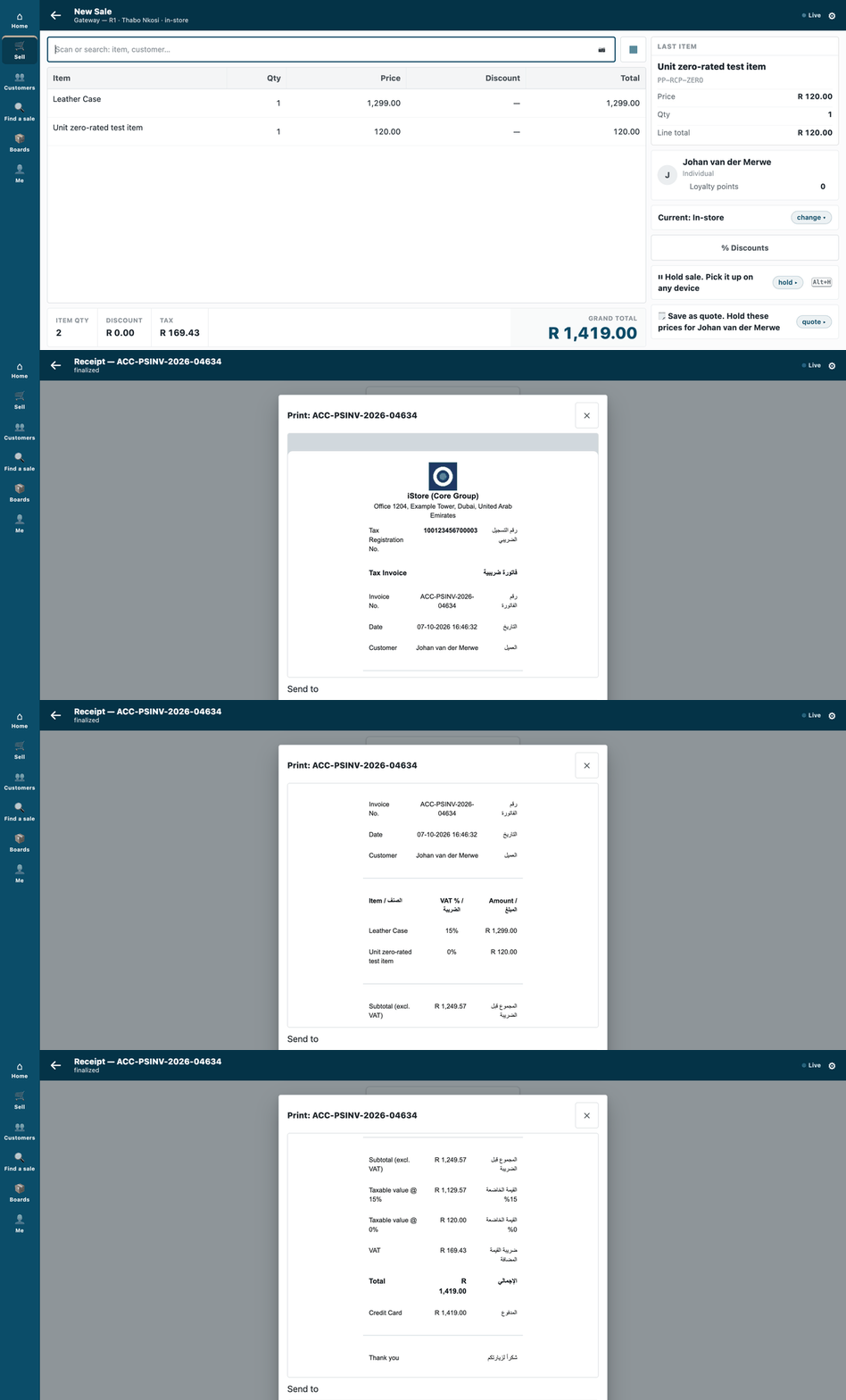
A sale at two VAT rates, then its tax invoice, in English beside Arabic, in the till's Print sheet.
This recipe makes the till's receipt look the way a country's tax rules or a retailer's brand require: a tax invoice with the company's tax number, an address, a logo, a line for each VAT rate, and a second language beside the first. It is for a partner, or our own Custom Development team. The sample to copy is samples/s4_receipt_pack/: a UAE tax invoice, English beside Arabic.
When to use it: you want a different layout of figures the shop has already worked out. It is Rung 4 of the guide's build ladder: a manifest with one print format.
A receipt prints money; it never decides money. If you need a QR code or a government mark on the receipt, this recipe does not do it: that needs an extension point that has not shipped (P-RECEIPT).
Steps
-
Put the facts where the shop keeps them, not in the layout. In iVendNext Desk, put the company's tax ID on the Company, and link an Address to the Company. The template reads them when it prints, so one layout serves every company.
-
Copy the sample and edit its template.
samples/s4_receipt_pack/receipt.htmlis the layout: a readable Jinja template, with comments.logo.pngis the logo. Change the words, the order and the logo. Your print format's name must start with your prefix (PP RCP …in the sample).- Rates come from the sale's own lines. Never type a rate into the template. Each line shows the VAT rate it was booked with (the line's
item_tax_rate), and the summary shows the taxable value at each rate. A reprint of an old sale keeps its old rate, even if the shop's tax setup has changed since. When a shop changes its VAT setup, the receipt follows with no edit. - Arabic beside English: every label sits in a two-column row. The Arabic cell is marked
dir="rtl" lang="ar". Keep the Arabic words in the template as plain text. - The logo is inline.
build.pywrites the small PNG into the page as a data address, so printing needs no outside fetch. - A template may not contain script, frames or event attributes. The checker refuses them.
- Rates come from the sale's own lines. Never type a rate into the template. Each line shows the VAT rate it was booked with (the line's
-
Build and check, before anyone installs it:
python3 samples/s4_receipt_pack/build.py python3 tools/manifest/validate.py samples/s4_receipt_pack/manifest.json # VALID, exit 0 -
Install the manifest (
recipes/manifest.mdstep 4: today we run the installer for you). -
Set the format on the till's POS Profile. This is configuration: iVendNext Desk → POS Profile → open the profile → the Print Format field → pick your format → Save. ⚠ A manifest cannot do this step yet. It may not change a POS Profile until the P-RECEIPT extension point ships. The till reads the profile's format each time it prints, so the change is live on the next receipt, with no restart.
-
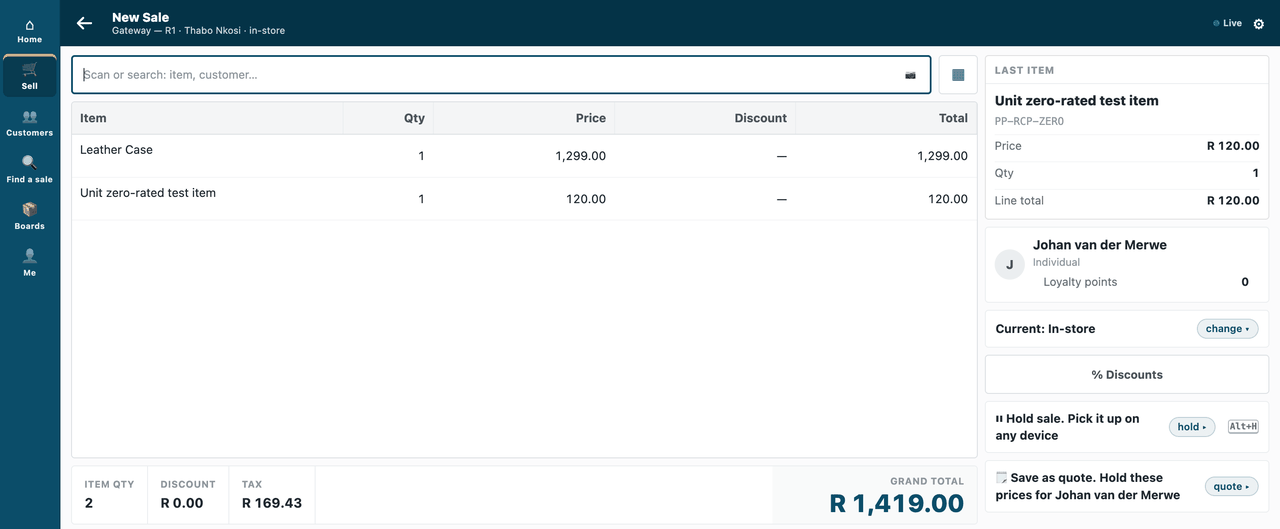
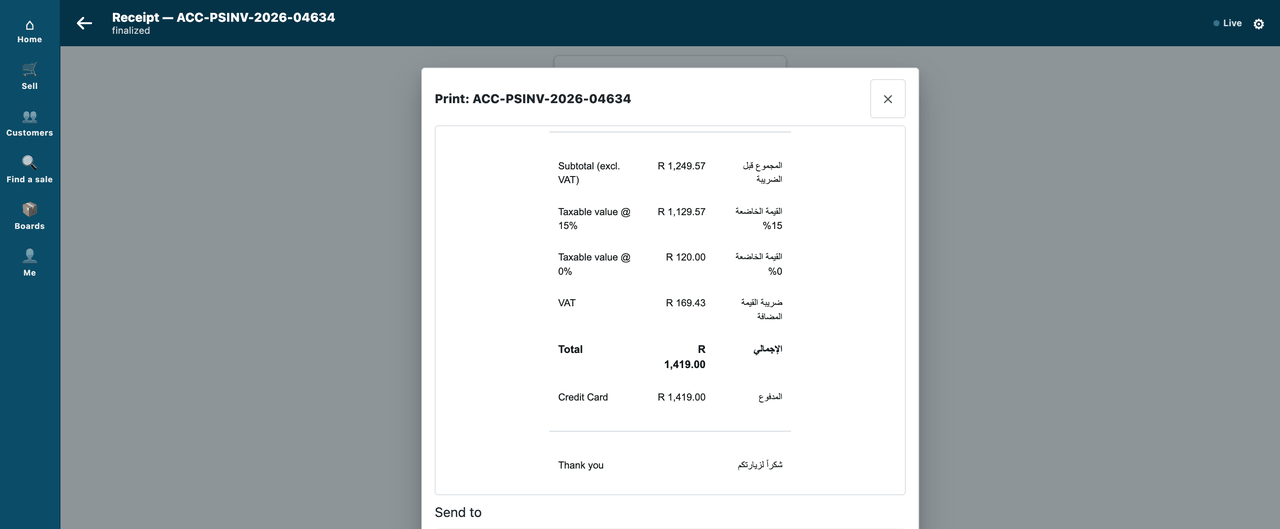
Look at a real sale. Book a sale on the till. Here, one item at 15% VAT and one zero-rated:
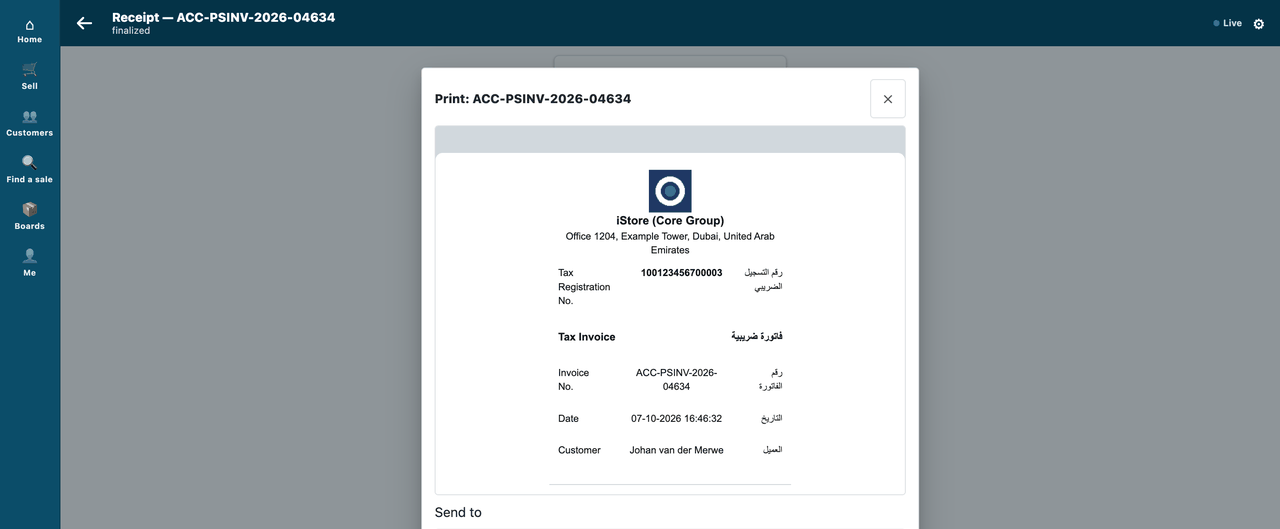
Open the Print sheet. It shows your format as the printer is fed it (before page geometry). The header carries the logo, the address, the tax number and the bilingual title:
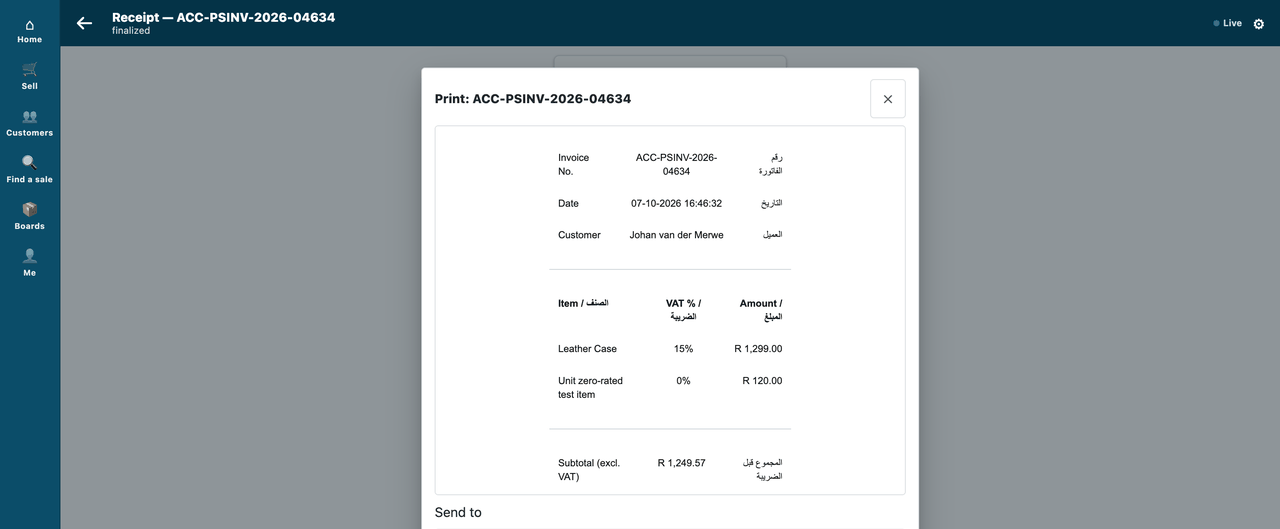
Each item has its own line, with the VAT rate it was booked with:
The summary shows the taxable value at each rate, the VAT and the total:
What a customised format gives up
The seeded receipt (mPOS Receipt) carries more than the sample does, and a format of your own stops receiving our fixes.
The sample keeps the seeded receipt's VAT figure, and shows charge money on a Charges row (copied, with its source, from the seeded format). It leaves out:
- the per-item charge rows under each item;
- the serial and batch identities of a bundle's parts;
- the deposit and balance lines of an order;
- the coupon-issue block;
- the "was a provisional receipt / sale made at" lines for a sale rung up offline;
- the payment-receipt wording;
- the local barcode.
Copy back any of those your market needs from the seeded format (ivendnext_mpos/install.py, RECEIPT_FORMAT_HTML), and test it. A defect in a copied line is a defect there: report it on the POS app's board.
When the till is offline
There is no offline final receipt. An offline sale prints a provisional slip only. This format is for the booked sale.
Limits
- No QR or fiscal mark (P-RECEIPT). No hiding or requiring a field (P-FIELDS), and no label layout (P-LABEL). A market that needs one of these cannot use this recipe alone.
- A shop with several tax heads (two or more tax rows on a sale) takes the template's other branch. That branch prints the per-head lines from the till's own reader. It has not been tried yet, and the kit's print check expects one
VATrow, so it would report a difference there. Verify it before use. - Some parts of the template have not been tried on a real sale yet (listed in Technical notes). Check any you rely on.
- The taxable value shown at each rate is the sum of the sale's net line amounts at that rate. The VAT line is the sale's own tax figure. So a sale with two different non-zero rates under one tax account shows each taxable value but a single VAT total.
- The format is for the till sale (
POS Invoice). A back-office invoice has its own formats.
Technical notes
The walk
The GIF and the four stills come from our test bench (2026-10-07, iVendNext POS app at 8dc36aab8; frame: the till, 1440 wide; nothing sent to a printer). The Print sheet shows the configured format's render (the page the printer is fed (before page geometry)). The recipe's reference implementation, samples/s4_receipt_pack/, is proven on our test bench.
What the sample was proven to do (bench :8110)
Three sales, one for each tax shape (standard-rated, zero-rated, a mix of both), each printed through the till's own receipt read, and each element read from the receipt's own text, beside its label: the logo, the company name, the tax number, the address, the English and Arabic titles and labels, right-to-left on the Arabic, the invoice number, the customer, every item with the VAT rate it was booked with, the taxable value at each rate, and the Total and the VAT beside their own labels, equal to the booked figures, with the taxable values adding up to the sale's net total. Canaries: the seeded receipt has no tax number, no Arabic, no logo and no right-to-left mark; a receipt whose Total row shows another figure is caught, and one with no VAT row is caught. A sale with 30.00 of charge money (built in memory: the bench has no surcharge set up) prints the VAT as the tax alone and the charge on its own Charges row. Uninstall, reinstall: the site's schema as found, and as it was before the first install. Money kit: preview equals booking on every basket, and the printed Total and VAT equal the booked figures.
What it has not proven
⚠ Not proven: Arabic shaping and right-to-left order in the PDF or printer path (the checks read the page's text and its dir="rtl" marks, not a printed page); AED and 5% VAT (the bench's company is ZAR at 15%; the layout reads whatever the shop has); a real Item Surcharge or fulfilment charge (only the in-memory case above); a returned sale (the Credit Note title is in the template and was not booked on the bench).
- Several tax heads: that branch was not run here (every bench sale had one tax row).
- Parts of the template that no check rendered: the Customer TRN row, the DUPLICATE mark, the Discount row, a serial number under an item, and the Credit Note title. A reprint keeping its old rate after a tax change follows from reading the booked rate, but was not tested.
Tests
python3 tools/manifest/validate.py samples/s4_receipt_pack/manifest.json— the manifest, without a shop.- The pack's bench test — install, set on a profile, three sales, the render, uninstall and reinstall, tear-down — passed on our test bench.
- The money kit with the pack installed (
recipes/money_kit.md).