
Shipping your own data in a manifest — the recipe
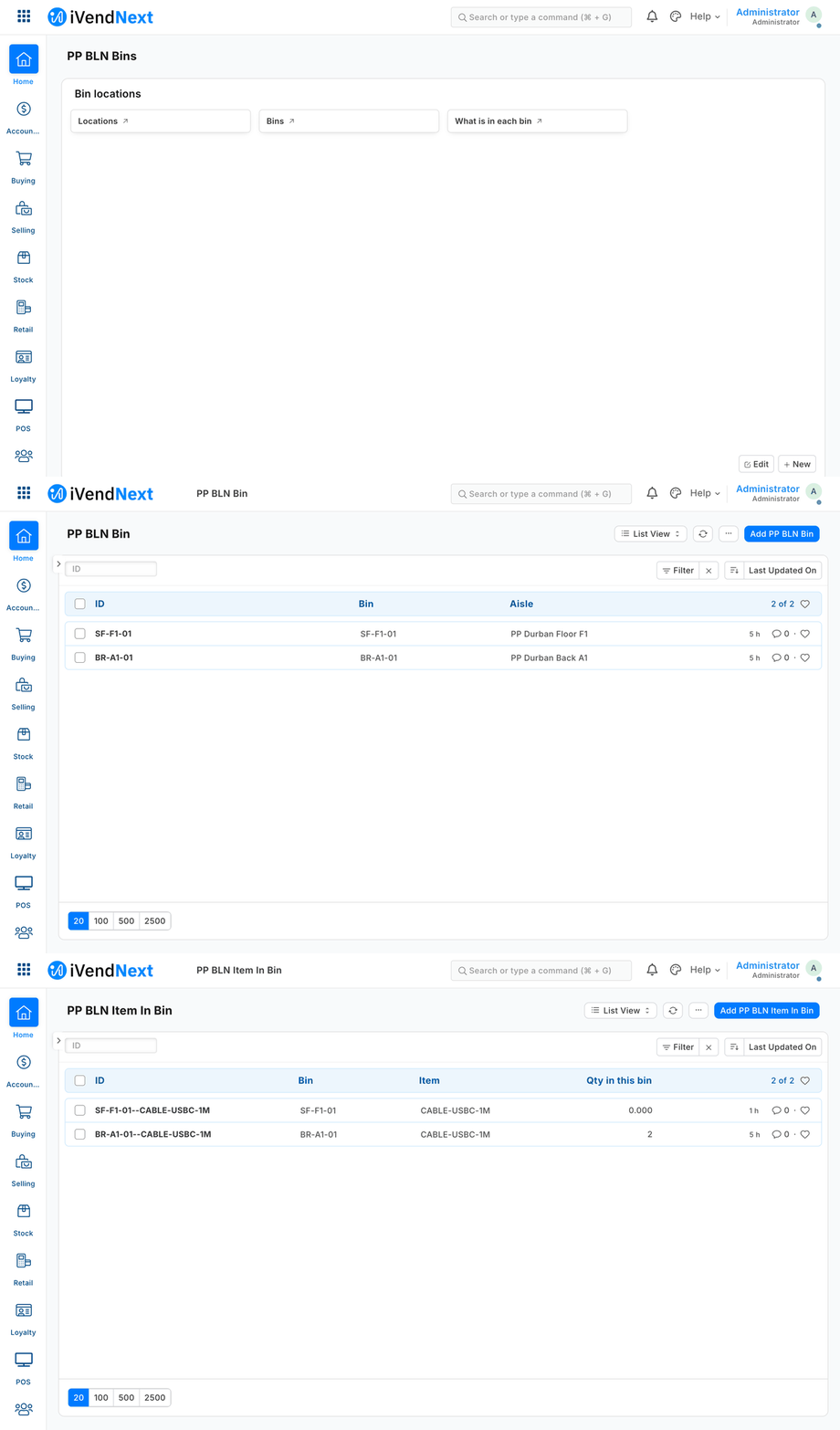
What the bin-location manifest installs, as staff see it in Desk: the workspace, the bins, and what is in each bin.
A manifest is one file that adds your own record types and fields to a shop — bins and what is in them, warranty terms, a reference list — without you writing code inside the shop. It is for partners, and for our own Custom Development team. Reference implementation: samples/s2_bins/manifest.json (five record types, a field on Item, a print format, a workspace, two webhooks) and samples/s1_warranty/manifest.json (one record type the till key reads). The checker is tools/manifest/validate.py; the installer is tools/manifest/apply.py.
When to use it. Rung 4 of the build ladder. Use it when configuration cannot hold your data and your app needs it inside the shop: staff see it in Desk, a till key reads it, or a webhook reports on it. A manifest runs nothing. Your logic lives on your server (a connected app) or in a till key.
Steps
-
Choose your prefix. One to three upper-case words (
PP BLN) and the matching app name (pp_bln). Every name you create starts with the prefix. A field you add to one of the shop's own record types starts with the lower-case prefix (pp_bln_default_bin). Names on a site are shared and carry no owner, so the prefix is how an uninstall finds what is yours. -
Write
manifest.json. The kinds a manifest may carry:Kind What it is Example (S2) doctypesyour record types (not submittable); child tables allowed PP BLN Bin,PP BLN Item In Bin, the childPP BLN Bin Movementcustom_fieldsfields on your own types, or prefixed fields on the shop's Item.pp_bln_default_binproperty_settersdisplay tweaks on your own types and fields PP BLN Bin.bin_codeboldprint_formatstemplates for your records or the shop's PP BLN Bin Labelnotificationse-mail or in-app alerts — workspacesa Desk page with headers and shortcuts PP BLN Binssale_attributesan optional sale detail a till key can fill — webhookssigned calls to addresses you list in allowed_urlsa booked sale → your service Manifest v2 (
"manifest_version": 2) adds the screen kinds, approvals, the feed and the remote till key. A v1 manifest still installs once every one of its permission rows writes all nine rights.Kind What it is The rules reportsa Report Builder report: columns, filters, order, totals row, roles Report Builder only — a query report (SQL) and a script report (Python) are refused. Columns are checked against the record type number_cardsa count, sum, average, minimum or maximum over a record type "Document Type" cards only; a custom card (a server method) is refused dashboard_chartscount / sum / average over time, or group-by; line, bar, percentage, pie, donut a custom chart (a server method) and a report chart are refused dashboardsyour charts and cards on one page only the manifest's own charts and cards list_settingsthe list view's columns and counters your own record types only — a shop record type has one list setting, the shop's workflowsstates, transitions, the role per transition, a field set on entering a state (approvals by workflow) your own record types only; every state keeps the record a draft (never submits or cancels); no transition condition (it is code evaluated on the server). Missing states and actions are made, and removed again at uninstall unless another workflow uses them naming_rulesa numbering rule (prefix + digits, optional conditions) your own record types only — numbering the shop's records, a sale's number included, is fiscal ground linksthe Connections panel: your records listed under a shop record (e.g. claims under a Customer) the link field must be a Link on your record type pointing at that shop record type registered_applicationsyour service's event-feed registration ( recipes/event_feed.md)installed switched off, with no user: the shop chooses the user your service reads as and ticks each record type on. At uninstall its queue rows go with it remote_keysyour remote till key (the till calls your service) installed switched off, consent not given — the shop's administrator ticks both; the installer makes the secret and hands it to you once; httpsonly, an address you list; a manifest may declare atimeout_secondsabove 0 and at most 5 (our checker refuses more:tools/manifest/validate.py). The record the installer makes accepts up to 10 in Desk (recipes/ai_till_key.md). Refused, with its reason, on a site whose POS app predates the remote keyextension_subscriptionsyour service for the desk_actionorpageextension point (label 1–40,httpsaddress you list,timeout_secondsat most 10; a page'spage_…settings and roles)installed switched off, consent not given; the installer makes the secret and hands it to you once ( <app>:sub:<key>); no consent text, no stores (scope), no sandboxed moduledesk_actionsa button on a Desk record (roles, when it shows, its inputs, send_fields) answered by one of yourdesk_actionsubscriptions (service= itskey)installed switched off; a service the manifest does not install is refused; no role open to everyone save_rulesa rule checked on every save of a record type, the shop's own or yours installed switched off; the name carries your prefix; no markup in the message; on a sale the product lets a rule only flag fiscal_readersone outside fiscal service's result on the sale: your result fields at their own permission level, the status map, the writer role and its users installed switched off, in the order the product accepts; no API key is made (the shop makes it). The steps the shop takes are in guide chapter 7 extension_modules(sandboxed modules)— refused: no extension point on this product runs one yet the declarations of extension points not shipped: scan_sources,receipt_blocks,label_layoutswhat those extension points will read each refused, naming the extension point it waits on (guide chapter 9) Each record type lists its permissions by role, including your app's integration role, so your service can read and write its own records. ⚠ Write every right out — all nine (
read, write, create, delete, report, export, share, print, email). A permission row that leaves one out gets it ON: a row ofreadonly is stored with all nine on. The manifest checker refuses a row that leaves a right out, or writes one as anything but 0 or 1. All four samples write all nine;samples/s11_approvals/manifest.jsonshows the form.What leaves the shop — nothing the shop did not grant. A partner sees a shop's data only through what the shop grants: the integration key's permissions, the event feed, the remote till key's fixed context. A manifest cannot open another channel:
- a webhook sends only its fixed, thin body (record type, name, event, time); the service reads the record with its own key;
- a print format loads nothing from outside the shop (an image address can carry data out, so embed images as files or
data:URIs); - a notification goes to the shop's own people (by role, or by a field of the record), never to an address the manifest names, and shows its own record's fields only.
Templates that read other shop data (a receipt reading the company's tax number) are allowed where the output stays with the shop's staff.
On the shop's own record types a manifest may only ADD. A field you add there may not carry anything the server enforces on save (mandatory, a default, unique, a minimum, a length, set-once, precision). A property setter there may only change how your own field is shown. Webhooks may listen to the shop's record types, but without a condition, and notifications go on your own types only. Each of those is evaluated inside the shop's own save: one mistake would stop every till sale.
-
Check it yourself, before anyone installs it:
python3 tools/manifest/validate.py samples/s2_bins/manifest.json # VALID, exit 0Every refusal names the element and the reason, for example "REFUSED webhooks[0] (PP BLN Hook): a webhook may only call an address the manifest lists in allowed_urls".
-
Install. ⚠ Today we run the installer for you, on the shop's server: it has no screen or command of its own yet. It runs in the site's console:
import sys, json; sys.path.insert(0, "<the kit>/tools/manifest"); import apply
r = apply.install(json.load(open("manifest.json")))     # {"ok": True, "items": [...], "secrets": {...}} or the refusals
The installer checks the manifest again. It refuses names already taken by someone else, and a field on one of the shop's single-record settings types. Then it creates everything, and records each element in an install record as it goes. If anything fails half-way, it removes what it made before it reports. Each webhook gets a fresh secret, handed to you and never written into the manifest.
-
Use your records over the record API, like any other type (
recipes/connected_app.md). The bins service writesPP BLN Item In Binwith its movement rows, and the "Where is it?" till key reads it. In Desk: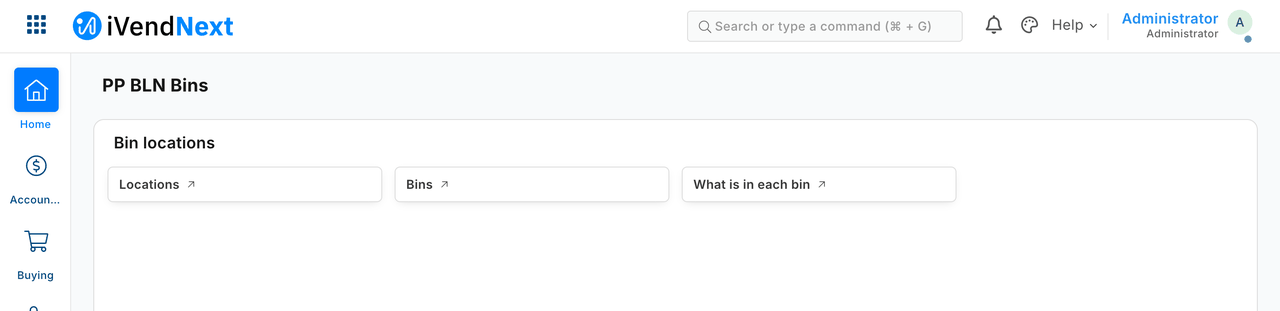
The workspace the manifest installs.
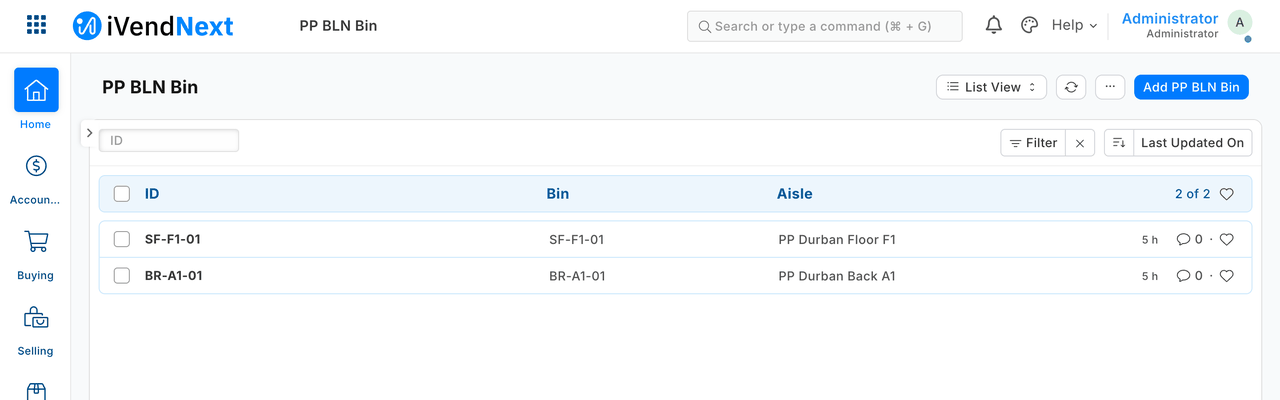
The bins, each on its aisle.
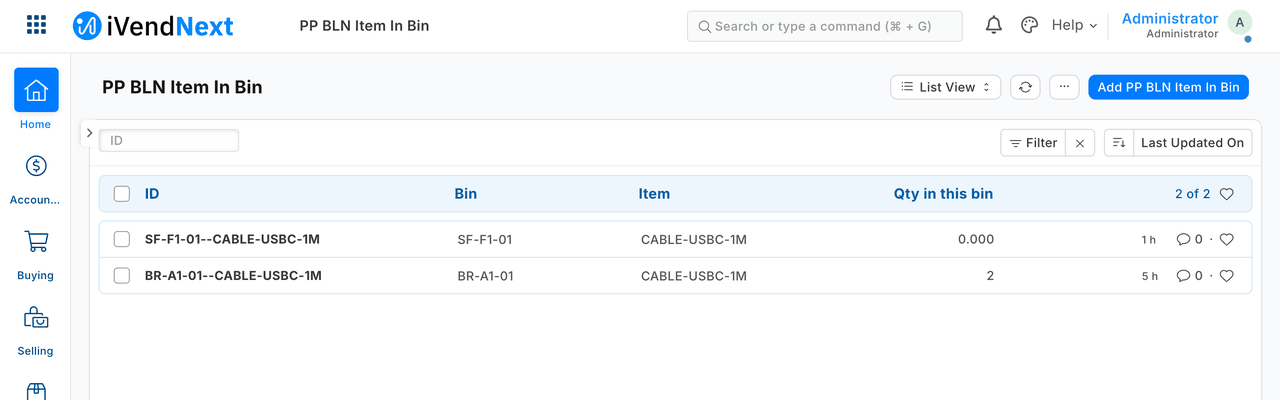
What is in each bin, kept up to date by the service.
-
Export before you uninstall.
apply.uninstall("pp_bln")is refused;apply.uninstall("pp_bln", export_path="pp_bln_export.json")exports first;skip_export=Trueis the explicit "no export". The installer refuses to uninstall without an export file, unless the administrator says explicitly that none is wanted. The export holds every record of your types, with their child rows, and the values of the fields you added to the shop's records. -
Uninstall — nothing is left behind. The installer removes everything the install record lists, newest first: webhooks, workspace, print format, property setters, fields, record types and the module. It also:
- drops your tables and the columns your fields added. iVendNext's own delete of a custom record type keeps its table and rows, and its delete of a custom field keeps the column and its values. With the drops, the site's schema after the uninstall equals the schema before the install, kind by kind;
- removes what the shop did to your types after install (a field added in Customize Form, a role-permission edit, a default print format), so a later install does not inherit a field whose column is gone.
Two cases it handles in the open. A sale detail that booked sales already use is kept, switched off, since a booked sale must keep its detail; a reinstall switches it back on. If any element cannot be removed, the uninstall says so (it does not report success), the app is refused for install, and running the uninstall again finishes the job. Not removed, by design: attachments, versions and comments on your records (the export holds the records themselves).
-
Reinstall — clean. A reinstall gives exactly the first install's schema. None of the old data comes back.
What is refused, and why
| Element | Why |
|---|---|
| a server script | it runs partner code inside the shop's own saves; partners use a till key or a connected app instead |
| a client script | it runs partner code in the browser of every Desk user who opens the form |
| a web page | it is published on the shop's own web address and can carry script or pass itself off as the shop |
| a web template | it puts partner markup on every web page that uses it |
| a submittable record type | it joins the shop's accounting and stock lifecycle; a manifest's types hold the partner's own data only |
| making a field mandatory, read-only or hidden on the shop's own record types — your own added field included | it can stop the shop's saves (a till sale included), stop a person or the till setting a field, or hide a value the engine needs |
| any other change to the shop's own fields | a manifest may only change the fields it adds itself |
| a mandatory field added to a shop's record type | it would stop every save that does not fill it |
| any name without the prefix | names on a site are shared and carry no owner |
a webhook to an address not in allowed_urls, or a secret in the manifest |
a webhook may only call addresses you declared; secrets are made at install |
| a custom block on a workspace, or script in markup | it runs in the browser of everyone who opens it, administrators included. ⚠ The markup check reads your manifest's text: it is a tripwire, not a guarantee (a print template's output is not escaped). A manifest from an outside partner is still reviewed by a person before it is installed |
| a script print format | it runs in the viewer's browser |
| an HTML or button field | an HTML field shows its own markup in Desk; a button needs a script |
| a required sale detail | it would stop every sale on every till that does not fill it |
| a notification on a shop's own record type, to an outside service, or with keys beyond the plain ones | it runs inside every save of that record, so an error in it stops the save (a till sale included); e-mail and the in-app bell only, on your own types |
| a webhook condition on a shop's own record type | it is evaluated inside every save of that record, and an error in it stops the save; filter in your own service instead |
| a default, unique, minimum, length, set-once or precision on a field you add to a shop's record type, or any property setter there that is not about display | the server enforces these on every save of the shop's record, a till sale included |
| a single-record or tree record type, or a field on a shop's single-record type | this installer installs and removes ordinary record types only |
| records open to visitors who are not signed in, or to a role the system hands out by itself (All, Desk User, Administrator) — and a notification sent to Guest or to one of those roles | a manifest's records are for the shop's own users; a row for All reaches every signed-in user (website customers included), and one for Desk User every staff user, whatever roles the shop's administrator chose; a notification to one reaches whoever holds a stored row for it, refused so every place a role is named follows one rule |
| a permission row that leaves a right out, or writes one as anything but 0 or 1 | a right left out is switched on, so every row says all nine |
When your service is down, and when the till is offline
A manifest runs no code of its own, and the rules above keep anything it declares out of the shop's own saves, so it cannot stop a sale. Its webhooks behave as every webhook does (recipes/webhook_receiver.md): three tries, then your reconciliation pull. A till key that reads your records is online-only: on an offline till it is dimmed.
What we would like to improve
- A till key declared from data, so a manifest can ship one with no code (the remote key covers keys answered by your server).
- The installer as a self-service step for the shop's administrator, with the manifest shown and consented to, and names reserved in a shared registry so two partners can never collide.
Technical notes
What was proven where
- The whole recipe was proven on our test bench.
- Manifest v2: proven on the bench on 2026-10-04 with a manifest carrying every kind but the remote till key (this bench's POS app then predated it, so it was proven only refused; it installs on the bench since 2026-10-07, see its row) (
tools/manifest/tests/fixtures/full_v2_ok.json; 35 of 35 checks on the bench's install–uninstall–reinstall cycle). remote_keys: refused, with its reason, on a site whose POS app predates the remote key; installs on our test bench since 2026-10-07.extension_modules: no extension point on this product runs one yet (it waits for P-CHECK, Wave B).- Permission rows (measured: a row of
readonly was stored with all nine on). - Install: on the bench it ran in the site's console. On the bench: S2 installed five record types with their tables, the Item field and its column, two property setters, the print format, the workspace and two signed webhooks.
- Screenshots in step 5: our test bench, 2026-10-07; frame: Desk, 1440 wide.
- Export, on the bench: the export held the bin, its item record with its movement, and the Item field's value.
- Uninstall, measured on the bench: with those drops switched off, both tables and the column were still there; with them on, the site's schema after the uninstall equals the schema before the install, kind by kind. The shop's own changes to your types: measured, all three swept, schema diff empty.
- The kept sale detail and the failed removal: both were measured by forcing the failure on the bench.
- Reinstall: on the bench a reinstall gave exactly the first install's schema, and none of the old data came back: no bin records, no old Item value.
- A custom block on a workspace (measured: such a block ran as the administrator).
- Offline: a till key that reads your records is online-only (on an offline till it is dimmed, per the till's own documentation; not run here).
Tests
python3 -m unittest discover -s tools/manifest/tests -p 'test_validate.py'— your manifest and the original refusals, without a shop (45 refusal cases, each with exactly its own reason);test_validate_v2.py,test_validate_rights.pyandtest_validate_automatic_roles.pyin the same folder hold the later ones.- Our test bench's install cycle (its own run, not in the kit): refuse at install, install, the shop's own customisations, export, uninstall, schema diff, reinstall, every allowed kind once, a removal that fails, a kept sale detail. 32 of 32 green with all its steps (the install cycle alone is 20), including a canary that proves the diff catches leftover tables and columns.