
A customer's history on the till: who served, and each discount — the recipe
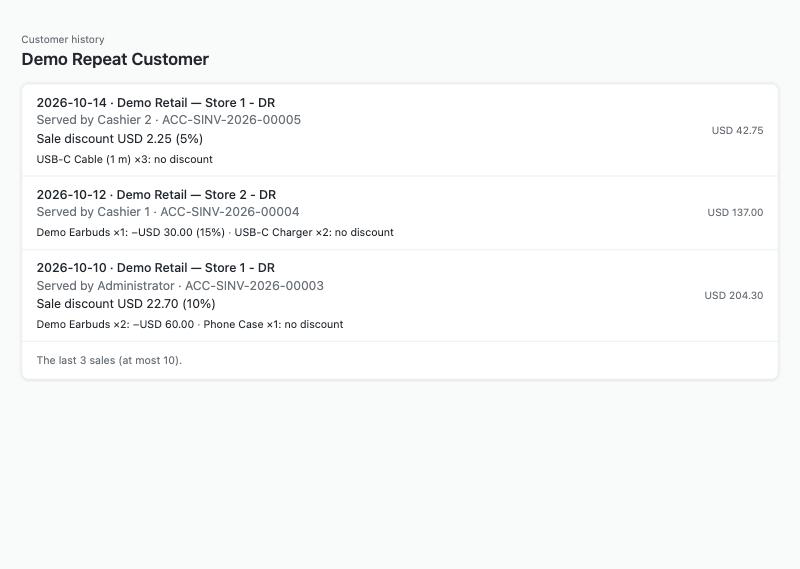
The page opened with a till-shaped context for a customer with three sales: the store, who served and each discount.
A cashier wants to see, for the customer on the sale, the last visits: when, in which store, who served them, and the discount on the sale and on each line. This recipe builds it as a partner page: a key on the till (and a page in Desk for a customer) opens your page, your server reads the customer's sales over the record API and shows them. It is for an iVendNext Partner, or the CitiXsys Consulting Team, who has read the partner page recipe.
Reference implementation: samples/s28_merge_and_history/ — Customer history (its other door is a Desk button, the merge recipe).
What the till already shows
The till's own customer card already shows, read from the POS app's code at commit e149dce4 (2026-10-14), not run on a site: the name, phone and e-mail, the year they became a customer, the credit limit and balance, the lifetime spend and the number of visits, what they usually buy (item groups), loyalty, and the last 10 sales, each with its number, date, first item, store, amount, whether it was a return, and its kind when it is not a purchase. It reads the same two ledgers as this page and skips the day's roll-up invoices the same way.
What your page adds: who served each sale, the sale's discount and each line's discount — and as many sales as the shop sets (up to 50).
Steps
-
Declare the page to open on a till key and in Desk, sending the sale (it carries the customer), never the user:
"extension_subscriptions": [{"key": "history", "point": "page", "label": "Customer history",
  "endpoint_url": "https://your.server/mhs/history/", "page_placement": "Till key and Desk page",
  "page_roles": ["PP MHS History"], "page_send_user": 0, "page_send_sale": 1,
  "page_returns_message": 1, "page_returns_sale_attributes": 0, "page_height": 70}]
The shop needs at least one thing a page may answer, so
page_returns_messageis 1 — and the page never answers. -
Check the context on your server (the partner page recipe, step 3): the signature over the payload's bytes, the expiry, the nonce once.
-
Find the customer. On the till,
sale.customer; in Desk, the record'snamewhen its type is Customer. No customer: say No customer on this sale and stop. -
Read the customer's sales, newest first, at most x. From POS Invoice and from Sales Invoice with
is_consolidated0, each filtered on the customer anddocstatus1, withorder_byposting_date desc, posting_time descandlimit_page_lengthx. ⚠ Sendorder_byas plain text: sent as JSON (in quotes) the shop ignores it and answers oldest first. A consolidated Sales Invoice is the day's roll-up of the till's sales (the event feed's page): reading it would show each sale twice. Merge the two lists, newest first by date and time (compare times as numbers: the shop sends9:15:00with no leading zero), and keep x. -
Read each sale (
/api/resource/⟨type⟩/⟨name⟩, side by side: each is a round trip) and check its customer again. Then the full names of the users who made them (/api/resource/User,full_name). -
Show each visit: the date, the store (the sale's warehouse), who served (the full name of the sale's owner), the sale's
discount_amountandadditional_discount_percentage, and each line's discount:discount_amount(per unit) timesqty, with itsdiscount_percentage. Use the design kit (kit/design/) andivnKit.applyTheme(theme); write every value withtextContent. -
Answer nothing. Do not post to the till.
The settings
One record of your type ⟨PREFIX⟩ Settings, named Default: how many sales the page shows (10 when empty, at most 50).
Bounds
- Online only; on the till the key needs an item and the customer on the sale. A till profile that puts a default walk-in customer on every sale opens the page for the walk-in.
- Anyone with the page's role sees the sales the app's key can read, in every store and company.
- Who served is the user who made the sale. The built-in Administrator's full name is not readable with the app's key.
- A line that stored a percentage but took nothing off shows no discount: the page shows what was taken off.
- The app's key reads every sale and every user's full name: give its role to the app's user alone. On the sandbox, a read the shop gave to every user did not reach the app's key; give the read to the role.
What was proven where
On a sandbox site, 2026-10-16 (POS 2.0.0.648), on the sample's first build (the review's changes after it ran on the laptop): the page opened in a real browser with the context the shop signed for a customer in Desk showed three sales by three people from two stores, newest first, each discount as stored, the roll-up invoice skipped (one made by hand; the sandbox had no till sale, so till sales and a real closing's roll-up are laptop only); a customer with no sales, a context used twice, a user without the page's role, and the settings' number at 2 each did what they say. The till's own key was not pressed (no one was signed in to the till); the till-shaped page used a context signed with the page's secret by the test script. Details: samples/s28_merge_and_history/README.md.
Tell the customer
The cashier presses Customer history with the customer on the sale and sees their last visits: when, where, who served them and what discount they had. It needs a connection.
Needs this serves
- A customer's shopping history or trend on the till: recent visits, the store, who served and the discount on each — Ready, with limits (5)
- Find what a customer bought before by typing their phone number — Ready, with limits (3)