
Restaurant back office: recipes off stock, allergens and food cost — the recipe
A café, a restaurant, a bakery or a cloud kitchen sells dishes, not the bun, the patty and the coffee beans in them. It wants the ingredients to come off its stock as the dishes sell, so its stock and its food cost tell the truth; it wants the cashier to see a dish's allergens and the receipt to print them; and it wants to know what sold, who sold it and when in the day. This recipe does it with the shop's own recipes (the engine's bill of materials), the shop's own stock issues and three buttons.
Reference implementation: samples/s45_restaurant_back_office/.
When to use it. The till already sells a dish as a plain item that is not stocked, and the shop can already give an item a recipe: a Bill of Materials, the parts and how much of each makes one. What is missing is the step between them: nothing in the shop takes a recipe's parts off stock when a dish is sold. For the till's own screens (an open check, courses, the kitchen display) see the POS app's own capabilities; this recipe is the back office.
The four rules, here. No code runs inside the shop. One address is called, your service, and only when someone presses one of the buttons. The service books stock only through the shop's own Material Issue, which the shop checks as it checks any issue (stock, units, periods, accounts). A sale is taken up once: the app's issue names it before any stock moves. The allergen check only reads.
What the manager and the cashier see
- The cashier rings the dishes as today. If the shop has added the field rules, each line shows its allergens (Allergens: Cereals containing gluten, Milk, Eggs) and the receipt prints them under the item.
- After the day's close the manager opens the company's PP RBO Settings record and presses Issue ingredients, then confirms: "Take the ingredients of this company's new till sales off stock, one stock issue per store and day?"
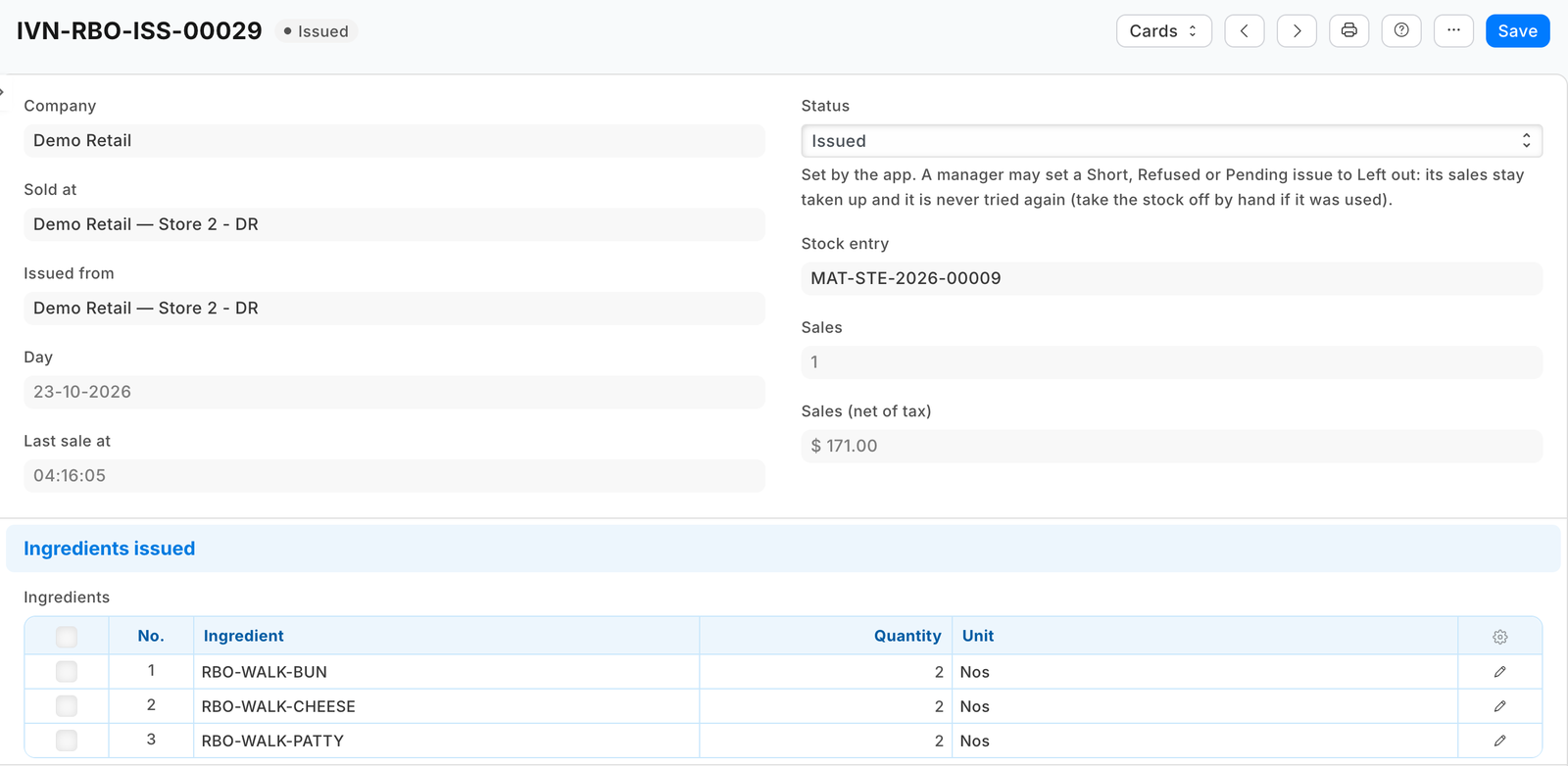
- Restaurant back office — Issued the ingredients of 1 store-day. 3 sales taken up. The PP RBO Issue list shows the store-day Issued, with its Material Issue, the ingredients it took and every line of its sales. Pressed again: Nothing new to issue.
- When the store is short of a part: 1 store-day is short of stock: open the issues marked Short. The issue names it: Not issued: Café is short of HK4-BEANS (needs 1.908, has 1.866). Receive or count them, then press Issue ingredients again. After the delivery, the next press books it.
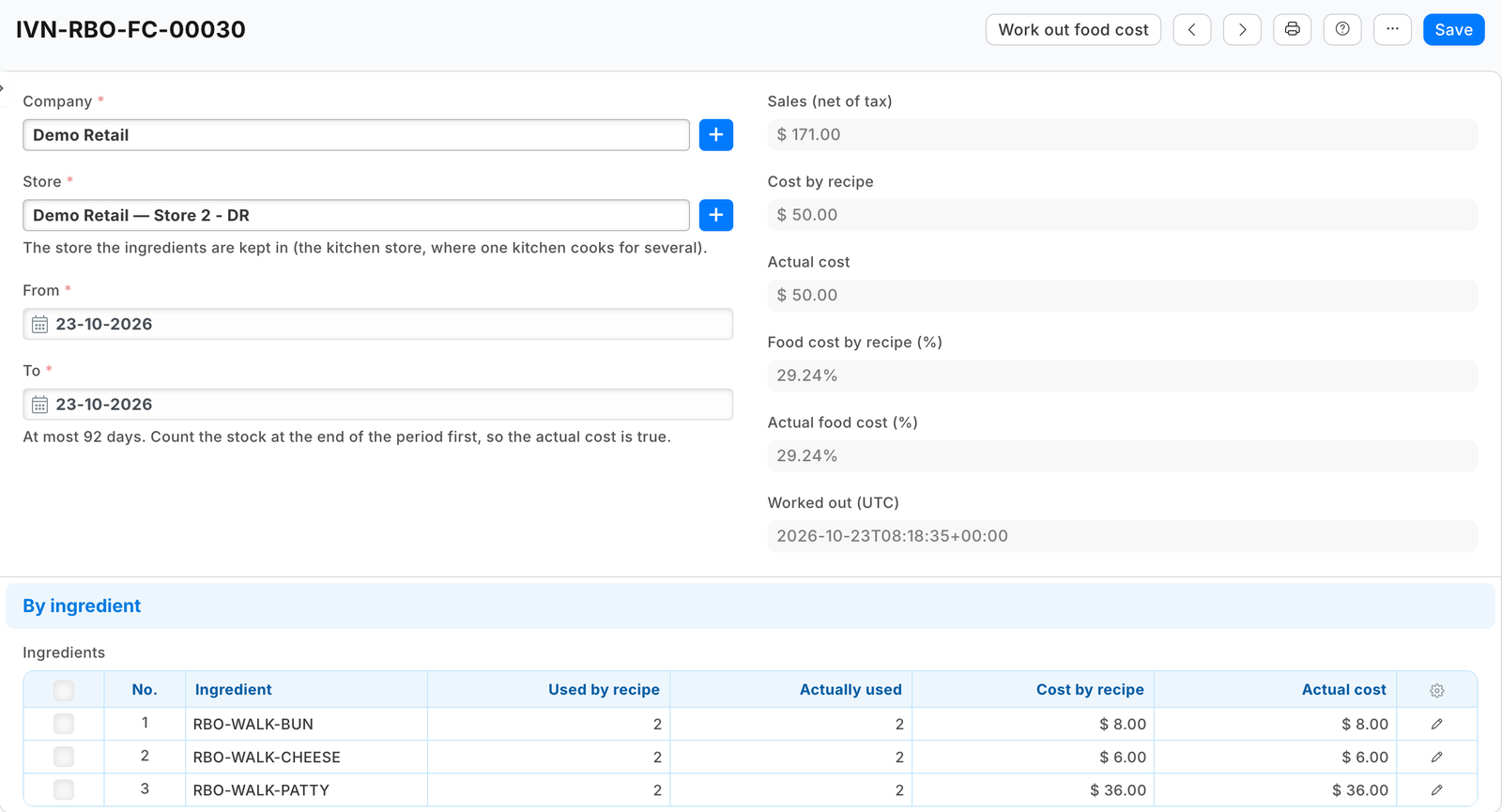
- At the month's end, after the stock count, the manager makes a PP RBO Food Cost record for the kitchen's store and the month and presses Work out food cost: Food cost at Café: 31.4% by recipe and sales, 33.9% actual, on sales of 48,210.00. The record lists each ingredient: used by recipe, sold as it is, other issues, missing at the count, and the difference in cost.
- The menu's owner ticks the dishes in the Item list and presses Check allergens: 2 dishes miss an allergen of their recipe. Open the check for every finding. Desk opens the PP RBO Allergen Check record: HK4-BURGER misses Sesame, Mustard (from HK4-BUN, HK4-MUSTARD), HK4-COMBO misses its burger's, HK4-COFFEE has Diary, not on the list.


Steps
<a id="settings"></a>
- A settings record type, one record per company (see the sample's
manifest.json): Issue sales booked from (a moment, required: sales before it are never issued), Look back (days) (7), an optional Kitchen store (one kitchen cooking for several stores or brands), a table of Day parts (a name, from, to; an end before the start runs past midnight), the shop's allergen list, and a read-only press stamp your service writes.
<a id="issues"></a> 2. An issue record type, written only by your service's role, one per store and day: the store, the store issued from, the day and its last sale's time, a status (Pending, Issued, Short, Refused, Nothing to issue), the Material Issue, why it is not issued, the sales it names, a table of the ingredients and a table of every line sold. And a read-only link field on Stock Entry to it:
"custom_fields": [
  {"dt": "Item", "fieldname": "pp_rbo_allergens", "fieldtype": "Data", "label": "Allergens", "insert_after": "item_group"},
  {"dt": "Stock Entry", "fieldname": "pp_rbo_issue", "fieldtype": "Link", "options": "PP RBO Issue", "label": "Restaurant back office issue", "insert_after": "stock_entry_type", "read_only": 1}]
-
The button on the settings record, for Stock Manager and Stock User (they read the record: the shop re-checks it at every press), sending its name and company, and the service that answers it (Desk action recipe).
-
The service's press, in this order:
- stamp the settings record with the shop's
modifiedcheck (a second press at the same moment is refused by the shop: say another press is issuing); a stamp older than a minute is a press that died; - finish any issue left Pending (look for its Material Issue by the link first);
- read the company's booked till sales (
POS Invoice,docstatus1) since the start moment and within the look-back, less those an issue already names, and their lines (POS Invoice Item, read withparent=POS Invoice); - read the dishes' items and recipes (
BOMandBOM Itemwithparent=BOM, two lists a level, never one read per recipe), group the lines by store and day, and open each dish into its stock parts; - write the issue first (it claims the sales), then the shop's Material Issue in one call (
docstatus1), dated at the day's last sale (set_posting_time1), carrying the issue's link; - if the shop refuses it for want of stock, try once more without a date (the shop dates it now: the stock came in after the sales); if that is refused too, read
Binfor the store and write Short naming every short part; any other refusal is Refused with the shop's own words; - a store-day whose recipe goes round, or whose sales name no store, is written Refused with why, and nothing is booked;
- then try up to five issues left Short or Refused, Short first, oldest first, working their parts out again from their own lines and the recipes as they are now (a manager may set one to Left out instead: never tried again);
- stop starting anything new after five and a half seconds and say more is waiting; clear the stamp. ⚠ When the shop's answer never came back, leave the stamp: the shop may still be writing, and a second press would book the same sales. It lapses after three minutes, and the next press finds the entry by its link.
- stamp the settings record with the shop's
<a id="food-cost"></a>
5. A food cost record type (a company, a store, from, to; the totals and a table per ingredient, read only) with a Work out food cost button: read the store's Stock Ledger Entry rows for the period, the app's own Material Issues (by the link) and the shop's other Material Issues, the period's counts (Stock Reconciliation Item, read with parent=Stock Reconciliation: counted less what the books held) and the app's issues' sales; write the lines and totals with the record's modified (an edit meanwhile is never written over).
<a id="allergens"></a>
6. The allergen check on Item (list and form), for Item Manager: read the ticked items, their recipes at every depth (a stocked sauce's own recipe too: its ingredients' allergens are in the dish; a row's own sub-recipe first) and the parts' Allergens, and each variant's template. Write every finding to a check record (a dish missing an allergen and from which part, a variant with none of its template's, a dish with none typed, a word not on the list) and answer with open_record to it: a message holds 280 characters, a menu's findings do not. Nothing on an item changes.
-
The field rules on each till theme the shop's tills wear (POS Studio, Fields),
cart_lineandreceipt_preview,showpp_rbo_allergenslabelled Allergens (field rules recipe). They name the shop's own theme, so the shop adds them; your manifest can carry them only when you know the theme. The till shows the field of the item sold: a variant needs its own (typed, or copied by Item Variant Settings where every variant shares the template's allergens; a template's save then writes over each variant's). The shipped receipt prints it; a receipt layout of the shop's own prints it only if it calls the till's item-fields reader. -
Two reports in your manifest: the issues' lines (date, store, sale, item, quantity, amount, who rang it, day part) and the food cost lines, each with a totals row.
What the shop does
- Makes each dish a plain item that is not stocked, with a Bill of Materials, submitted and default (the Desk form's item picker lists stock items only: type the dish's code).
- Gives the app's user the rights the sample's README lists, and the role allowed to book back-dated stock if Stock Settings limits it.
- Sets the ingredients' expense account (their Item Defaults or their Item Group) to its cost of goods sold, if that is where it wants the ingredients booked; the app sends no account.
- Presses Issue ingredients each day after the close, and counts its stock before working out a period's food cost.
Limits
- The ingredients come off at the press, not at the sale; a short store-day waits for a delivery or a count.
- An issue booked at the press after a delivery lands on that day, not the sales' day.
- Only till sales; a returned dish takes nothing back; a dish that is itself a stock item is never opened.
- An ingredient counted in whole units takes whole quantities: a recipe using half a bun is refused by the shop and named on the issue.
- The kitchen ticket does not print the allergens; the till shows at most three extra item fields per theme, and the field holds 140 characters.
- A sale older than the look-back is never taken up; a till sale cancelled after its issue keeps its issue, and one cancelled and amended in Desk, its date left as it was, is not issued again.
- A dish rung before its recipe was made issues nothing; its issue names it.
- A combo leaves out of its recipe the side or drink the customer chooses as an option line, or that part comes off twice; a No onions option takes nothing off the dish.
- Reinstalling removes the app's issues: set Issue sales booked from again, or the same sales are taken up twice.
Technical notes
- Why not the engine's Get Items. A Material Issue from BOM explodes one recipe per entry (
fg_completed_qtyof onebom_no), so a day of many dishes would be one entry per dish. The service reads the same recipe rows (stock_qtyperquantitymade) and books one entry per store-day. - Cost of goods sold is the shop's own default chain for an issue row: the item's default expense account, else its group's, else the company's stock adjustment account. A client that sends a row's account is kept by the shop; this recipe sends none, so the shop's own setting holds.
- Food cost. Theoretical = used by recipe + sold as it is; actual = that + other issues + missing at the count. Receipts and transfers between stores are not use.
Needs this serves
- See what sold, who sold it and when in the day (breakfast, lunch, dinner) across stores — Ready, with limits (2)
- Sell a dish at the till and have its ingredients (the bun, the patty, the coffee beans, the milk) come off the kitchen's stock by its recipe, without counting each one by hand — Ready, with limits (4)
- Show a dish's allergens to the cashier on the sale and print them on the receipt, and make sure the dish lists every allergen its ingredients carry — Ready, with limits (5)
- Show what the food should have cost by the recipes against what it really cost after waste and the stock count, as a percentage of sales — Ready, with limits (2)