
A manager's AI assistant on our MCP server — the recipe
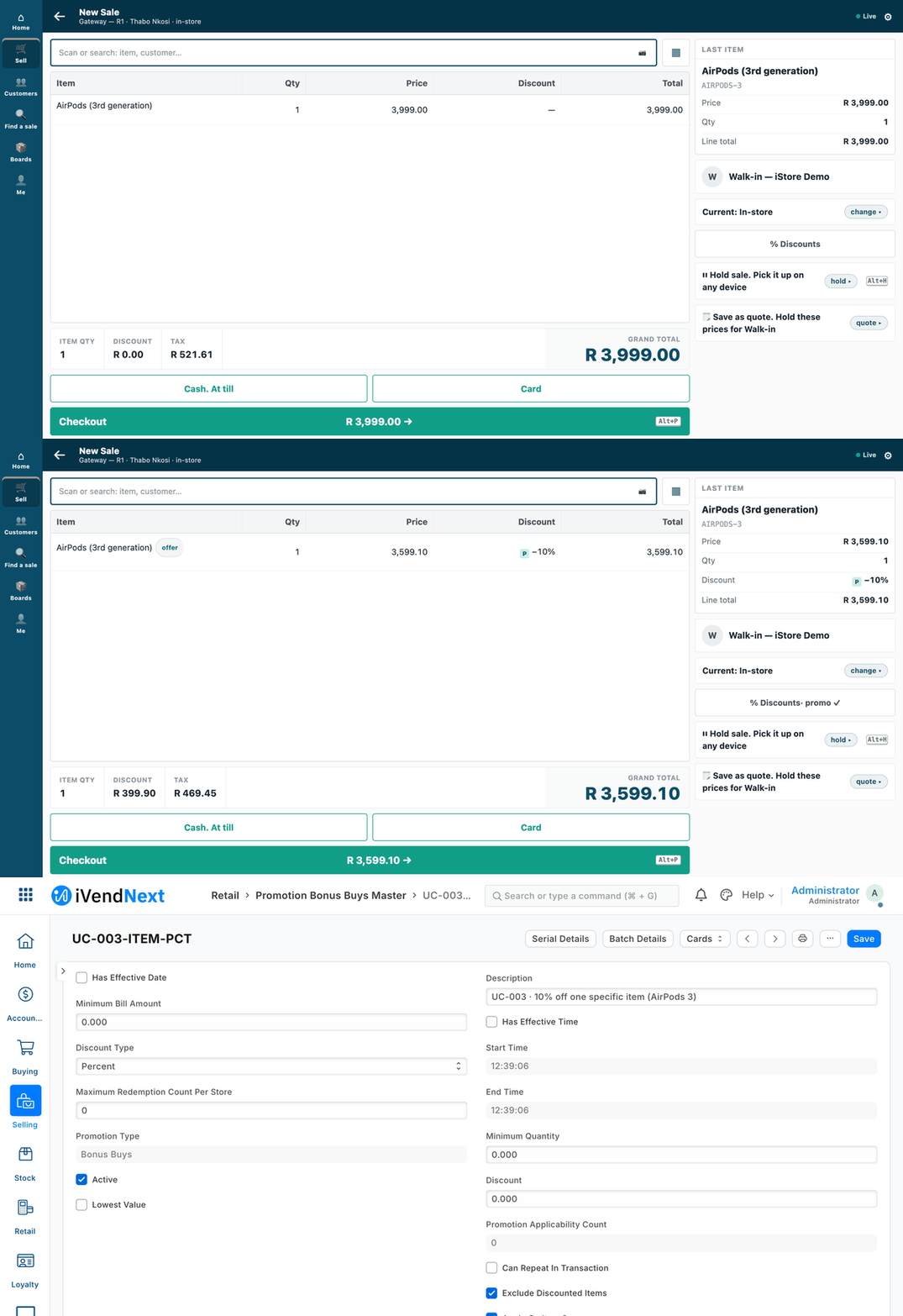
The manager asks for the 10% off AirPods promotion and says yes: the till's price drops by 10%, and the promotion reads Active in Desk.
This recipe lets a store or area manager ask an AI assistant "what sold in the Durban store yesterday?" — and, when the manager says so, "put the 10% off AirPods promotion on". It is for a retailer's IT person, a partner, or our own team. Reference implementation: samples/s10_ai_manager/ (two profiles of our MCP server, a scripted assistant standing in for the AI, the tests).
Three rules shape it.
- Bring your own AI. The assistant is one the customer already pays for, or a free model on their own machine. We pay for none and ship none.
- The manager's own key. The server holds no key of its own. Every request carries the manager's, and the shop's permissions for that person decide what is allowed.
- Read-only unless the operator starts the server with
--writes, and every write waits for a yes.
When to use it. When a manager should read the shop's figures, and perhaps switch a promotion or change a price, by asking in plain words.
Steps
-
Make the manager a key with only the rights they need. In the shop, give the manager's user a role that can read sales, closings, stock, profiles, items, prices and promotions, and — only if they may change them — write promotions and price rows. The profile cannot give more than the role has: a reader's key that says yes is refused by the shop. Generate the user's API key and secret in the usual way. ⚠ A price changed here skips any approval. If the shop runs price approvals (approvals), leave price rows out of the manager's write rights and out of the profile: an approval binds only the service that applies it.
-
Pick the profile and start the server — outside the shop.
profile_read.jsonlets the assistant look: 6 tools, 3 record types, and no write exists in it.profile_writes.jsonadds one write: switch a promotion on or off, or change a price-list row.
The profile can only take away from the server. It names the tools (with the words the assistant reads for each) and the record types the general record tools may touch. For a write, it also names the one field of each type that may change (
"Promotion Bonus Buys Master": ["active"],"Item Price": ["price_list_rate"]). A profile that offers the general record tools but names no record types is refused at start. The shop's permissions for the key still apply on top.IVN_BASE=https://shop.example python3 tools/mcp_server/server.py --http 127.0.0.1:8130 --profile samples/s10_ai_manager/profile_read.json IVN_BASE=https://shop.example python3 tools/mcp_server/server.py --http 127.0.0.1:8130 --profile samples/s10_ai_manager/profile_writes.json --writesAn AI desktop app that starts its own tool servers gets the same command without
--http, withIVN_BASE,IVN_KEYandIVN_SECRETin its environment (tools/mcp_server/README.md). Put HTTPS in front of the server before anyone else reaches it. -
Connect the assistant. It reads the profile's instructions and each tool's words. They tell it to add sales up in the shop, never to list them, and to show the preview and ask before any change. Any assistant that speaks the Model Context Protocol will do.
-
Check it with the scripted assistant before a person uses it.
samples/s10_ai_manager/assistant.pyplays the manager's sentences with fixed rules, so you can test the whole path with no AI account. Run the laptop tests (python3 -m unittest discover -s samples/s10_ai_manager/tests), then try it against a staging shop.
How a write is guarded
-
On a read-only server the write tool is not even listed, and a write call to one is refused.
-
The first call has no
confirm: nothing is sent. The server returns a preview of the exact change (method, address, body). The assistant shows the manager that preview in words and asks. -
Only after a yes does the assistant call again with
confirm: true. The shop then checks the manager's rights. One confirmed write is one line on the audit log, with a fingerprint of the manager's key (first four characters and a hash — never the key, the secret, a record's name or any value).What the manager sees, and what the till then does. The conversation itself is text (see the sample's README). On the till, the same basket before and after the yes, then the promotion in Desk:
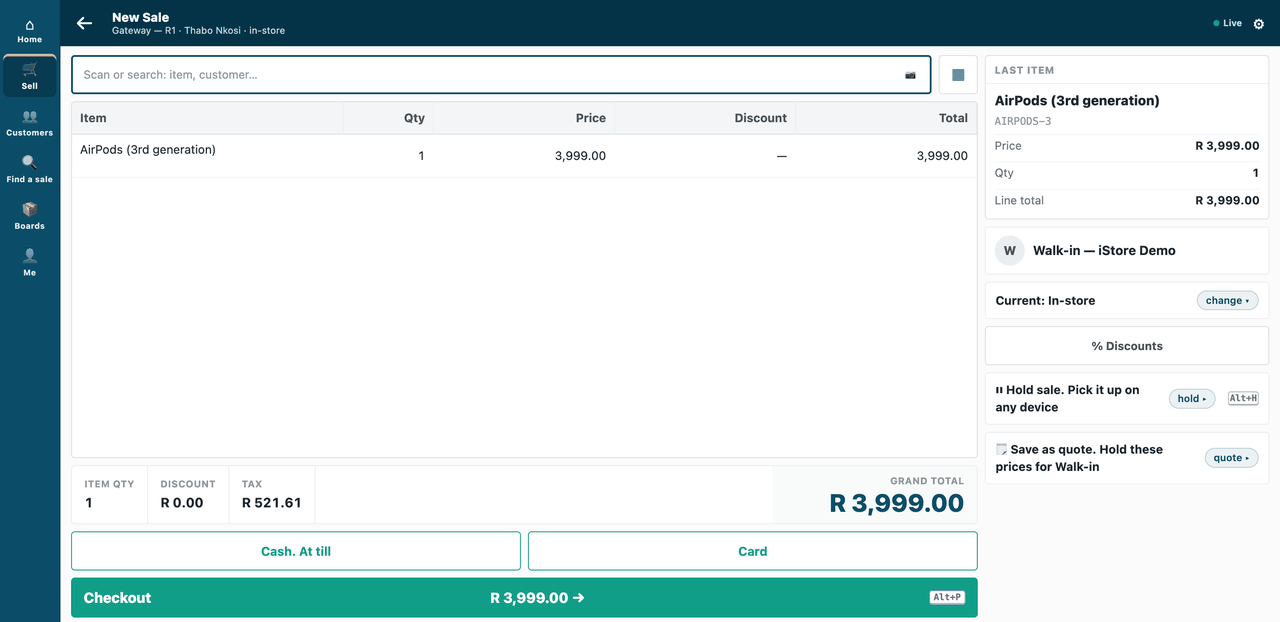
Before: the AirPods at full price on the till.
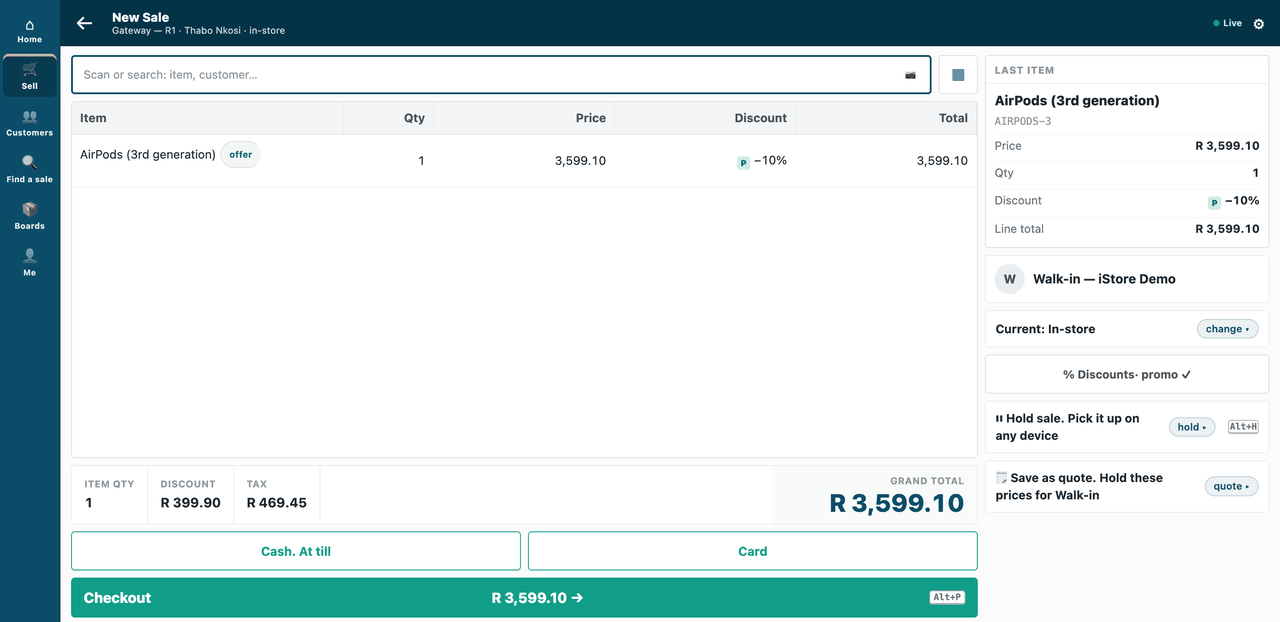
After the yes: the same AirPods 10% lower, the promotion marked on the line.
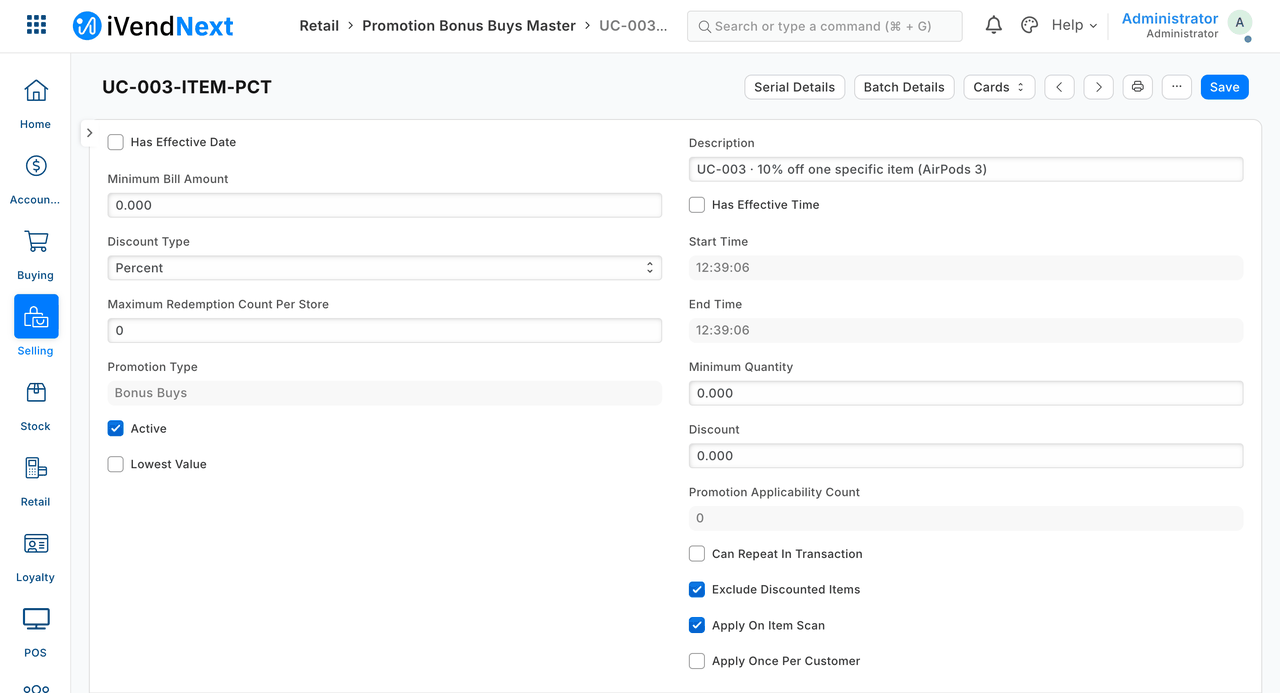
The promotion, Active, in Desk.
-
⚠ The server cannot see a person.
confirmis the assistant's promise that the manager said yes. Use an assistant that asks before it calls a tool marked as changing things, and read the audit log.
What the manager can ask (the scripted assistant's sentences)
What sold in the Durban store yesterday? · Show me the closing for the Durban store on 2026-10-03 · How many CABLE-USBC-1M are in the Durban store? · Put the 10% off AirPods promotion on / Take the 10% off AirPods promotion off · Change the price of PP-MGR-ITEM to 120.
A real assistant understands far more; these are the ones the tests pin. It does not guess: two promotions that fit, or two stores called the same, are named back to the manager and nothing is changed.
⚠ Privacy. The profile fences the general record tools: which record types, and which fields of a write. The named read tools (sales, stock, profiles, items) return any field the manager's key may read. So a customer's name or phone on a sale reaches the AI provider if the assistant asks for it. The server does not fence read fields. Narrow it in the shop (the role: no right on the customer fields), or tell the assistant, in the profile's words, which fields to ask for.
What is refused, and why
- A tool, a record type or a field outside the profile: the server refuses it before the shop is asked. The profile can only take away.
- A profile that offers the general record tools but names no record types: refused at start, so the record tools are never open to every type.
- A confirmed write from a key whose role cannot write: the shop refuses it, and the assistant says so. Nothing moves.
- A request that fits two things (two promotions, two stores of the same name): named back to the manager, nothing changed.
Technical notes
Proven on our test bench.
Notes moved from the steps
- Step 1: a reader's key that says yes is refused by the shop (proven, 403).
- Step 4: our test bench runs a scripted drive of its own, not in the kit.
- The screenshots: our test bench, 2026-10-07; frames: the till at 1440 wide, then Desk; the conversation is text (README). The GIF is built from the same screens, every frame cut above the till's key row.
- ⚠ Bound: the server cannot see a person (step 4 of How a write is guarded). ⚠ Privacy bound: the server does not fence read fields (What the manager can ask).
What was proven where
- Laptop, 19 tests, no AI (
samples/s10_ai_manager/tests/test_s10.py): a read-only server lists no write with either profile; the read profile never lists one even with--writes; a tool, a record type, or a field outside the profile is refused before the shop (and the log says only that it was outside the profile — never the names the assistant sent); a profile that offers the record tools with no record types is refused at start; the assistant previews, asks, and only then confirms; a no sends nothing; a promotion with a 10 that is not a 10%, and a 10% coupon, are not taken for the manager's promotion; a reader's confirmed write is refused by the shop and said so; the audit log holds the fingerprint and no secret or value. - Bench
:8110, 25 checks : "what sold in the Durban store yesterday" equals the shop's own POS Closing Entry total for that store and day (read as Administrator, not through the manager's key), with the same count of sales, added up in one call; an unconfirmed write sends nothing; a no sends nothing; a yes lands once (one line on the log with the manager's fingerprint and the shop's 200) and the till's own preview of one AirPods 3 drops by exactly 10%, then returns to the first figure when switched off by asking; the reader's confirmed write is refused by the shop (403) and nothing moves; one price row changes 100 → 120 with one new version; a customer record, a sale, a customer list (through the general record tool), a stock entry and a promotion's discount field are all refused by the server itself with no status from the shop; neither the logs nor the servers' output hold a key, a secret, a record name or the manager's words. - ⚠ Not proven: a real AI model (the scripted assistant stands in; the optional local open-weight model was not run); that a given assistant really asks before it sets
confirm; the HTTPS front; more than one manager at once; a shop whose promotion master keeps version history (here it keeps none, so one change is read from the audit log and the record's modified time).