
Alterations and made-to-measure tickets — the recipe
A fashion store takes a garment for alteration, or a customer's measurements for a made-to-measure piece, at the counter, and hands it back days later. This recipe gives the retailer the ticket as its own record in iVendNext Desk: what to do to which garment, the measurements, the fitting, the date it is ready, the tailor's progress, a slip for the customer with a tag for the garment, the tickets due, and who collected it. It is for an iVendNext Partner, or the CitiXsys Consulting Team, who wants a store's alterations off paper without code inside the retailer's iVendNext.
Reference implementation: samples/s53_alteration_tickets/.
When to use it. The store alters what it sells (a hem, a waist, a sleeve), or makes suits and dresses to measure, and keeps its tickets on paper. The money side is already the till's: an alteration is rung as a service item or a line surcharge, and a made-to-measure deposit by the till's order or a layaway.
The four rules, here. No code runs inside the retailer's iVendNext. No address is called: the app is a manifest of records, a workflow, a print format and a report. It reads and writes no money. Its only message to a customer is the retailer's own Notification, which sends through the retailer's own mail server or SMS gateway.
What the store sees
- At the counter. The cashier rings the alteration at the till as before. Store staff open PP ALT Ticket in Desk and press + Add: the Customer by name and number, never the store's walk-in (its phone and e-mail come from the customer), Collect at (the store), Ready by, and one row per garment under Garments and the work (the garment, its item if it was sold here, What to do). A made-to-measure piece is Made to measure, with its Measurements (a measure, a value, cm or in, a note). Sale and Order name what it was paid on. Saved, it is numbered
ALT-00001and is Taken. - The slip and the tag. Print, format PP ALT Ticket: the customer's slip and, under a cut line, the garment's tag with the number large.
- In the workroom, by the ticket's buttons: Send to tailor, Book a fitting (and Next fitting), Back to tailor, Ready. Ready ticks Ready to collect; Back to tailor from there unticks it.
- The hand-over. For a made-to-measure piece, take the balance at the till first. Write Collected by, press Hand over: Closed is ticked. Cancel closes a ticket the customer gave up.
- What is due. The report PP ALT Tickets Due lists every open ticket, the earliest Ready by first.
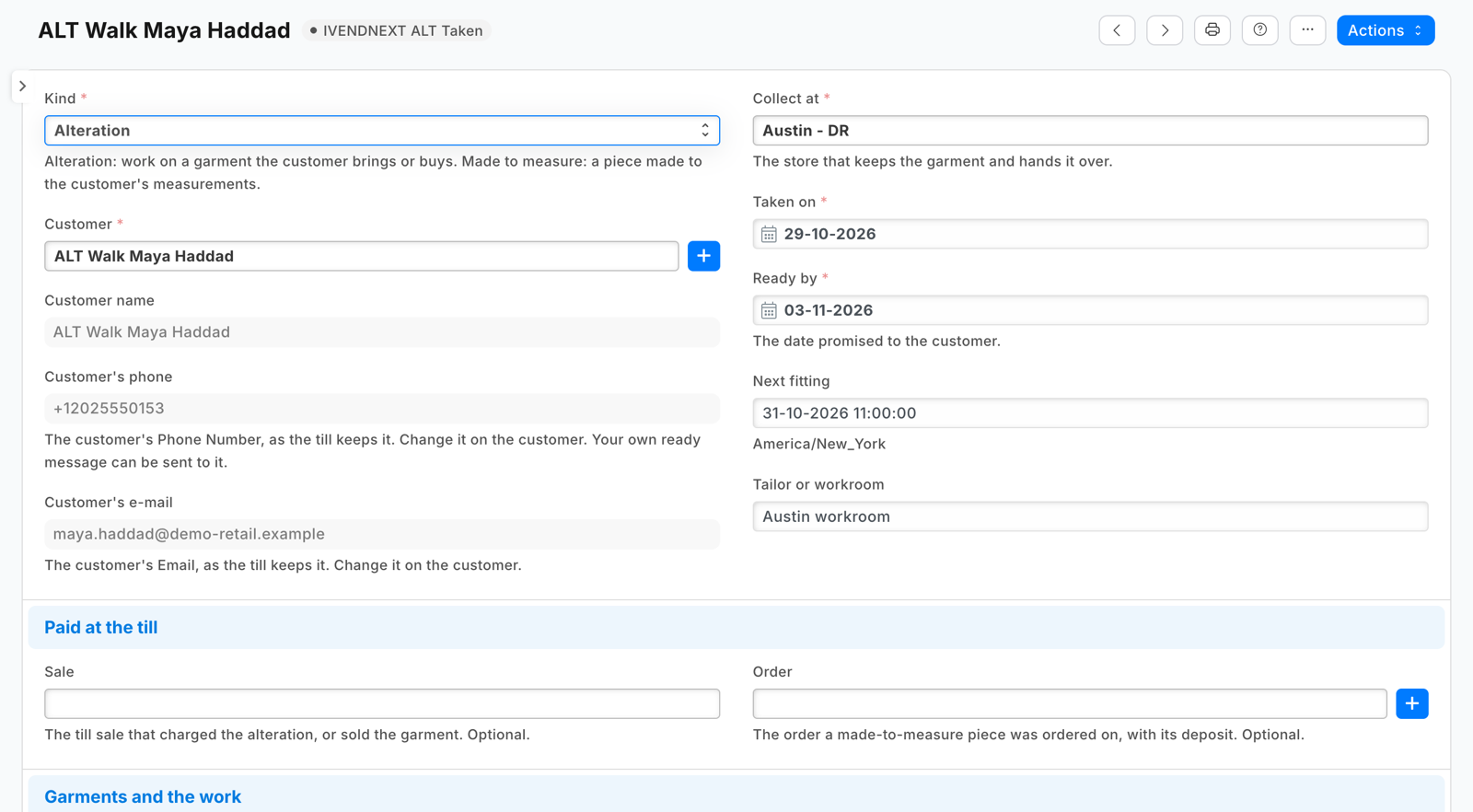
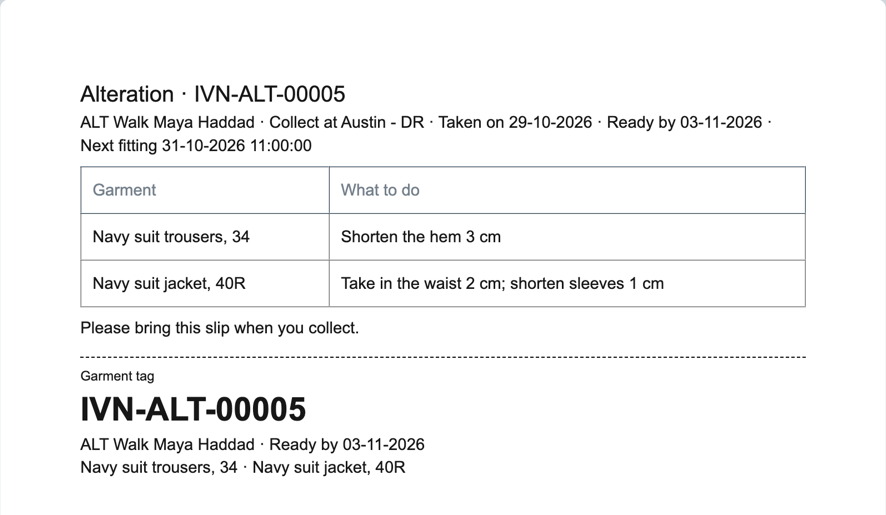
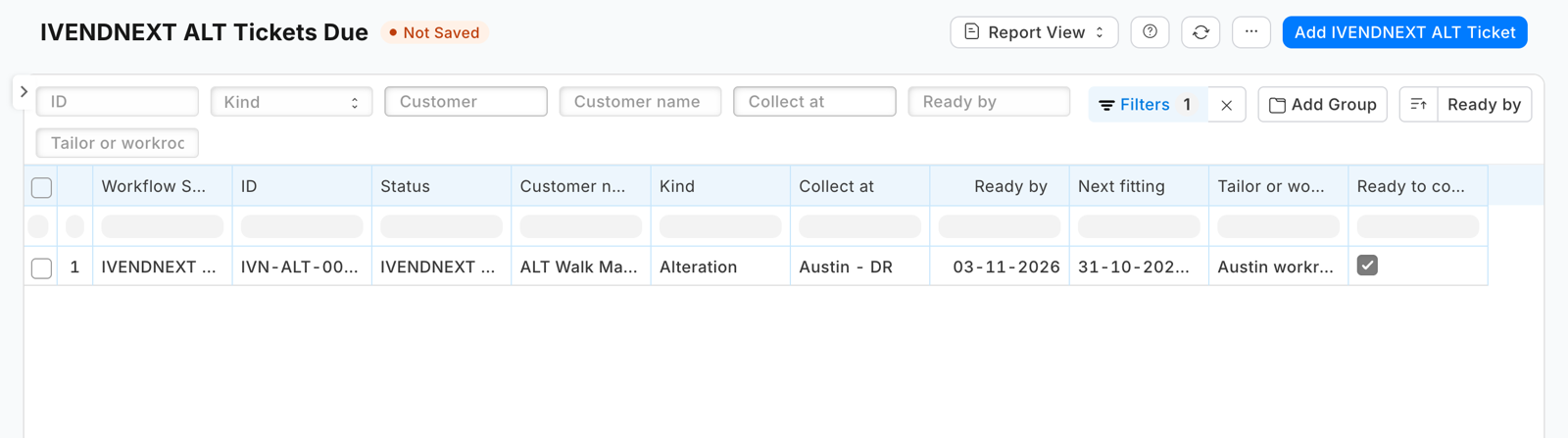
Tickets
The record type PP ALT Ticket, numbered format:ALT-{#####}, tracked (its history shows who moved it and when):
| Field | What |
|---|---|
kind |
Alteration or Made to measure |
customer, customer_name |
the customer; its name, read only |
customer_phone, customer_email |
read only, fetch_from the customer's custom_phone_no and custom_email: the fields the till's new-customer sheet and customer edit write |
store |
Collect at, a Warehouse |
taken_on, due_date, next_fitting |
Taken on (today), Ready by, Next fitting (date and time) |
tailor |
the tailor or workroom, as text |
sale, order |
a POS Invoice and a Sales Order, each optional |
garments |
child table PP ALT Garment: garment, item, work, done |
measurements |
child table PP ALT Measure: measure, value, unit (cm, in), note |
fitting_notes, notes, collected_by |
text |
ready_to_collect, closed |
read only ticks the workflow sets |
Sales User reads, writes, creates and prints tickets; Sales Manager and System Manager may also delete. The ticket shows under the Customer, the POS Invoice and the Sales Order it names (manifest links).
The workflow
| State | Sets | Who edits |
|---|---|---|
| Taken | — | Sales User |
| With the tailor | ready_to_collect 0 |
Sales User |
| Fitting | ready_to_collect 0 |
Sales User |
| Ready to collect | ready_to_collect 1 |
Sales User |
| Handed over | closed 1 |
System Manager |
| Cancelled | closed 1 |
System Manager |
The actions, each allowed to Sales User: Send to tailor (Taken to With the tailor), Book a fitting (to Fitting), Back to tailor (from Fitting or Ready to collect), Ready (from With the tailor or Fitting), Hand over (from Ready to collect), Cancel (from any open state).
Steps
- Add the record types above to your manifest (
doctypes, the two child tables with"istable": 1), with no money field: the charge and the deposit belong to the till's sale and order. Never make a child tablereqd: Desk drops a row whose list fields are all blank, so none is a ticket with no rows. A row whose list field has a default (the measure's unit,cm) is kept even when the rest is blank, so the print skips a measurement row with no measure ({% for m in doc.measurements if m.measure %}). - Add the workflow (
workflows), its states and actions under your prefix, each state's tick inupdate_fieldandupdate_value. A workflow writes the tick as text,"0"or"1". - Add the print format (
print_formats, Jinja) reading only the ticket's own fields and its rows (doc.garments,doc.measurements), the report (reports, Report Builder, filteredclosed = 0, ordered bydue_date), the Connections (links) and adocumentationproperty setter that points at your help. - Tell the customer, with the retailer's own Notification (a manifest notifies only the retailer's own users). In Desk, Notification, + Add: Document Type PP ALT Ticket, Send Alert On Value Change, Value Changed Ready to collect, Condition
doc.ready_to_collect in (1, "1")(a baredoc.ready_to_collectwould also fire on the untick, which is the text"0"), the channel Email to the document field Customer's e-mail, or SMS to Customer's phone through the retailer's SMS gateway. An SMS one adds the phone to its condition,doc.ready_to_collect in (1, "1") and doc.customer_phone: iVendNext refuses an SMS with no number; the Notification catches that and writes Failed to send Notification to the Error Log, so the ticket still moves, but each one of a customer with no phone leaves an error (measured on the bench, APPF run 20). A fitting reminder is a second one: Days Before, Next fitting, 1 day, conditionnot doc.closed(by SMS,not doc.closed and doc.customer_phone). - Check it before it reaches a retailer:
python3 tools/check/check.py samples/s53_alteration_tickets.
What the retailer does
- Install the app. It adds the ticket, its workflow, the print format, the report and the Connections. No setting, no role, no switch, no outside address.
- Give Sales User to the people at the counter and in the workroom. A Sales Manager deletes a ticket taken in error.
- Add its own Notification for the ready message (step 4), and a fitting reminder if it wants one.
Limits
- The ticket is written in Desk, at the counter or in the workroom; the till rings the charge and the deposit, and staff name the sale or the order on the ticket.
- The phone and e-mail are the customer's, read only: change them on the customer. A customer made in Desk with only its contact's mobile and e-mail has a blank phone and e-mail on the ticket until its Phone Number and Email are set: the e-mail message then goes to no one.
- Who may edit in a state is Desk's screen rule, not a lock over the API. Hand over does not ask for Collected by.
- Desk shows the states and buttons with the app's prefix (PP ALT Ready).
- Before removing the app, delete the retailer's own Notifications on the ticket.
- A cancelled ticket refunds nothing: a refund is the till's return.
- Measurements and the customer's phone are personal data the retailer keeps under its own policy. Uninstalling removes the tickets; the install's export keeps a copy.