
Duty-free allowance and boarding pass — the recipe
An airport shop sells only to passengers, and only up to what customs lets each passenger carry: so much spirits, so many cigarettes. This recipe adds both from outside, through the check before payment. The cashier scans the boarding pass into the sale's Sale details. When the cashier presses Pay, your service reads the pass: is it a boarding pass, from this airport, for today's flight? Then it adds up each limited item group on this sale and on the passenger's earlier sales with the same pass. It is for an iVendNext Partner, or the CitiXsys Consulting Team.
Reference implementation: samples/s36_duty_free/ — Duty-free allowance and boarding pass.
When to use it. A sale needs a document the customer shows (a boarding pass, a ticket, a permit), and what it allows depends on what that customer bought before. If you only need the value recorded on the sale, a sale detail alone does it (a manifest's sale_attributes), with no service.
Steps
-
Declare, in your manifest (
samples/s36_duty_free/manifest.json):- a sale detail
<PREFIX> Boarding Pass(sale_attributes). ⛔ Neverrequired: a required sale detail stops every sale on every till of the site, city stores too, and the installer refuses one. The check's POS Profiles decide where a pass is needed; - a settings record type
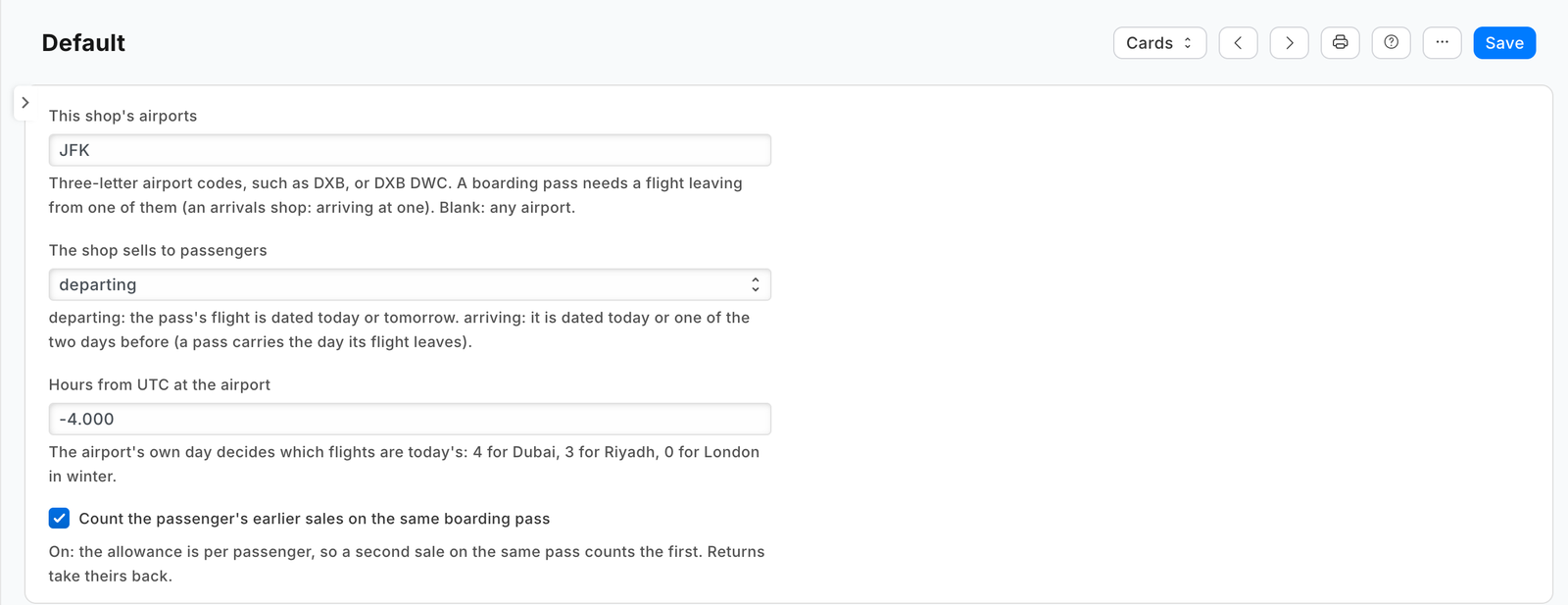
<PREFIX> Settings(the recordDefault): the shop's airports, departing or arriving, the airport's hours from UTC, and whether earlier sales count. Give System Manager the rights to edit it and your integration role read only; name the role<PREFIX> Integration, so the install makes it; - two fields on Item Group, the allowance and the word it is counted in, and one on Item, how much one stock unit counts (0.75 for a 75 cl bottle, 200 for a carton of cigarettes). A group's allowance covers every group below it, so a shop sets it once on Spirits;
- one
checksubscription at your service's address, and that address alone inallowed_urls; - a feed registration naming your one integration user, so the shop's Connect again hands that user's key to your service;
- a help address on the settings record type (a
documentationproperty setter).
- a sale detail
-
Choose what happens when your service is down. The sample declares
allow_and_flag: an outage never stops an airport shop selling, and the sale is flagged on Sales to review. A shop whose customs rules forbid selling unchecked changes its subscription torefuse. -
Check every call with the check's secret (
<app>:sub:<key>; the sample's key isallowance), and refuse a timestamp more than five minutes from yours. -
Answer the cheap cases first, reading nothing. A sale with no line of a positive quantity is a refund: allow. A sale with no
<PREFIX> Boarding Passinsale_attributes: refuse, "Scan the customer's boarding pass into Sale details, then press Pay again." -
Read the pass. IATA's bar-coded boarding pass starts
Mand the number of legs (1 to 4), then the passenger's name (20 characters) and one character; each leg is then 37 fixed characters: the booking reference (7), from (3), to (3), the airline (3), the flight (5), the day of the year (3), the cabin (1), the seat (4), the check-in number (5), the status (1), and the size of the leg's variable part in two hex digits, which you step over to reach the next leg. ⚠ The till keeps 140 characters of a sale detail, so a phone's pass with its security part is cut: read every leg that fits whole. The first leg always fits. -
Judge the pass against the shop's settings, read with your integration user's key (
GET /api/resource/<PREFIX> Settings/Default; a 404 means the shop has not made it: any airport, departures, UTC) and kept a minute:The pass Answer not readable as above {"verdict": "refuse", "reason": "The boarding pass could not be read. Scan it again into Sale details."}no leg leaves from one of the shop's airports (an arrivals shop: arrives at one) {"verdict": "refuse", "reason": "This boarding pass is for a flight from LHR. This shop sells to passengers departing DXB."}no such leg is dated the airport's today or tomorrow (an arrivals shop: today or the two days before, since a pass carries the day its flight leaves and a long flight arrives up to two days later) {"verdict": "refuse", "reason": "This boarding pass is for a flight on another day. Ask for the pass for today's flight."}(an arrivals shop: "…Ask for the pass of the flight the customer just arrived on.")The airport's day is UTC plus the shop's hours from UTC; compare days of the year, so a flight on 1 January is tomorrow on 31 December.
-
Add up the allowance. Read the item groups once a minute (
GET /api/resource/Item Group,fieldsname,lft,rgtand your two fields,limit_page_length0): a line's group falls under every group whoselftandrgthold its own. If no line of the sale falls under a group with an allowance, allow. Otherwise read, at the same time:- the basket's items (
GET /api/resource/Item,filters[["name","in",codes]],fieldsname,stock_uomand your measure). A line rung in another unit is converted with the item's own units (GET /api/resource/Item/<code>, itsuoms); - the passenger's earlier sales:
GET /api/resource/POS Invoicewithfilters[["POS Invoice Sale Attribute","sale_attribute","=","<PREFIX> Boarding Pass"], ["POS Invoice Sale Attribute","attribute_value","like","<the pass's first 60 characters>%"], ["docstatus","=",1]]. Write a%,_or\in the pass as\%,\_,\\. Then read each sale's lines (GET /api/resource/POS Invoice/<name>:item_group,item_codeandstock_qty). A return'sstock_qtyis negative, so it takes its amount back.
Each line counts its stock quantity times the item's measure (blank: 1). Judge only the groups this sale's own lines fall under, so an earlier sale alone never refuses this one:
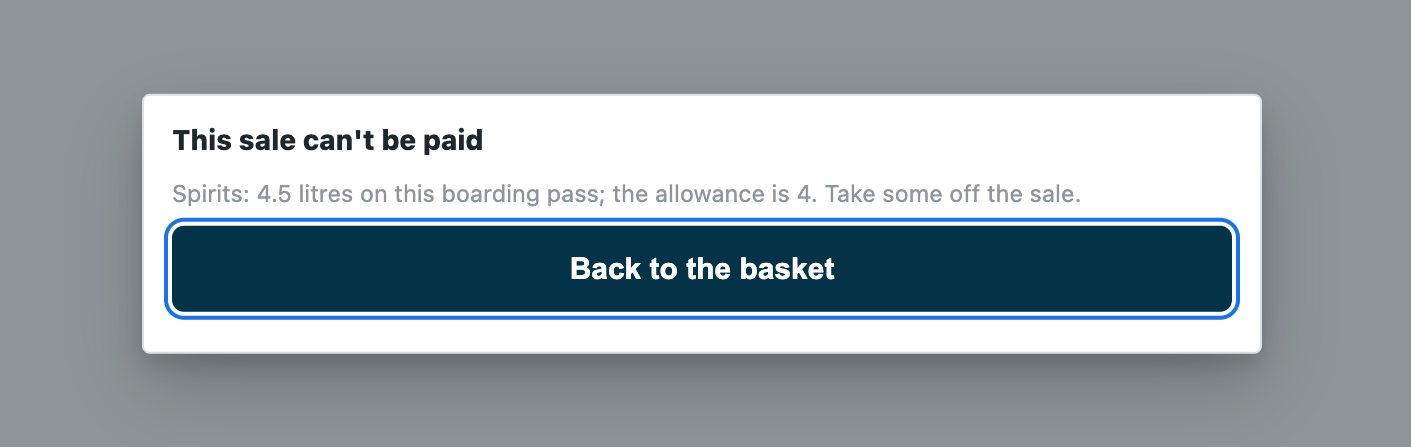
{"verdict": "refuse", "reason": "Spirits: 4.5 litres on this boarding pass; the allowance is 4. Take some off the sale."}. Else allow.The shop gives your role a plain read on Item Group, Item and POS Invoice (not Only If Creator) and your user no User Permissions, or the earlier sales are only partly seen and a passenger can buy past the allowance.
- the basket's items (
-
When the shop cannot be read, say so the right way. No answer, an error answer other than 401 or 403, an answer cut short, not records, or an item on the sale the shop does not return: answer 503, so the till applies your down answer. The shop refuses your key (401 or 403): refuse in words that say so ("Duty-free allowance cannot read your shop: it refused the app's user. Ask your administrator to check the app's setup."). Never follow a redirect with the key.
-
Test it. The sample's tests: the pass (one leg, several, cut short, not a pass), the airport and the day (the airport's own day, the new year), the tree and each allowance, the earlier sales and returns, the check's secret, one shop and many, every answer against the contract;
canaries.pybreaks each guarded rule and expects its test to fail. Then scan a pass into Sale details on a sandbox and press Pay.
Settings
The shop's record Default of <PREFIX> Settings: This shop's airports (three-letter codes, separated by spaces or commas; blank: any airport; a word that is not a code is kept, so every pass is refused naming it and the typo shows at once), The shop sells to passengers (departing: a flight dated today or tomorrow; arriving: today or the two days before), Hours from UTC at the airport (4 for Dubai, 3 for Riyadh; a value past ±14 reads 0), and Count the passenger's earlier sales on the same boarding pass (on). On each Item Group, Duty-free allowance per passenger (0: no limit) and Allowance counted in; on each Item, Counts toward the duty-free allowance as. A change reaches the service within a minute.
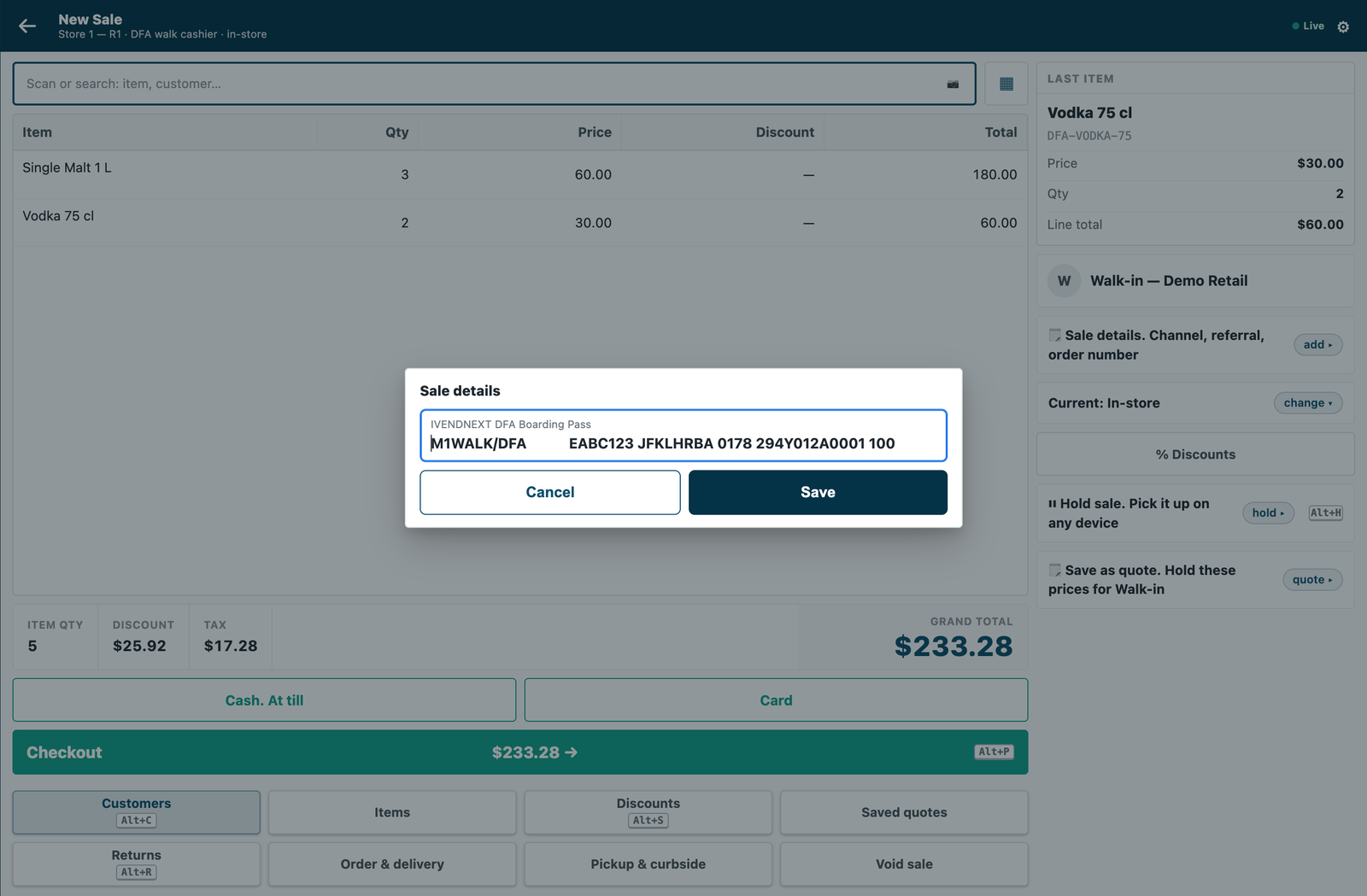
What the cashier does. The cashier taps 🗒 Sale details on the basket and scans the boarding pass into its field (a keyboard scanner types it in), then presses Pay. The field shows on every till of the site; only the tills whose POS Profiles the check serves need it. A refusal shows "This sale can't be paid" and the app's sentence, then goes back to the basket: the cashier scans the right pass, or takes some items off, and presses Pay again.
What the shop needs from you
| You give | The shop checks |
|---|---|
| an HTTPS address its server trusts | the address is consented; a private address is refused on a customer's site |
| a settings record type, three fields and a sale detail, by manifest | the installer makes them and removes them at uninstall (the sale detail is kept, switched off, because booked sales name it) |
| a signature check on every call | — (yours to do) |
| an answer within the subscription's time (the sample: 5 s) | your declared down answer applies otherwise |
Technical notes
- Offline, the till does not call you: the down answer applies, and the sale is flagged when it syncs.
- Earlier sales are counted at the check: two sales on one pass checked at the same moment at two tills each see the other as not yet made. A count, not a lock. Sales at another shop, on another site, or not yet submitted are not counted.
- Passenger categories (transit, crew, airport staff) and their tax are not judged: tax is money, and no extension point sets it.
- Summer time: the hours from UTC are the shop's to change when the airport's clock changes.
- A departing flight delayed past midnight is refused after midnight as another day's: the pass carries the day it was due to leave. Nothing in this version lets that sale through.
- A connecting passenger's pass with two legs: on most real passes the first leg's own data fills the till's 140 characters, so the second leg is not read. The cashier asks for the pass of the flight that leaves here.
- A phone's camera cannot fill Sale details on the till yet: a keyboard scanner, or typing, fills it.
- Where the check never runs: a park to a till, a layaway deposit, an account collection (the check page, Not in this version), nor a sale rung in the Desk's own POS screen.
- A cold start: on CitiXsys hosting the first Pay after a quiet spell starts the function; past the check's time the down answer applies, flagged.
- Hosting: the service is the app template's shape, so it serves many shops through the template's handshake (guide chapter 14b); each shop's site hands over the check's secret when it connects after the install, and its integration user's key on Connect again. It only answers presses, so on CitiXsys hosting it runs as a function, paid per call (
app.json"runs": "function"). Until a shop's user key arrives the service answers 503, so your down answer applies.
What was proven where
- On the laptop: the sample's tests and canaries (its README says how to run them).
- On a demo shop (2026-10-22, iVendNext POS 2.0.0.658): installed from the App library and set up in the card's order; at the till, no pass, over the allowance and another airport refused, and a sale within the allowance opened the payment screen, against the hosted service. Then uninstalled, its data removed and its key withdrawn.
- On our test bench (2026-10-22, the iVendNext POS app at
84185344(the programme's own clone the bench mounts), the engine atdc65d832; the service in its one-shop form, reading the shop with a user holding only the app's role and a read on Item Group, Item and POS Invoice; the shop's settings DXB, departing, UTC+4; a group Spirits allowed 4 litres, with a 1-litre whisky in a group below it and a 75 cl vodka), 12 of 12, twice, through the till's own calls inside one day that was closed after: a sale with no pass refused in the app's words, the card push refused, no sale booked · a pass for a flight from London refused, naming LHR and DXB · a pass dated three days ago refused as another day · a passenger's 2 whiskies and 2 vodkas (3.5 litres) allowed and booked with the pass on the sale · that passenger's next sale of 1 whisky refused at 4.5 litres (the booked sale found by its pass and counted live) · an item of no limited group allowed and booked · another passenger's 3.75 litres allowed · the service received the pass whole, as the sale detail, with each line's item group. Before the scenario, each read the service makes was made as the app's user and none was refused. The install, the uninstall (the schema as found; the sale detail kept, switched off) and the rights put back were checked too, and no POS day was left open. In a browser on that bench, as a System Manager with Item Manager: the settings record and the allowance on the item group opened as set, and an item's measure changed and saved; at the till as a cashier: 5 bottles of the whisky and no pass refused, the pass typed into Sale details, 5 litres refused, 4 litres allowed to the payment screen (the sale voided, nothing paid). The library copy rehearsed on a new site with developer mode off: check, install, update, export and uninstall, reinstall, each without error; the site as found after the uninstall; the reinstall made the app's role. Not run on the bench: an arrivals shop, a pass with two legs, an earlier return taking its amount back, a line in another unit, many shops (each in the laptop tests), offline.