
Required sale details: the details a customer group gives before paying — the recipe
A Sale Attribute's Required switch holds for every customer on every till. Retailers ask for less: an account customer's purchase order number on every sale, an insured patient's policy number, a contractor's project at the trade counter, and nothing asked of anyone else. This recipe adds that from outside, through the check before payment: the retailer writes one rule per customer group in Desk, naming the sale details that group must give, and your service refuses Pay, in the retailer's words, while one of them is empty. The cashier fills it under the sale's details and presses Pay again. It is for an iVendNext Partner, or the CitiXsys Consulting Team.
Reference implementation: samples/s50_required_sale_details/ — Required sale details.
When to use it. A detail matters for some customers or some tills only. A detail every sale needs is configuration: tick Required on its Sale Attribute.
What the cashier sees
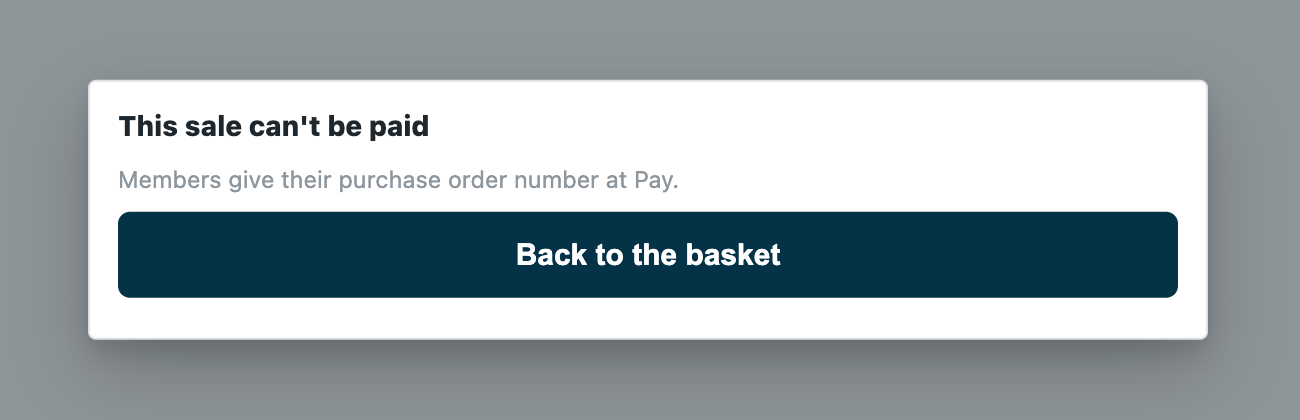
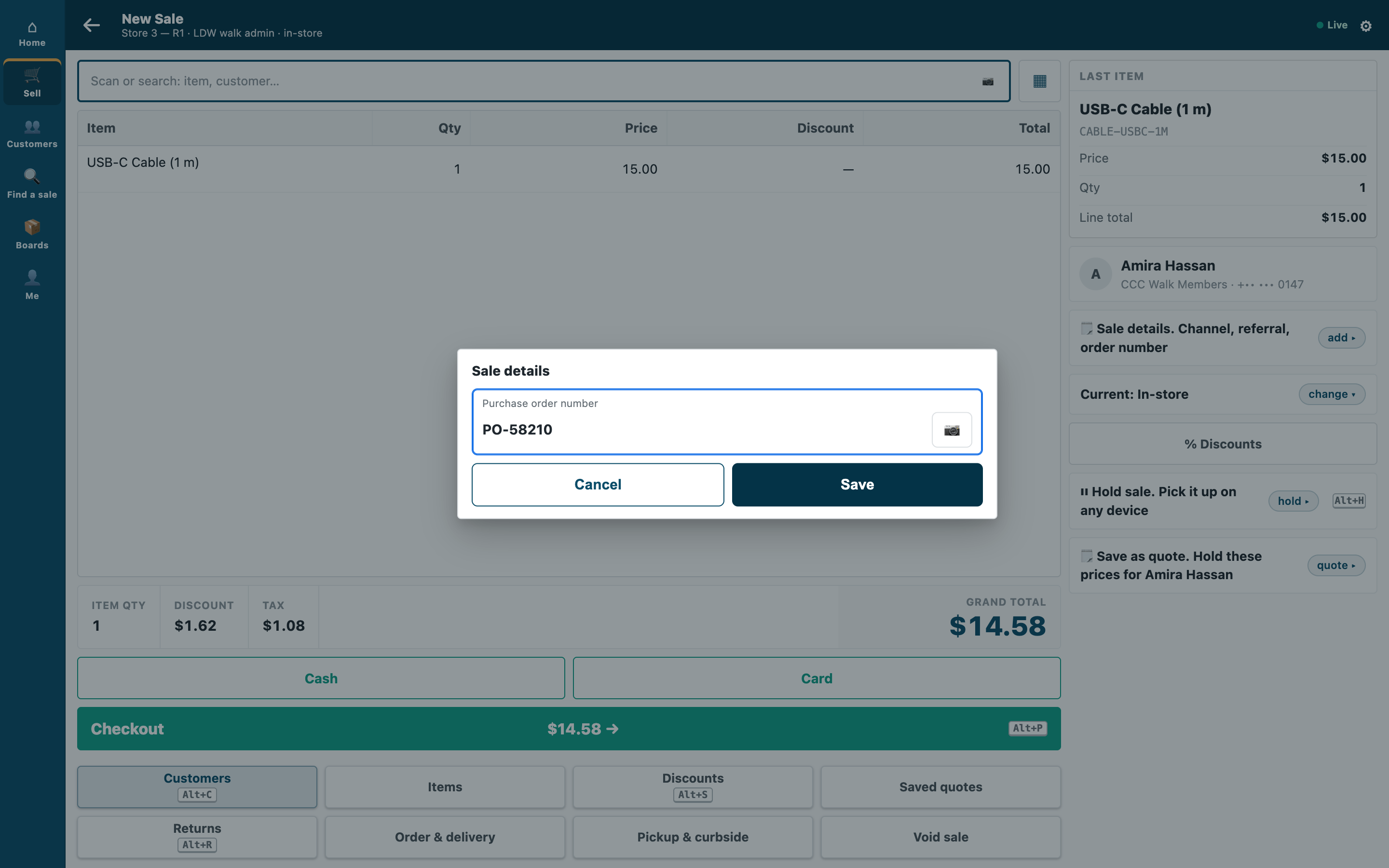
- A sale whose customer's group needs a detail left empty: "This sale can't be paid" and the retailer's sentence, or "Customers in ⟨group⟩ need ⟨details⟩. Fill in the sale's details, then Pay."
- The detail filled, and Pay again: the payment screen as always.
- Any other sale: the payment screen as always. Every refund: the refund choices as always.
Rules
-
Declare the rule record and the check in your manifest (
samples/s50_required_sale_details/manifest.json):- a record type
<PREFIX> Rule, one record per customer group, named by it ("autoname": "field:customer_group", a Link to Customer Group, unique): Switched on, the sale details needed (a Table of<PREFIX> Rule Detail, each a Link to Sale Attribute), the POS Profiles it holds on (a Table of<PREFIX> Rule Profile, each a Link to POS Profile) and the cashier's words (a Data field of at most 140 characters). Neither table is required: no detail is a rule that lets a group off the rule above it, and no POS Profile is every till. Give System Manager the rights to edit it and your integration role read only; name the role<PREFIX> Integration, so the install makes it; - one
checksubscription at your service's address, and that address alone inallowed_urls; - a feed registration naming your one integration user (its description at most 140 characters), so the retailer's Connect again hands that user's key to your service;
- a help address on the rule record type (a
documentationproperty setter). - ⛔ Never declare the sale details themselves as required in a manifest: the install refuses it, because it would stop every sale on every till. The retailer makes them in Sale Attribute, with Required off.
- a record type
-
Choose what happens when your service is down. The sample declares
allow_and_flag: an outage never stops a retailer selling, and the sale is flagged on Sales to review. A retailer that must never take such a sale changes its subscription torefuseafter Connect again has sent your user's key. A key withdrawn or a user disabled (401 or 403) is iVendNext unreadable too: log it apart from an outage. -
Check every call with the check's secret (
<app>:sub:<key>; the sample's key isdetails), and refuse a timestamp more than five minutes from yours. -
Answer a refund at once.
stageis"return"for every refund, the returned items of an exchange and a return without its sale: allow, and read nothing. An exchange's new basket comes asstage: "sale"and is judged, except an exchange rung without its sale when nothing is owed: it comes as"return"with its sold lines (positiveqty_milli). The sample allows it; to judge those lines, answer with a sentence for the refund screen, never then Pay. -
Read the retailer's rules and its group tree at the same time, with your integration user's key, and keep them a minute:
GET /api/resource/<PREFIX> Rulewithfields["name","customer_group","words","details.sale_attribute","profiles.pos_profile"](iVendNext answers one row per detail and POS Profile, a left join: count each detail once),filters[["enabled","=",1]]andlimit_page_length0; andGET /api/resource/Customer Groupwith["name","lft","rgt"]. iVendNext gives your role a plain read on Customer Group; the rule records are the role's own. If either read fails, answer 503 (the down answer applies), never a decision on half the rules. -
Find the rule that decides. The customer's own group's rule; else the nearest group above it with a rule: the groups whose span holds the group's (
lftbelow andrgtabove), the innermost first. No rule up the tree: allow. A rule that names POS Profiles holds only at thepos_profilethe check sends; at any other till, allow. -
Refuse while a needed detail is empty.
sale_attributesholds the sale's details as the cashier filled them,[{"name", "value"}], by the Sale Attribute's name. A detail the rule needs that is absent, empty or only spaces is missing. Answer{"verdict":"refuse","reason":"…"}with the rule's own words or a sentence naming the missing details and what to do, plain text of 1 to 140 characters: cut the list, never the instruction. Nothing missing:{"verdict":"allow"}. -
Tell iVendNext to lock the customer's group. Your rule trusts the group the customer record holds, and the till's edit sheet lets a cashier change it: a customer moved into a group that needs nothing gives nothing. The retailer puts Customer Group at permission level 1 in Customize Form and gives level-1 write only to its managers (Customers by store, rule 7). Put that in the setup, with what follows from it: a cashier can no longer give a new customer a group, and the till still says Customer saved. after a group change it dropped.
Bounds
- A sale only: refunds and an exchange's returned items are not judged; its new items are, as a sale, except an exchange rung without its sale when nothing is owed.
- A detail switched off, or hidden by a field rule, cannot be filled at the till: take it off the rules first.
- An exchange's screen and a sale made from a quote have no place to fill a sale detail today: your refusal there is one the cashier cannot clear. Say so in your guide (fill it on the quote first; refund and ring a new sale), or let those sales through.
- The sale's details, not a line's (
line_attributes): a line rule is your version. - Present, not right: the value's shape is the Sale Attribute's own Regex Pattern.
- One rule per customer group; a customer's own rule is a group of their own.
- Offline, the till does not call your service: the sale is flagged when it syncs, never refused. The check does not run on a park, a layaway deposit, an account collection or the Desk's own POS screen.
- At most three checks answer one POS Profile, ten seconds together.
See also
- Payment method rules: the same service shape and group tree, leaving payment methods out.
- A rule checked before payment: the check's answers and its basket lock.
- The fields page,
contracts/pages/fields.md§7b: a sale detail required on some registers only. - The check before payment's page,
contracts/pages/partner_check.md:sale_attributes, the reasons and the down answers.