
Optical prescriptions and lab orders — the recipe
An optical store keeps each customer's eye prescription, sells lenses against it, and follows the glasses through the lab until the customer collects them. This recipe gives the shop its prescriptions and lab orders as its own records in Desk, with a workflow and a lab job sheet, and one check at the till: a lens line is paid only when the customer has a prescription of that kind in date. It is for an iVendNext Partner, or the CitiXsys Consulting Team, who wants an optical store's back office and its one till rule without code inside the shop.
Reference implementation: samples/s42_optical_prescriptions/.
When to use it. The store sells frames, spectacle lenses and contact lenses, and its optometrists test eyes in the store or the customer brings another practice's prescription. Many markets require a fitted prescription in date before contact lenses are sold, and a store wants the same for prescription spectacle lenses. For a medicine's prescription with fills and a pharmacist, see S39 (Pharmacy counter rules); for an age check, S37.
The four rules, here. No code runs inside the shop. One address is called, your service, and only when the cashier presses Pay. The service reads two fields of a prescription (its kind and Valid until), never a lens value, and writes nothing. It never changes the money: it allows the sale or refuses it in the cashier's words.
What the optometrist, the staff and the cashier see
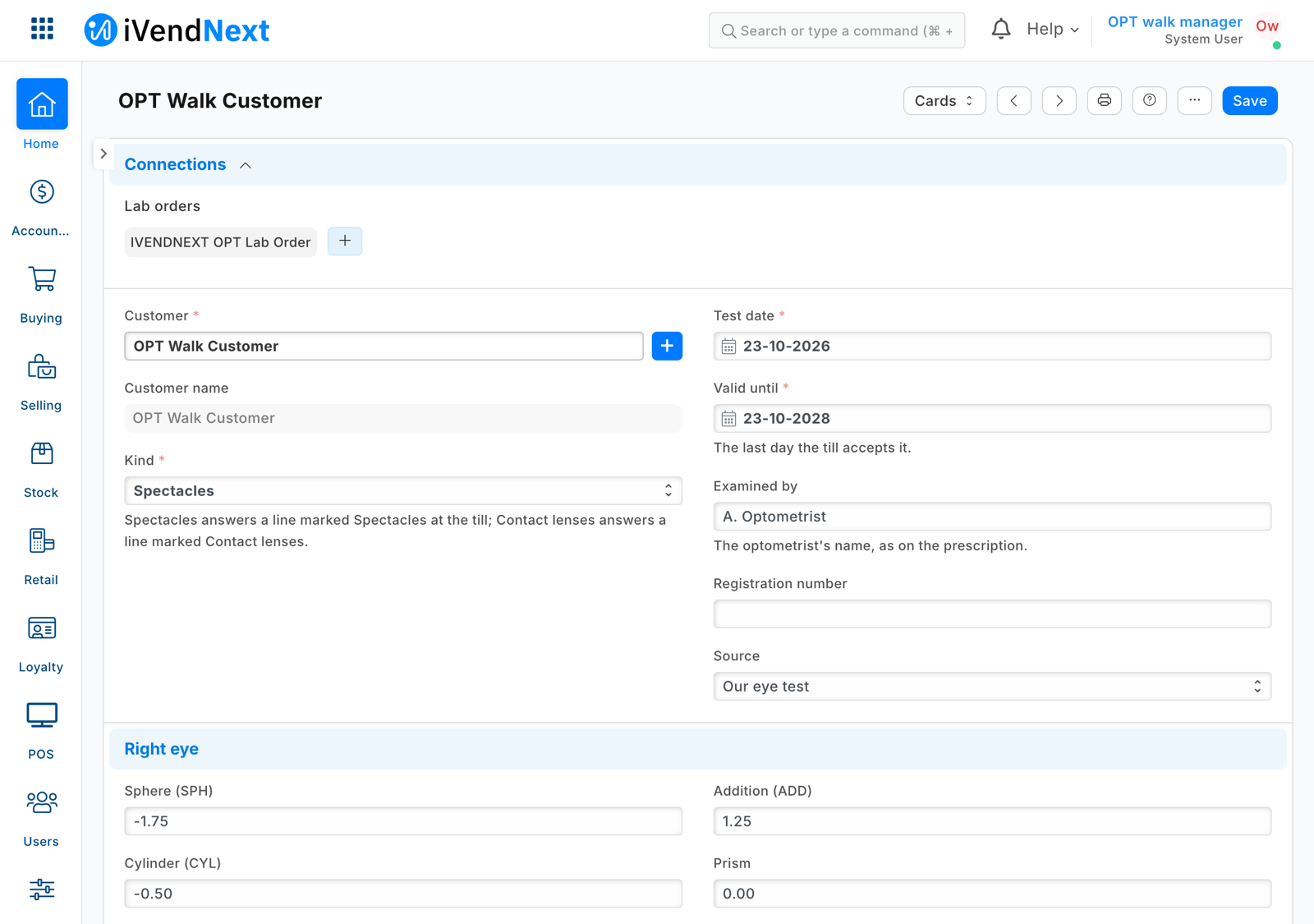
- The optometrist opens Prescription, picks the customer, chooses Spectacles or Contact lenses, and fills the test date, Valid until and each eye's values.
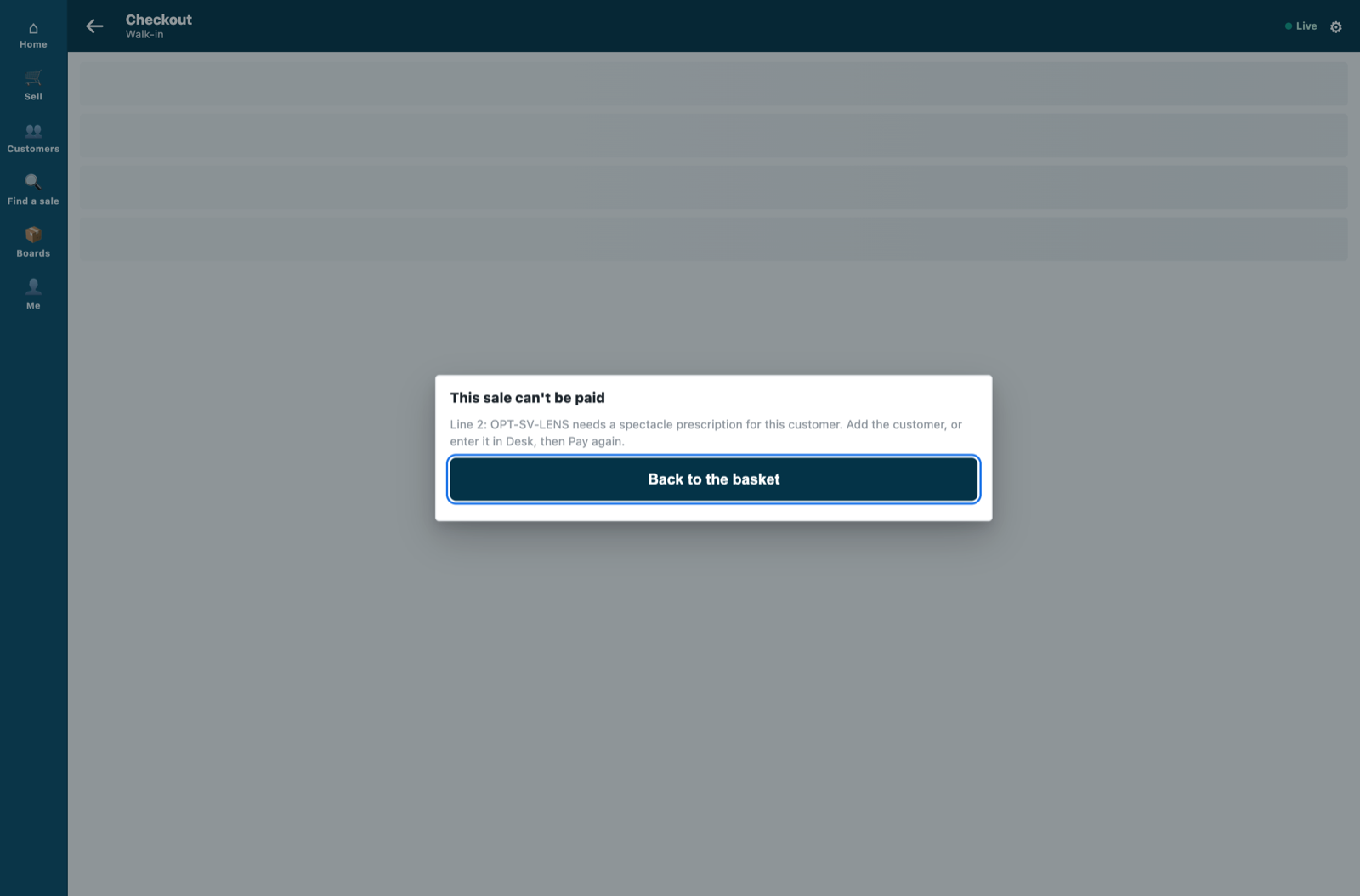
- The cashier rings frames and lenses for the customer and presses Pay. A lens line for a customer with no prescription of its kind in date is refused: "Line 2: SV-LENS needs a spectacle prescription for this customer. Add the customer, or enter it in Desk, then Pay again." One that ran out names its last day: "…: the customer's contact lens prescription ran out on 18 Sep 2026. Enter the new one in Desk, then Pay again." A frame alone, solutions, or plano lenses in a group marked Not needed are never asked.
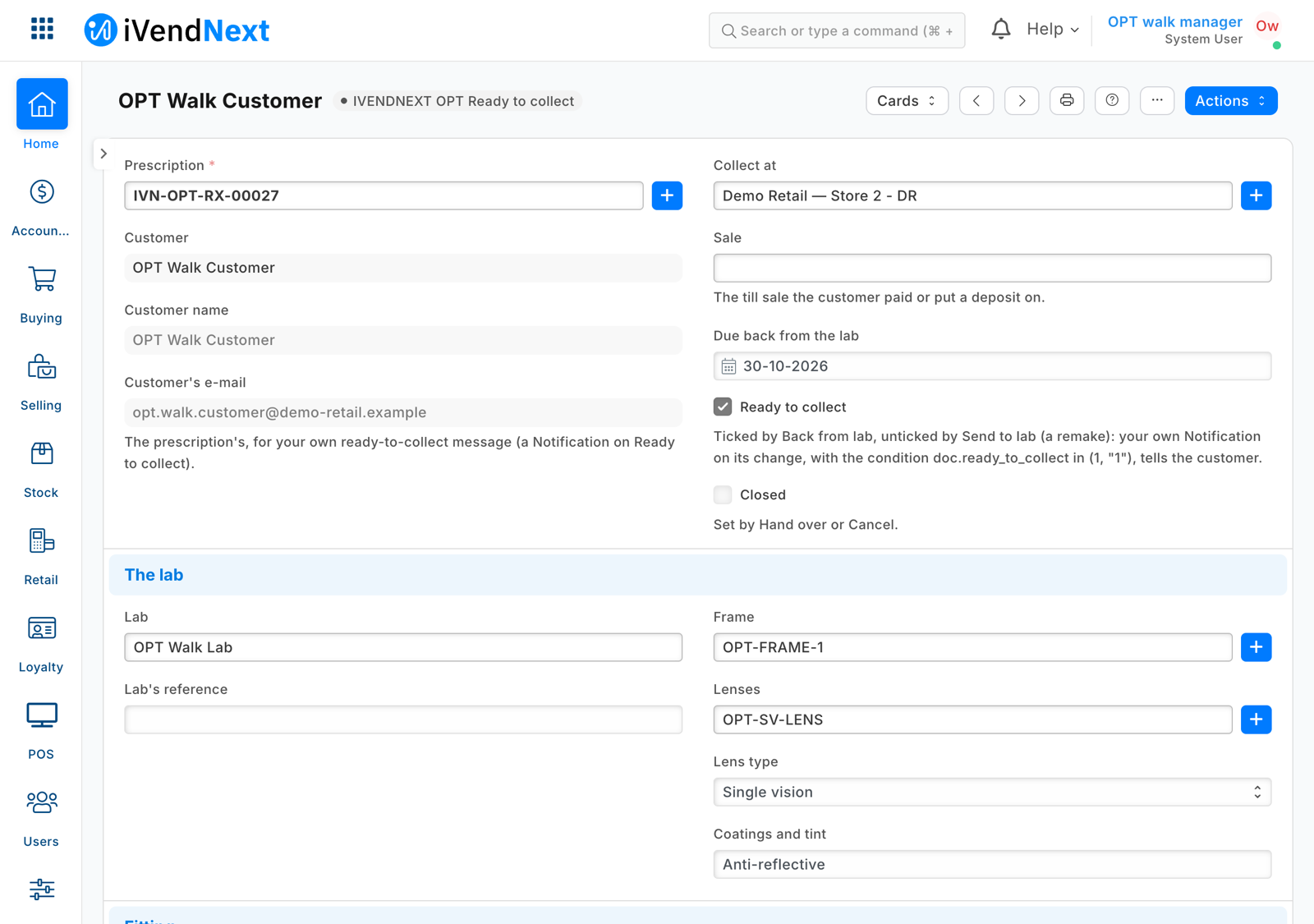
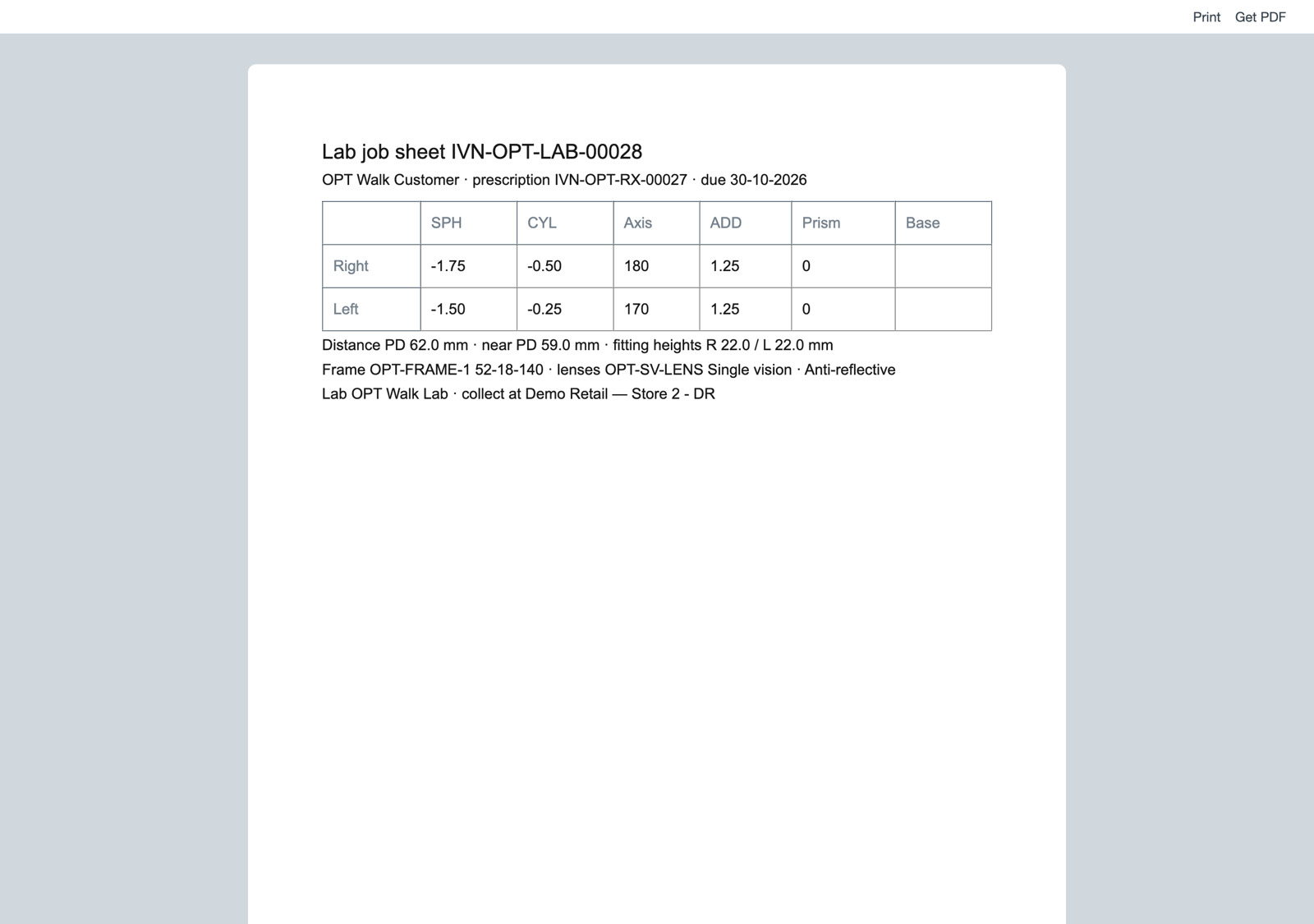
- Staff open Lab Order, choose the prescription (its customer and lens values come with it, read only), and fill the lab, frame, lenses, coatings, fitting heights, the store to collect at, the sale and the due date. They print the job sheet for the lab.
- The order moves by its buttons: Send to lab, Back from lab (Ready to collect is ticked), Hand over (Closed), or Cancel; Send back to lab for a remake. Lab orders to chase lists every open order, the oldest due first.
Prescriptions
A record type of your own, numbered (format:OPT-RX-{#####}), whose required fields are what the till's rule reads:
{"fieldname": "customer", "fieldtype": "Link", "options": "Customer", "reqd": 1},
{"fieldname": "kind", "fieldtype": "Select", "options": "Spectacles\nContact lenses", "reqd": 1},
{"fieldname": "test_date", "fieldtype": "Date", "reqd": 1, "default": "Today"},
{"fieldname": "valid_until", "fieldtype": "Date", "reqd": 1},
{"fieldname": "customer_email", "fieldtype": "Data", "options": "Email", "fetch_from": "customer.email_id"},
{"fieldname": "remind", "fieldtype": "Check", "default": "1"}
then each eye's sphere, cylinder, axis, addition, prism, base and visual acuity, the distances between pupils, a contact lens's base curve and diameter, notes and a scan (an Attach: keep Is Private ticked). Permissions: your optometrist role writes; Sales User reads, reports and prints; your integration role reads. Add a Connections link from Customer (links, group Optical).
Lab orders
A second record type, numbered (format:OPT-LAB-{#####}), linked to its prescription. Copy the customer, the e-mail and the lens values from it with fetch_from: "prescription.<field>" and read_only: 1: the order carries what it prints (the print readers do not serve a package's own record types). Add two read-only ticks the workflow sets, Ready to collect and Closed, because a manifest's notification goes to the shop's own users only (the customer's message is the shop's own Notification on the tick) and a report is installed before the workflow's state field exists:
"workflows": [{"name": "PP OPT Lab Order", "document_type": "PP OPT Lab Order",
  "states": [{"state": "PP OPT Ordered", "allow_edit": "Sales User"},
             {"state": "PP OPT Sent to lab", "allow_edit": "Sales User", "update_field": "ready_to_collect", "update_value": "0"},
             {"state": "PP OPT Ready to collect", "allow_edit": "Sales User", "update_field": "ready_to_collect", "update_value": "1"},
             {"state": "PP OPT Collected", "allow_edit": "System Manager", "update_field": "closed", "update_value": "1"},
             {"state": "PP OPT Cancelled", "allow_edit": "System Manager", "update_field": "closed", "update_value": "1"}],
  "transitions": [
    {"state": "PP OPT Ordered", "action": "PP OPT Send to lab", "next_state": "PP OPT Sent to lab", "allowed": "Sales User", "allow_self_approval": 1},
    {"state": "PP OPT Sent to lab", "action": "PP OPT Back from lab", "next_state": "PP OPT Ready to collect", "allowed": "Sales User", "allow_self_approval": 1},
    {"state": "PP OPT Ready to collect", "action": "PP OPT Hand over", "next_state": "PP OPT Collected", "allowed": "Sales User", "allow_self_approval": 1},
    {"state": "PP OPT Ready to collect", "action": "PP OPT Send back to lab", "next_state": "PP OPT Sent to lab", "allowed": "Sales User", "allow_self_approval": 1},
    {"state": "PP OPT Ordered", "action": "PP OPT Cancel", "next_state": "PP OPT Cancelled", "allowed": "Sales User", "allow_self_approval": 1},
    {"state": "PP OPT Sent to lab", "action": "PP OPT Cancel", "next_state": "PP OPT Cancelled", "allowed": "Sales User", "allow_self_approval": 1},
    {"state": "PP OPT Ready to collect", "action": "PP OPT Cancel", "next_state": "PP OPT Cancelled", "allowed": "Sales User", "allow_self_approval": 1}]}]
- Sent to lab unticks Ready to collect, so a remake (Send back to lab) is told again when it is back; Cancel closes an order at any step before Collected, one the customer never collects included.
allow_self_approval: 1lets whoever made the order move it (the installer writes 0 when it is left out).- A report on
closed = 0lists the open orders. ⚠ Never markclosed(or any field a report filters on)in_standard_filter: Desk moves a saved filter on a standard-filter field into that field, and an unticked tick filters nothing, so the report lists closed orders too (measured). - A print format of your own is the job sheet: print each value with
doc.get_formatted("<field>"), so-0.50prints as the lab reads it. - A state's who may edit is a screen rule: over the record API anyone with write can change an order in any state.
- The states and actions carry your prefix (PP OPT Send to lab): they are site-wide records your install and uninstall own by it.
Settings
A settings record type whose record Default holds the shop's hours from UTC: the shop's own day decides whether a prescription is still in date.
Steps
-
Add the records above, and a mark on Item Group and Item:
{"dt": "Item Group", "fieldname": "pp_opt_needs", "fieldtype": "Select", "label": "Sold against a prescription",
 "options": "\nSpectacles\nContact lenses\nNot needed", "insert_after": "parent_item_group"}
An item's mark is its own, else its template's (a variant does not inherit a field its template gained later), else the nearest group above it with one; Not needed frees it.
-
Add the check before payment (rule guard recipe), and a feed registration for the app's user (switched off):
"extension_subscriptions": [{"key": "check", "point": "check", "label": "Prescription check", "endpoint_url": "https://your-service.example/opt/check", "timeout_seconds": 3, "down_answer": "allow_and_flag"}] -
Write the service (
samples/s42_optical_prescriptions/optical.pyandservice/app.py, standard library). For each check:- check the signature (the subscription's secret);
- a refund that sells nothing is allowed at once;
- read, with the app's user: the settings Default, the item groups with their mark (
lft,rgt), the sold items' own marks and their templates — kept a minute; - if no sold line is marked, allow without reading a prescription;
- otherwise read the sale customer's prescriptions with
fields=["kind","valid_until"]andfilters=[["customer","=",…]], never kept; a record without those two fields (a bare select right) is a 503, never a refusal, and so is an item or group answered without its mark; - refuse the first marked line whose kind has no prescription valid until the shop's today or later (not the test date: Desk stamps it by the site's time zone, so a bound on it could refuse this morning's eye test), naming the last day one ran out if it did; sentences at most 140 characters.
-
Check it before the shop:
python3 tools/check/check.py samples/s42_optical_prescriptions.
What the shop does
- Install the app. The check comes in switched off. The install adds the records, the mark, the workflow, the job sheet, the report and the roles.
- Give the optometrist role and Sales User to whoever writes prescriptions (Sales User reads customers for the picker and holds the lab order's buttons); store staff keep Sales User. Whoever chooses a lab order's Lab (a supplier) also needs a role that can see suppliers, such as Stock User or Purchase User.
- Give the app a user, as in the integration user recipe: its integration role alone, its API key, and in Role Permissions a plain Read on Item Group and Item. Choose the user on the app's feed; a hosted service: press Connect again.
- Fill in the settings (Default: hours from UTC) and mark the lens item groups.
- Switch the check on in Retail Extension Subscription for the optical stores' POS Profiles (read what it is sent, tick the consent).
- Tell customers, with the shop's own Notifications (a manifest may only notify the shop's own users; a shop's own Notification may carry a condition): Lab Order, Value Change on Ready to collect, condition
doc.ready_to_collect in (1, "1")(the workflow writes the tick as text,"0"or"1", so a baredoc.ready_to_collectalso fires on the remake's untick), to Customer's e-mail; Prescription, Days Before Valid until (30 days), conditiondoc.remind, to Customer's e-mail. The e-mail is filled from the customer whenever it is empty, so untick a prescription's E-mail reminders to send it none; the SMS channel works the same way through the shop's SMS gateway.
Limits
- Answered at Pay, not when the line is entered; a sale made in Desk, on the Desk POS screen or through the API is not checked.
- One check of three on a POS Profile, 10 seconds together.
- When the service is down, the sale is paid and flagged for review (
allow_and_flag); offline, the same. - A lab order's copied values are its prescription's at the order's last save.
- A newer eye test does not stop the older prescription's reminder: untick the older one's E-mail reminders.
- An insurer's or optical plan's share of the payment is the POS board's payer split (
PB-8), not this recipe's. - One customer record, one person's prescriptions: the check passes a line on any prescription of the sale's customer, so a family sharing one record shares its prescriptions. Never enter a prescription on your walk-in customer: every walk-in sale would pass.
- One time zone per site: Hours from UTC holds for every store of the site.
Technical notes
What the service is sent and reads
- Each Pay, and each refund the till pays, sends the priced basket: lines with their item groups, totals, store, till, the cashier's user, the customer and the sale's details. The consent the System Manager reads lists exactly these.
- The service reads the settings, the item groups' and the items' marks, and the customer's prescriptions' kind and Valid until; it writes nothing and keeps nothing about a prescription. The app's user holds a read on the prescription record type, so its key could read a whole prescription: the service asks for two fields, and the card says so. That a customer has a spectacle or contact lens prescription, and until when, is health-related personal data: say so on the card, and host the service where the shop's rules allow.
Needs this serves
- Contact lenses and prescription spectacle lenses are sold only to a customer whose eye prescription is on file and still valid — Ready, with limits (5)
- Optical lab orders tracked in iVendNext and sent to the lab — Ready, with limits (3)