
S62 — Liquor excise returns (pp_exr): excise figures from your stock, kept as filed
Start from this sample: python3 tools/manifest/start.py s62_liquor_excise_returns --prefix "ACME EXR" copies it into apps/ of your repository under your own prefix (your company's first word, then a short name for the app) and checks it (how).
A liquor store files an excise return every month or quarter: what it held and what moved, in volume, by duty class (spirits, wine, beer …), and often the volume of pure alcohol too. The app works those figures out from the retailer's own stock: per store and period, for each duty class, the opening stock, what came in, what went out, what stock counts changed and the closing stock, each in units, volume and pure alcohol. A filed return is kept as filed: its figures are locked.
When to use it: the retailer sells alcohol and reports volumes to an excise or licensing authority. The authority's own form, its codes and duty rates differ by country and state: they are the partner's version, built on these figures.
What happens
| When | What happens |
|---|---|
| Set-up | The retailer makes its duty classes once (Spirits, Wine, Beer …, each with the authority's code if it has one), and on each liquor item its Duty class, Millilitres per stock unit (750 for a 750 ml bottle; 9000 for a case of twelve kept in cases) and Alcohol by volume |
| A sale, a receipt, a transfer, a count | Nothing new: the till, Desk and the stock screens work as before. The app reads what iVendNext booked |
| The back office opens a return | The company, the store (its warehouse), From, To and Volumes in (Litres or US gallons), saved as a draft numbered EXR-R-00001. All five are set once, so the lines the service writes are always of the return's own store, period and unit |
| Work out the return is pressed (Stock User, Stock Manager) | The service reads the store's stock ledger and writes twelve lines per duty class: Opening stock, Received from suppliers, Transferred in, Returned by customers, Other in, Sold, Transferred out, Returned to suppliers, Written off, Other out, Count difference and Closing stock, each in units, volume and pure alcohol. A summary says what was sold, the closing stock, what counts changed and any item missing its millilitres or strength. Pressing again replaces the lines with the books as they are now |
| The worksheet | Print, PP EXR Excise return worksheet: one table per duty class under the retailer's letter head, the authority's code beside the class |
| Filed | The Stock Manager files the figures with the authority and moves the return to Filed (the workflow's File, the Stock Manager's alone), then fills Filed on and the authority's reference. The lock keeps the store, the period and every figure as filed |
| A correction | A new return for the same period. A filed return never changes. A draft that is not wanted (a wrong period, a copy) is put aside with Actions, PP EXR Drop (Stock User): a dropped return is locked too |
| The service down | The button's own words: did not answer in time. Check the record before you try again. Nothing is written |
| What the back office sees (on a demo site, 2026-10-31) | |
|---|---|
| What the install will change, read before you consent | 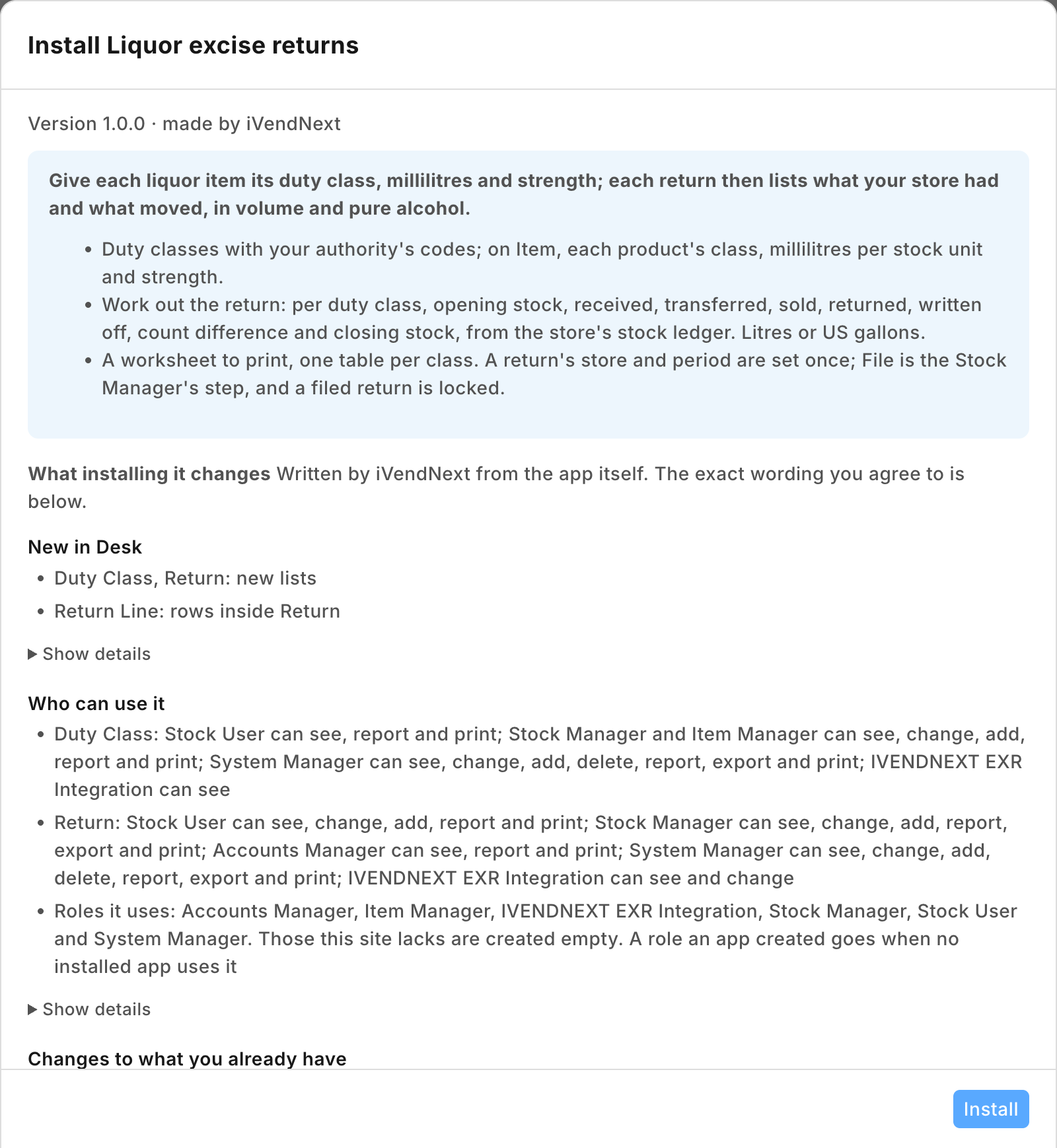 |
| A liquor item's duty class, millilitres and strength | 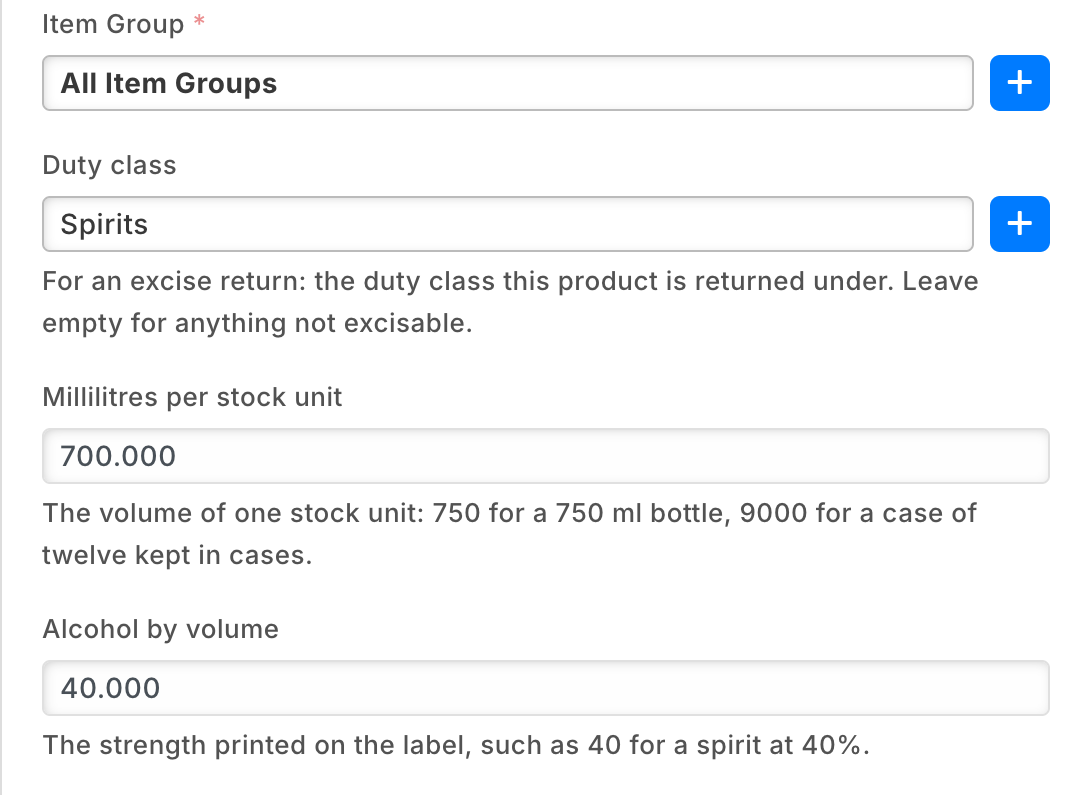 |
| A return worked out: the summary and the first duty class's lines | 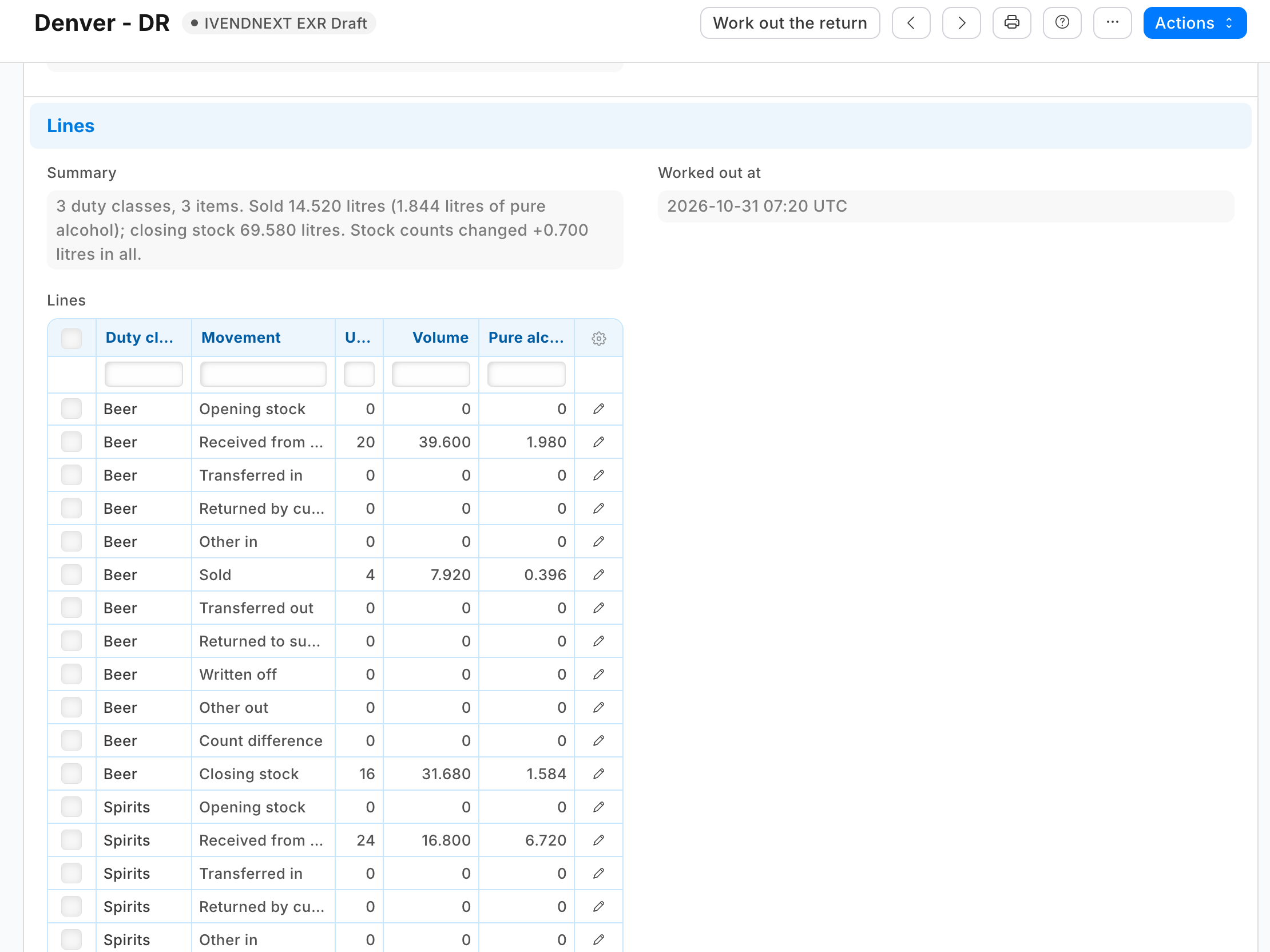 |
| A filed return's worksheet: one table per duty class, the authority's code beside it | 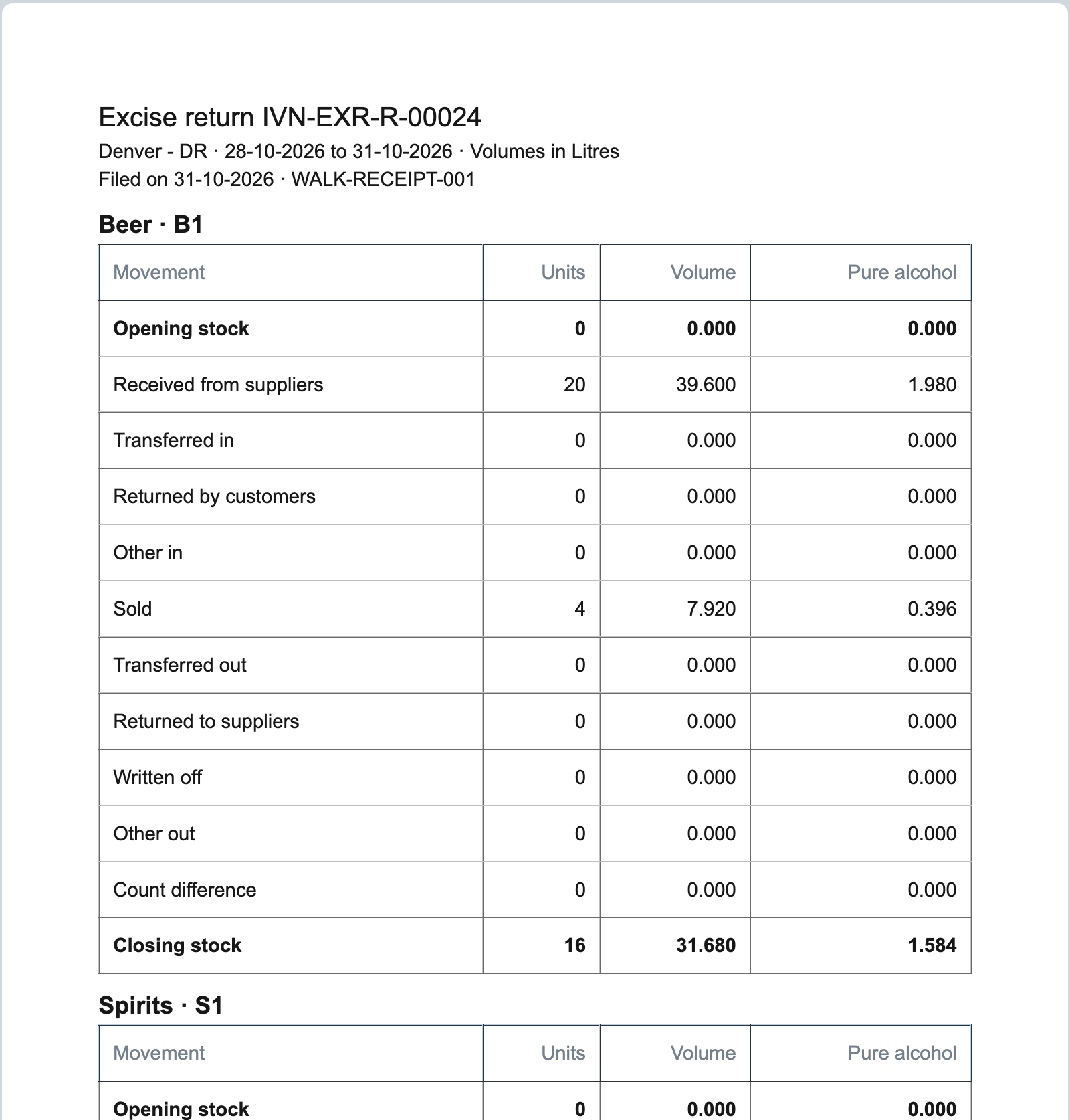 |
What iVendNext does
- Install the app from the App library (or paste its manifest into Retail Extension Package in Desk), read what it will do and consent. It comes in switched off: its service has no consent and is off, its button is off, and its lock rule is off. The install adds the record types PP EXR Duty Class and PP EXR Return (with its table of lines), three fields on Item, the workflow PP EXR Return, the lock rule and the print PP EXR Excise return worksheet, and makes the role PP EXR Integration and the app's own user,
pp_exr@integration.invalid, with that role alone (API only, never Desk; give it no User Permissions). - Switch the lock on: Retail Save Rule, the rule PP EXR return locked once filed: switch it on. Work out the return refuses while it is off.
- Give the app's role its reads: in Role Permissions Manager, give PP EXR Integration Read on Stock Ledger Entry, Stock Entry, Item and Retail Save Rule. The install gives it its rights on the app's own record types. A service for one retailer: press Generate Keys on the app's user (User, API Access) and put the key in the service's settings. A service for many retailers is handed the key by the retailer's site itself; press Connect again on the app's record only if the site could not reach the app, or a key was lost or changed.
- Switch the service and the button on: Retail Extension Subscription, Liquor excise returns work out: read what it is sent, tick the consent, switch it on. Then Retail Desk Action, Work out the return: switch it on.
- Classes and items: make the duty classes your authority uses, then fill the three fields on each liquor item (the Item list filters by Duty class). An item with no duty class is left out of every return.
- Who does what: Stock Users make returns, work them out and drop a draft not wanted; the Stock Manager files them. Accounts Managers may read and print them. A draft is the Stock User's to edit (the workflow shows it read only to anyone else): a manager who also makes returns holds Stock User too. A filed return is the Stock Manager's, for Filed on and the reference.
- Test it: a duty class Spirits, one item at 700 ml and 40%, ten in stock at the start of the month, three sold at the till: work out that month's return. Sold: 3 units, 2.100 litres, 0.840 litres of pure alcohol.
Where it shows. In Desk: the duty classes and returns, the button on a draft return, the worksheet to print, and on Item the three fields under the item group. At the till: nothing new.
What leaves the retailer's iVendNext. On each press, the retailer's server sends the service the pressing user's login and language and the return's name. The service then reads, with the app's user's key: the return (its company, store, period and unit), the lock rule's state, the duty classes and their codes, the items that have a duty class (code, name, class, millilitres, strength), and from the store's stock ledger only totals and balances: each item's last ledger time before the period and at its end, the rows at those times (their balance), the period's totals per item and voucher type, the Stock Entries' net movement per item, and those entries' purpose. No customer, no price and no money. It writes the return. It keeps nothing of a call. A hosted copy holds each retailer's press secret and the API key of the app's user until the retailer removes the app. Say so on your card.
The files
| File | What it is |
|---|---|
manifest.json |
the record types PP EXR Duty Class (named by the class) and PP EXR Return (EXR-R-#####) with its table PP EXR Return Line (read only: the service writes it); the fields pp_exr_class, pp_exr_ml and pp_exr_abv on Item; the workflow (Draft, Filed, Dropped; File allowed to the Stock Manager, Drop to the Stock User); the lock rule; the worksheet; two help addresses; a feed registration (it names the app's integration user); one desk_action service and its button; installed switched off |
exr.py |
the pure core: the press's signature (verify) and return (return_of), the period (period), an item's measures (item_of), each item's balance from its last ledger row (last_balances), where a movement goes (kind_of), the lines (work_out), the summary (summary_of) and the answer (message) |
service/app.py |
the service, standard library only: POST /exr/work (the press), GET /health, and the app template's handshake for many retailers; one handle answers the web server and the function entry (lambda_handler) alike |
app.json |
the settings file for hosting ("runs": "function": on CitiXsys hosting it is a function, paid per call) |
tests/ |
the core's rules; the service against a stand-in iVendNext (fakeshop.py, a stock ledger that keeps its balances as iVendNext does) with signed presses, one retailer and many; iVendNext's record API over the wire; the manifest, with the kit's checker; canaries.py breaks each guarded rule and expects its test to fail |
Run it
python3 -m unittest discover -s samples/s62_liquor_excise_returns/tests -p 'test_*.py'
python3 samples/s62_liquor_excise_returns/tests/canaries.py
python3 samples/s62_liquor_excise_returns/service/app.py samples/s62_liquor_excise_returns/service/.env.local
Settings, one retailer (service/.env.local, never committed): PP_BASE (the retailer's iVendNext address), PP_KEY and PP_SECRET (the integration user's API key and secret), PP_WORK_SECRET (handed back at install as pp_exr:sub:work), PP_PORT (8162). EXR_PREFIX names the record types and fields (default PP EXR).
Before you install: every host.docker.internal address in manifest.json (in allowed_urls, and where the manifest calls it) is our test bench's own address for the sample's service, and it resolves only where Docker provides it. Replace it with your own service's address first, or iVendNext's presses never reach your service; if this manifest is already installed, raise its version and install it again (the manifest recipe, step 6).
Many retailers, hosted
The service is the app template's shape: set IVN_LIBRARY_APP and a store (IVN_SHOPS_TABLE on CitiXsys hosting; IVN_SHOPS_FILE is for the tests and a laptop: a retailer's site names itself and connects by itself only to an app on *.ivendnext.app, so a partner's own server runs one retailer). Each retailer connects itself after its install and hands over the press's secret and the key of the app's own user (Connect again is only for when the site could not reach the app, or a key was lost or changed). Until the key arrives a press is answered in words. Every press names its retailer's iVendNext (X-iVendNext-Site), so each retailer is read and written with its own key.
Make it your own
What a partner usually changes:
- the authority's form: a print in the authority's own layout and order, its line codes, a brand-by-brand or size-by-size schedule, or a file the authority's portal takes;
- the duty: a rate per class or strength band and the duty owed, worked out from these volumes;
- more classes of goods: tobacco by stick or weight, or sugar-sweetened drinks by litre, with the item's own measure in place of millilitres and strength;
- the period: a return per month for every store at once, made by one press;
- the prefix:
tools/manifest/rename.pymakes your copy under your own reserved prefix in one step; the service takes its prefix fromEXR_PREFIX; - its records:
tools/deploy/copy_records.pymoves the duty classes and returns between a test site and the retailer's iVendNext.
Before you copy it
- The figures are the retailer's own books. The service reads what iVendNext booked in the store's stock ledger and never counts stock itself. It reads totals, never a row per sale, so a month of a busy store is one press.
- Counts are worked out by difference. A stock count writes its ledger row with a quantity of 0 and sets the balance directly, so no sum of quantities sees it. The opening and closing stock are each item's balance from its last ledger row, and Count difference is what is left: the closing less the opening and every other line.
- The books as they stand when it is worked out. A back-dated entry (a receipt or count dated in an earlier period) changes the earlier books, not a filed return: the next return's opening then differs from this one's closing by it. A till's sales reach the books as the company's till posting setting says (below), so a till that syncs late may count its sales in a later period. The worksheet prints when it was worked out.
- When a till's sales are dated depends on the company's till posting setting. Where the company posts the till's sales when the day is closed (one invoice per sale, or one for the day), they reach the stock ledger dated at the day's closing: a last day of the period closed after midnight puts that day's sales, and the stock they took, into the next period, so close each till's last day of the period before midnight. Where the company posts each sale as it is made, and for a sale on account or one delivered later, the sale carries its own date.
- Kept as filed. A return's store, period and unit are set once, so the lines the service writes are always of that period (the lines are read only on the form; a person with write on returns could still write them over the record API before File); the lock keeps every figure of a filed return; only a System Manager can switch it off or delete a return.
- A press, not a schedule. A return is worked out when someone presses, one store and one period at a time.
Technical notes
Why it is built this way
| Option | Cost | Verdict |
|---|---|---|
| Do nothing: iVendNext's Stock Balance report in litres (a Litre unit on each item) | 0 | no split by kind of movement, no pure alcohol, no class totals; a queued report; nothing kept as filed |
| A manifest only: a return record and a print that adds up the ledger as it prints | half a day | the figures change after filing; thousands of ledger rows read in a print |
| A container on the event feed keeping running totals per class | two days, and a container's monthly cost | a standing process for a sum made monthly; counts and back-dated entries need the ledger anyway |
| A press that reads the store's ledger totals and writes the return; a workflow whose File step the Stock Manager takes; a lock on a filed return | about 720 lines of core and service with their docstrings, and about 1,000 of tests | picked: kit doors only, a function paid per call; S44's press, S58's workflow and lock |
The answer, exactly
- The press's reads, each with its own timeout inside the press's 7 seconds, all with
limit_page_length0:GET /api/resource/<prefix> Return/<return>;Retail Save Rulewithfields["name","enabled","mode"]for the lock (off: refused, nothing else read);<prefix> Duty Classwithfields["name","return_code"];Itemwithfields["name","item_name","<field prefix>class","<field prefix>ml","<field prefix>abv"]andfilters[["<field prefix>class","is","set"]]; then onStock Ledger Entry, every read filtered to the store'swarehouseandis_cancelled0:["item_code","max(posting_datetime) as last_at"]grouped byitem_codebefore the period's start, and the same before the period's end, then the rows at both ends' times in one pass (posting_datetimein them, about 2,000 bytes of times a read, about 50, four reads at a time) for theirqty_after_transaction; the period's["item_code","voucher_type","sum(actual_qty) as qty"]grouped byitem_code, voucher_typeforactual_qtyabove 0 and below 0, Stock Entry and Stock Reconciliation left out;["item_code","voucher_no","sum(actual_qty) as qty"]grouped byitem_code, voucher_nofor Stock Entries; andStock Entrywithfields["name","purpose"]for those entries. For a store of fewer than about 50 liquor items: eleven reads. - The period runs from
<From> 00:00:00up to, not including, the day after To at00:00:00, onposting_datetime, at most 366 days. - A balance is the last ledger row's
qty_after_transactionat the item's lastposting_datetime, the last bycreationamong rows at that time: iVendNext's own order. - Where a movement goes: Sales Invoice, POS Invoice and Delivery Note out Sold, in Returned by customers; Purchase Receipt and Purchase Invoice in Received from suppliers, out Returned to suppliers; a Stock Entry by its purpose and its net movement in the store: Material Transfer in or out Transferred, Material Receipt in Received from suppliers, Material Issue out Written off; anything else Other in or Other out. The till's day reaches the ledger as the day's combined Sales Invoice.
- The figures: units are stock units; volume is units times the item's millilitres over 1,000, in US gallons divided by 3.785411784; pure alcohol is volume times strength. Each line is summed unrounded and rounded once to 3 places, half away from zero.
- The write: one
PUT /api/resource/<prefix> Return/<return>withlines,summary,worked_out_by,worked_out_at(the service's clock, UTC) and the return'smodifiedas read. An edit made meanwhile refuses the write (the return was changed while this press read it).
Bounds, stated
- An item missing its millilitres or strength is counted in units and left out of the volume or the pure alcohol, and the summary names it. An item variant does not take the three fields from its template: fill them on each variant that holds stock.
- Internal (inter-company) deliveries and receipts made with a delivery note, sales invoice, purchase receipt or purchase invoice to an internal customer or from an internal supplier count as Sold, Returned by customers, Received from suppliers or Returned to suppliers, by their document type; a transfer between your own stores is a Stock Entry and counts as Transferred. A Material Receipt counts as Received from suppliers (stock taken in without a supplier document, such as from an ERP that keeps the purchasing).
- Units add each item's own stock unit: a class holding both bottles and cases adds both. US gallons are gallons of volume and of pure alcohol; a US proof gallon is twice a pure-alcohol gallon.
- Rounding: each line is rounded once; the Count difference is what is left of the rounded lines, so every printed column adds up, and a period with no count can show a count difference of a few thousandths (at most about 0.005) from rounding alone; the summary names a count only when an item's count changed.
- A store of another company is read by its warehouse: the return's company is the company named on it.
- Two returns for one store and period are not stopped or linked: a correction is a new return, and the filing reference tells the filed one from the draft.
- An item moved to another duty class takes its whole stock with it on the next return, with no line of its own: the old class's next opening then differs from its last closing.
- A period not yet over (To today or later) is worked out from the books so far; file it after the period's last day is closed.
- A licensed premises over several warehouses is one return per warehouse: a group of warehouses is refused, and moves between them are transfers.
- A count on an item with no millilitres says Stock counts changed +0.000 litres in all: its units changed, its volume is not known.
- Every item the store ever held is read for its last ledger time, liquor or not, and every item at a shared time (a day's combined invoice): a supermarket that also sells liquor reads more than its liquor items.
- A return with no lines can be filed: a workflow step cannot ask for lines (a manifest refuses a transition condition), so the manager checks the lines before File.
- A replayed press: the press's signature holds for five minutes; a copy of a press sent again within them works the same draft out again from the books as they are then (a draft only: a filed return refuses it, and an edit made meanwhile refuses the write).
- The key used: for many retailers, the service reads with the first user key the retailer's site handed over at connect (today the app's own user's, the only one it hands over), as the app template does.
- A count and a movement at the same second are not told apart: the count difference is what is left, so the sum stands.
- An item's class, millilitres and strength are read at the press; a change shows only on a return worked out after it.
- A store with very many liquor items makes the press read more: the rows at each item's last time, about 50 times a read, four reads at a time (2,000 items: about 40 reads). A shorter period does not shorten it. Past the press's 7 seconds it writes nothing and says did not answer in time; the ceiling on a hosted site is not measured beyond the items the walk used.
- The app's user must hold no User Permission: one on Item, Warehouse or Company silently narrows what it reads, so a return would leave items out without a word (one that hides the whole store is refused).
- The write after the reads: the one write takes up to 3 seconds of its own after the 7, so a slow press can land after the button has said it did not answer in time: check the record before pressing again.
- Inventory dimensions: the balance read is the item's in the warehouse; a site that splits stock by its own dimensions reads the warehouse's total.
- Where it runs: the App library's copy runs in CitiXsys hosting's US region. The first press after a quiet spell starts the function (1 to 2.5 seconds, measured on earlier apps), inside the button's 10.
- It logs one line per call: the route, the status and the milliseconds, never a body or a key.