
S61 — Consignment payouts (pp_csg): each consignor's share of what sold, paid once
Start from this sample: python3 tools/manifest/start.py s61_consignment_payouts --prefix "ACME CON" copies it into apps/ of your repository under your own prefix (your company's first word, then a short name for the app) and checks it (how).
A resale or consignment store sells pieces it does not own. Each piece belongs to a consignor, who is owed an agreed share of what it sold for. Once a month, or when the consignor asks, someone adds up what sold, takes off what came back, works out the share and pays it. The app keeps the consignors, names the consignor on each item, and works each payout out from the retailer's own till sales and Desk invoices. Each sold line is paid once: a line on a payout is never put on another, and a payout is marked paid only after the app's service has checked every line again.
When to use it: the retailer sells goods on consignment (second-hand clothing, furniture, books, collectables, luxury resale) and pays consignors a share of each sale.
What happens
| When | What happens |
|---|---|
| Intake | A consignor is made once: a name, phone, e-mail, the share (a percent of what each piece sells for, after discounts and before tax) and Consigned since (today unless changed): no sale before it is ever theirs, even of an item named to them later. Each item taken in names its consignor, and its own share where it differs |
| A piece is sold | Nothing new at the till: the sale is an ordinary till sale or Desk invoice |
| The back office makes a payout | The consignor, the company and Sales up to (today by default), saved as a draft |
| Work out the payout is pressed (Accounts User, Accounts Manager) | The service reads the consignor's items and every submitted till sale and Desk invoice of them in the company from Consigned since up to the date, and writes one line per sold line no other payout holds: the date, the item, Sold for, the share, the consignor's part. A return's line is negative. A summary says how many lines, what they sold for and the consignor's share |
| The lines | At most 500, oldest first; the rest wait for the next payout. Pressing again replaces them with what is owed now |
| The consignor is paid | The back office pays them your way and fills Paid with, Paid on and the reference: a draft is the Accounts User's to edit (the workflow shows it read only to anyone else) |
| Pay this payout is pressed (Accounts Manager) | Only once Paid with and Paid on are filled. The service reads everything again and checks: each line is still exactly what is owed (the same sale, item, amount, share and part), no other payout that is not cancelled holds it, the total is their sum and not below zero, and the payout lock is on. Then it moves the payout to Paid and records who pressed. Anything else is said in words and nothing changes |
| A paid payout | Locked by the save rule: its lines, totals and payment details cannot change. Pay also counts its lines (Lines paid): if a paid payout's lines are ever changed (the lock switched off, or deleted by a System Manager), every later work-out and pay of that consignor refuses and names it, until it is put back |
| A payout's consignor or company | Set once: a wrong one is dropped (Actions, Drop) and made again |
| A paid payout that was never really paid | Its workflow's Cancel (Accounts Manager) moves it to Cancelled: its lines come onto the next payout |
| A sale cancelled after its payout was paid | The next payout settles it once by what the consignor was paid on it: a negative line Taken back. If the payout that paid it is cancelled afterwards, a later payout gives the take-back back as a Correction |
| Returns larger than sales | The payout's total is below zero: Pay refuses. When more has sold, set Sales up to later and work it out again |
| A second draft for the same consignor | Work out and Pay refuse while another draft of theirs exists: a consignor has one draft payout at a time, so a forgotten draft can never hide lines from the next |
| A copied payout (Desk's Duplicate) | A second draft for the consignor: both refuse Pay until one is dropped (Actions, Drop) |
| The service down | The button's own words: did not answer in time. Check the record before you try again. Nothing is written |
| What the back office sees (on a demo site, 2026-10-30) | |
|---|---|
| What the install will change, read before you consent | 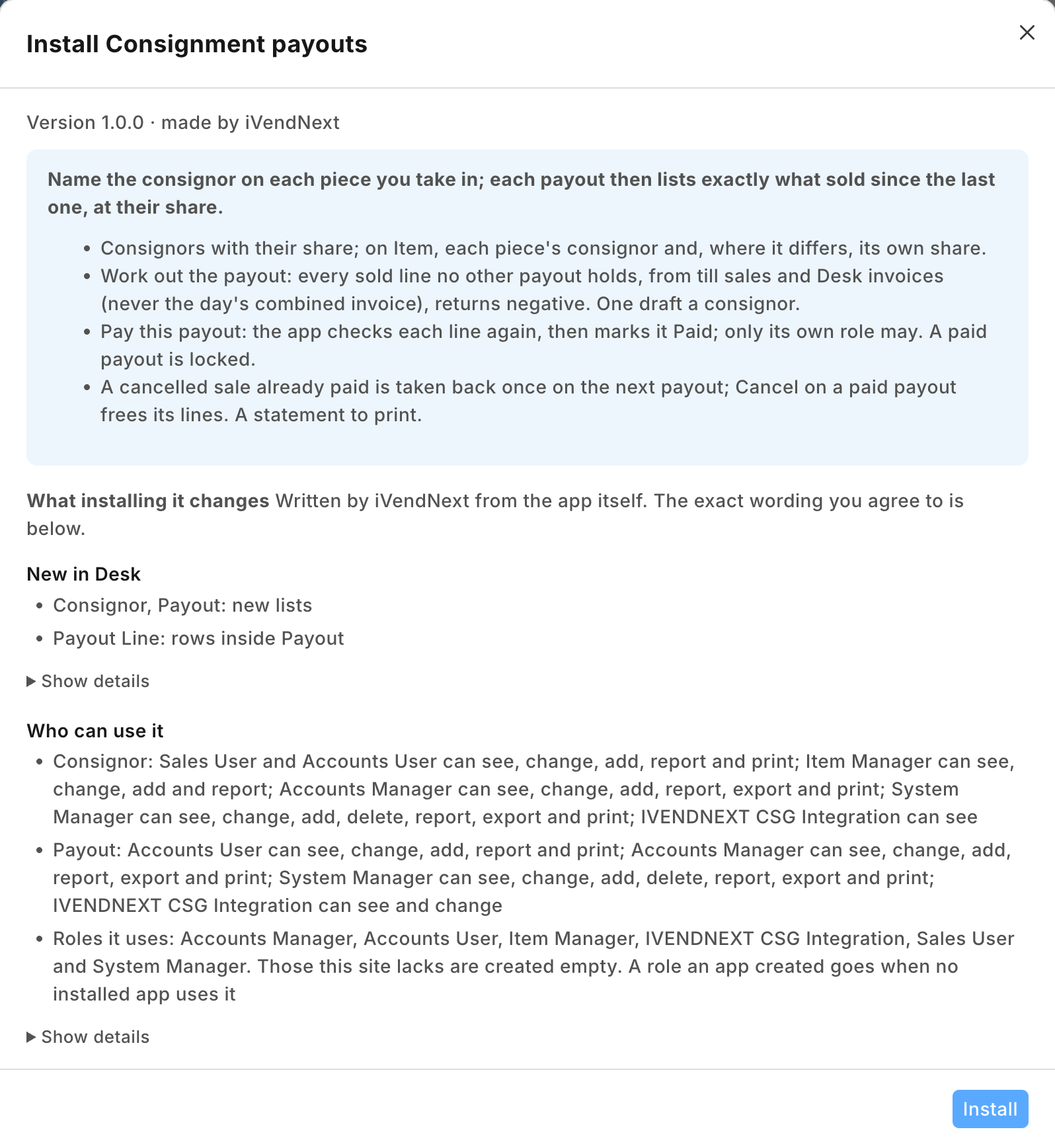 |
| A consignor: her share and the day her consignment began | 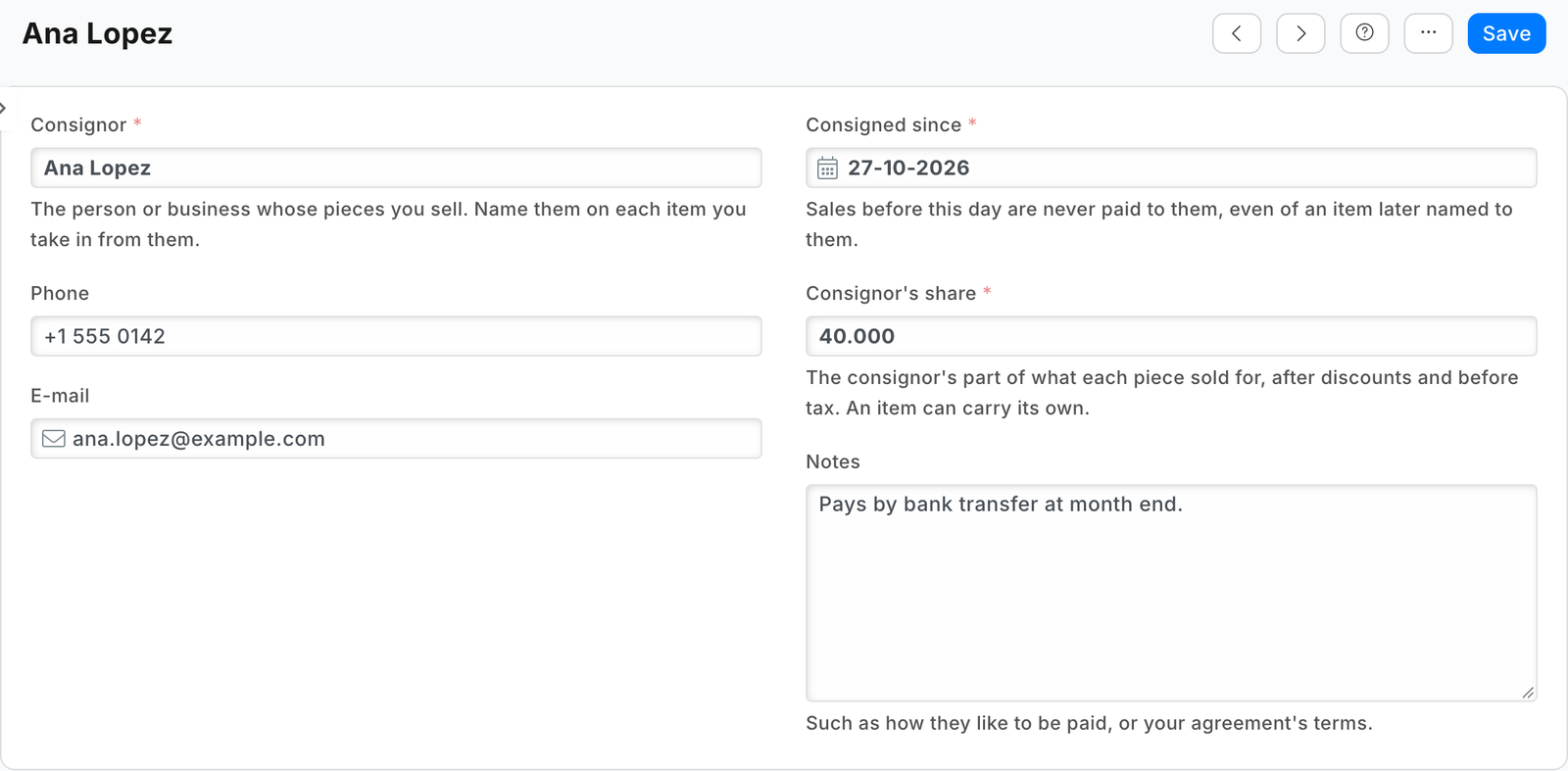 |
| An item named to its consignor, with a share of its own | 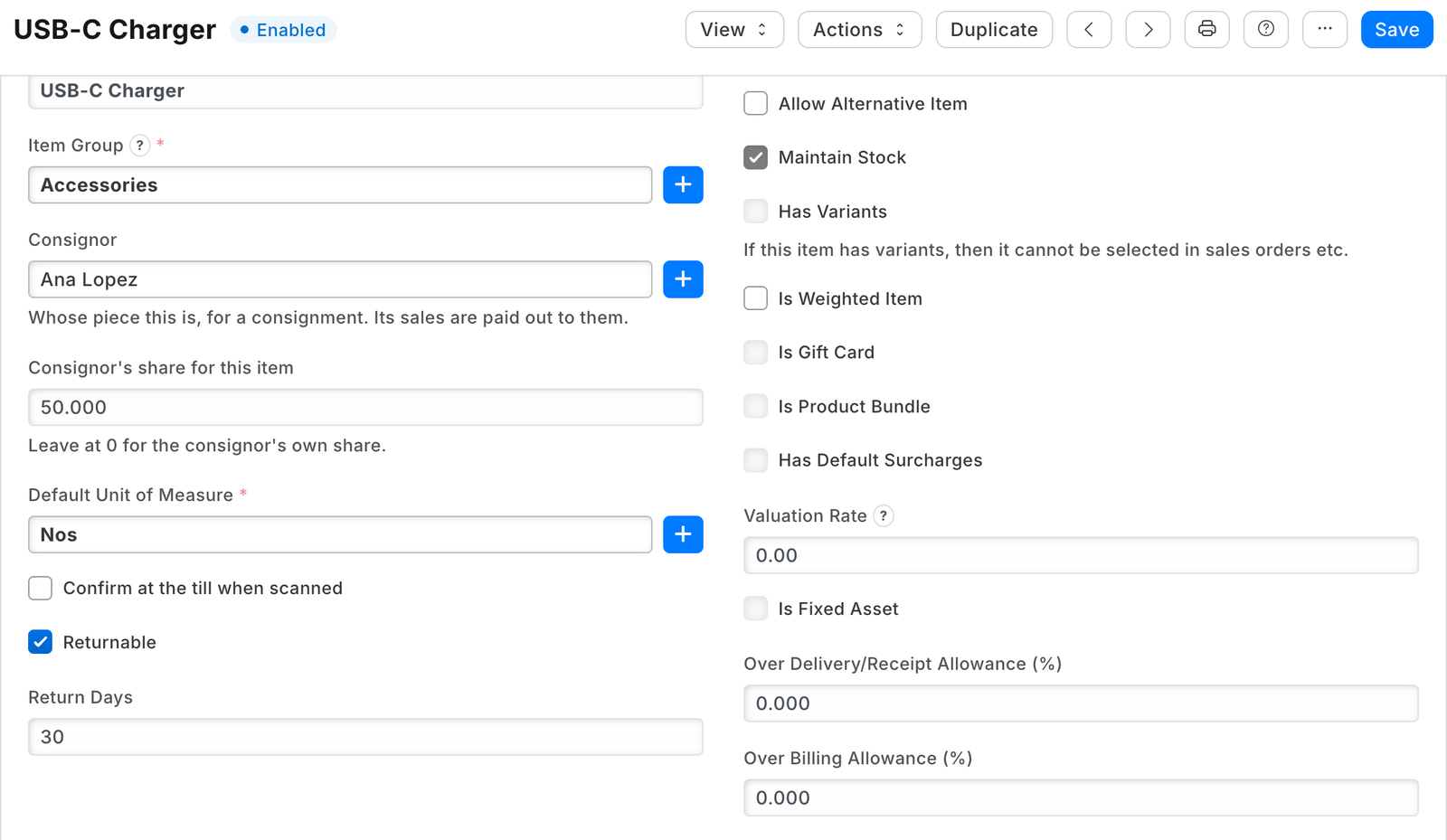 |
| A payout worked out: two pieces sold at the tills, each at its share, and how it was paid | 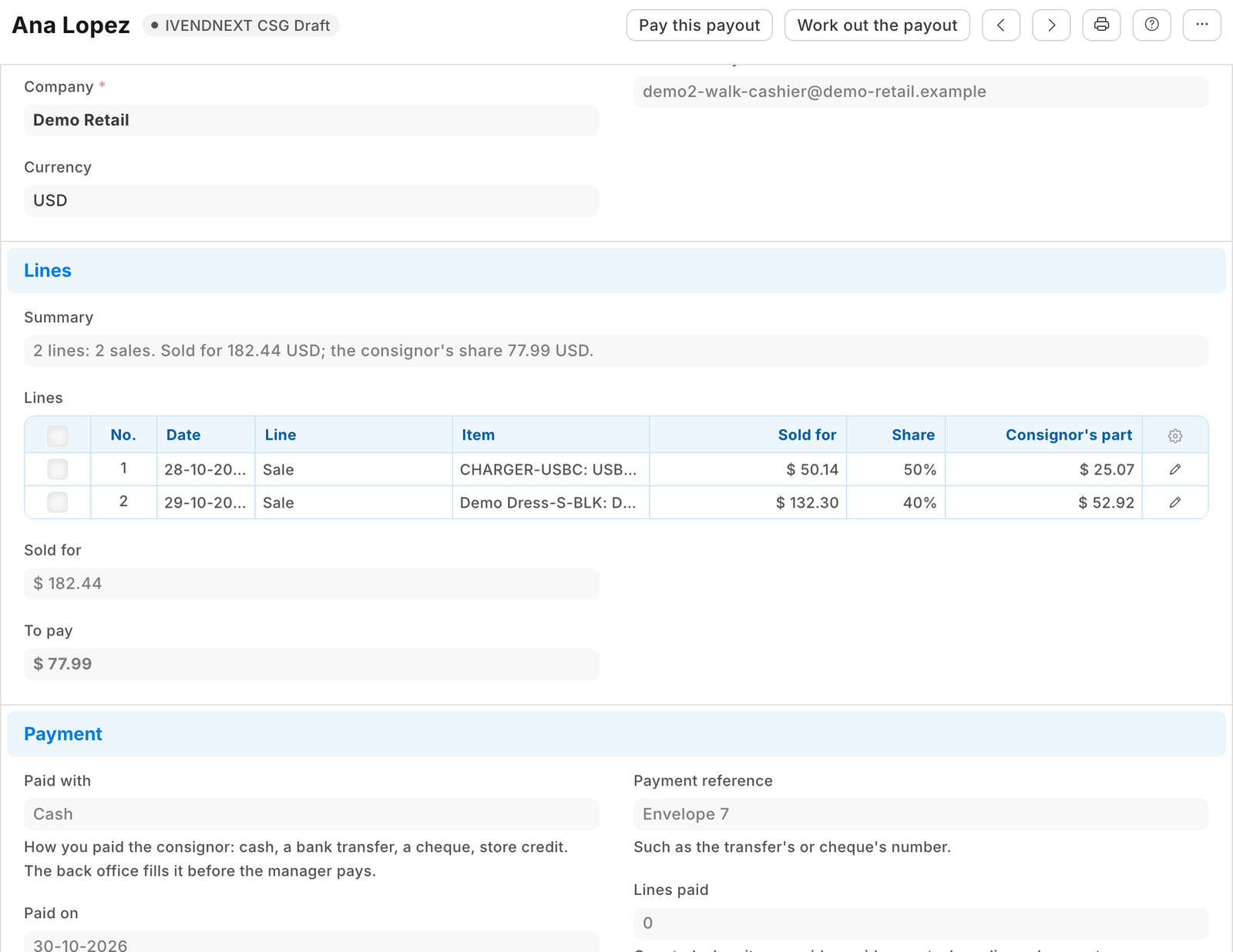 |
| The payout statement for the consignor | 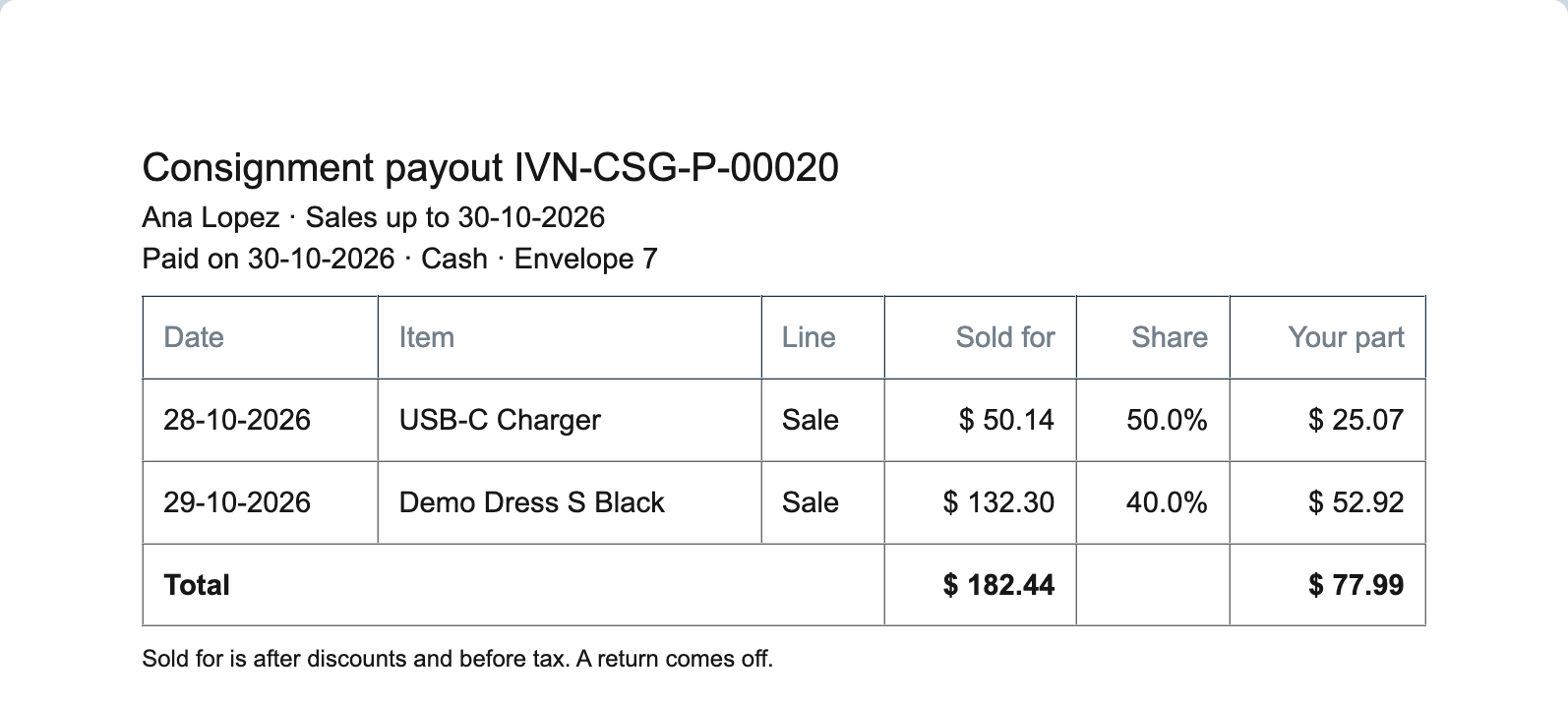 |
| The payout marked Paid: locked, its lines as they were paid | 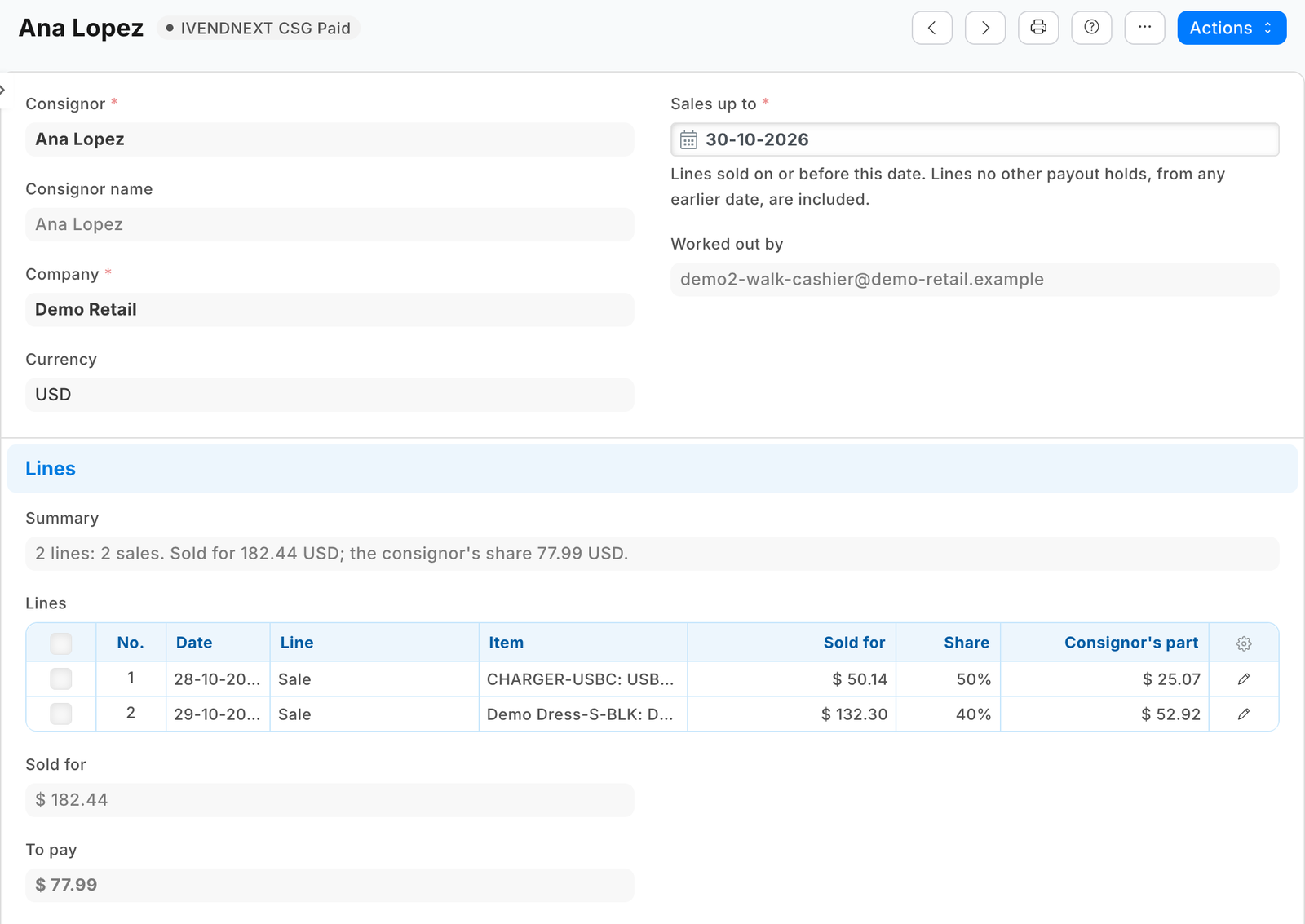 |
What iVendNext does
- Install the app from the App library (or paste its manifest into Retail Extension Package in Desk), read what it will do and consent. It comes in switched off: its services have no consent and are off, its buttons are off, and its lock rule is off. The install adds the record types PP CSG Consignor, PP CSG Payout (with its table of lines), two fields on Item, the workflow PP CSG Payout, the lock rule and the print PP CSG Payout statement, and makes the role PP CSG Integration and the app's own user,
pp_csg@integration.invalid, with that role alone (API only, never Desk; give it no User Permissions). - Switch the lock on: Retail Save Rule, the rule PP CSG payout locked once paid: switch it on. Pay this payout refuses while it is off.
- Give the app's role its reads: in Role Permissions Manager, give PP CSG Integration Read on POS Invoice, Sales Invoice, Item and Retail Save Rule. The install gives it its rights on the app's own record types. A service for one retailer: press Generate Keys on the app's user (User, API Access) and put the key in the service's settings. A service for many retailers is handed the key by the retailer's site itself; press Connect again on the app's record only if the site could not reach the app, or a key was lost or changed.
- Switch the services and buttons on: Retail Extension Subscription, the records Consignment payouts work out and Consignment payouts pay: read what each is sent, tick the consent, switch it on. Then Retail Desk Action, Work out the payout and Pay this payout: switch them on.
- Who does what: intake is anyone who makes items (Item Manager) or serves at the counter (Sales User): both keep consignors. Accounts Users work payouts out and record how each was paid; Accounts Managers check them, press Pay this payout and cancel a paid one. A draft is the Accounts User's to edit: a manager who also fills it holds Accounts User too. Write on Item (an item's consignor and share) and on the consignor (share, Consigned since) decide what a payout pays: give them only to whom you trust with prices.
- Test it: make a consignor at 40%, name them on one item, sell it at the till, and work out a payout up to today: one line, its part 40% of what it sold for before tax.
Where it shows. In Desk: the consignors and payouts (a consignor's payouts under the consignor), the two buttons on a draft payout, the payout statement to print, and on Item the Consignor field (the Item list filters by it). At the till: nothing new.
What leaves the retailer's iVendNext. On each press, the retailer's server sends the service the pressing user's login and language and the payout's name. The service then reads, with the app's user's key: the payout, which carries the consignor's name and the payment's reference; the consignor's share and Consigned since (never their phone or e-mail); the consignor's payouts (their step and company), and the lines of the paid ones; the consignor's items (code, name, own share); each till sale line and Desk invoice line of those items (the line, its sale, item, quantity and net amount) and those sales' headers (state, company, date, return, and for a Desk invoice whether it is the till day's combined one); the lines other payouts hold for the same sale lines, and those payouts' steps; and, for Pay, the lock rule's state. It writes the payout. It keeps nothing of a call. A hosted copy holds each retailer's press secrets and the API key of the app's user until the retailer removes the app. Say so on your card.
The files
| File | What it is |
|---|---|
manifest.json |
the record types PP CSG Consignor (numbered CSG-C-#####) and PP CSG Payout (CSG-P-#####) with its table PP CSG Payout Line (read only: the service writes it); the fields pp_csg_consignor and pp_csg_share on Item; the workflow (Draft, Paid, Cancelled; Pay allowed to PP CSG Integration alone, Drop to Accounts User, Cancel to Accounts Manager); the lock rule; the payout statement; a consignor's payouts under the consignor; two help addresses; a feed registration (it names the app's integration user); two desk_action services and their buttons; installed switched off |
consign.py |
the pure core: the press's signature (verify) and payout (payout_of), the share (share_of), a line's part (payout_amount), the lines other payouts hold (holds_of), the lines owed (work_out), the check before paying (check_to_pay), the summary (summary_of) and the answers (message, paid_answer) |
service/app.py |
the service, standard library only: POST /csg/work and POST /csg/pay (the presses), GET /health, and the app template's handshake for many retailers; one handle answers the web server and the function entry (lambda_handler) alike |
app.json |
the settings file for hosting ("runs": "function": on CitiXsys hosting it is a function, paid per call) |
tests/ |
the core's rules; the service against a stand-in iVendNext (fakeshop.py) with signed presses, one retailer and many; iVendNext's record API over the wire; the manifest, with the kit's checker; canaries.py breaks each guarded rule and expects its test to fail |
Run it
python3 -m unittest discover -s samples/s61_consignment_payouts/tests -p 'test_*.py'
python3 samples/s61_consignment_payouts/tests/canaries.py
python3 samples/s61_consignment_payouts/service/app.py samples/s61_consignment_payouts/service/.env.local
Settings, one retailer (service/.env.local, never committed): PP_BASE (the retailer's iVendNext address), PP_KEY and PP_SECRET (the integration user's API key and secret), PP_WORK_SECRET and PP_PAY_SECRET (handed back at install as pp_csg:sub:work and pp_csg:sub:pay), PP_PORT (8161). CSG_PREFIX names the record types and fields (default PP CSG).
Before you install: every host.docker.internal address in manifest.json (in allowed_urls, and where the manifest calls it) is our test bench's own address for the sample's service, and it resolves only where Docker provides it. Replace it with your own service's address first, or iVendNext's presses never reach your service; if this manifest is already installed, raise its version and install it again (the manifest recipe, step 6).
Many retailers, hosted
The service is the app template's shape: set IVN_LIBRARY_APP and a store (IVN_SHOPS_TABLE on CitiXsys hosting; IVN_SHOPS_FILE is for the tests and a laptop: a retailer's site names itself and connects by itself only to an app on *.ivendnext.app, so a partner's own server runs one retailer). Each retailer connects itself after its install and hands over the presses' secrets and the key of the app's own user (Connect again is only for when the site could not reach the app, or a key was lost or changed). Until the key arrives a press is answered in words. Every press names its retailer's iVendNext (X-iVendNext-Site), so each retailer is read and written with its own key.
Make it your own
What a partner usually changes:
- how a consignor is paid: store credit at a higher share than cash, a minimum payout, a fee taken off each payout, or the payout booked as a purchase invoice to the consignor as a supplier;
- the consignment's terms: a date after which an unsold piece goes back to the consignor or is donated, or a markdown by age before the share is worked out;
- what the consignor sees: a page of their own with what sold and what is owed, or the statement e-mailed by the retailer's own Notification;
- the prefix:
tools/manifest/rename.pymakes your copy under your own reserved prefix in one step; the service takes its prefix fromCSG_PREFIX; - its records:
tools/deploy/copy_records.pymoves the consignors and payouts between a test site and the retailer's iVendNext.
Before you copy it
- The money is the retailer's own sales. The service reads the lines as iVendNext booked them (
base_net_amount: after the sale's discounts, before tax, in the company's currency) and never prices anything itself. - The till day's combined invoice is never counted. The till's sales are booked as POS Invoices and later rolled into one Sales Invoice a day; the app reads the till's own sales and only the Desk invoices that are not that roll-up, so a till sale counts once.
- Paid once, by construction. A sale line on any payout that is not cancelled is never put on another, and a consignor has one draft at a time; Pay checks that again, and the framework's workflow lets only the app's own role move a payout to Paid, so a person cannot mark one paid without the check. A System Manager can still delete a paid payout (its lines would then be owed again): no other role may delete one.
- The share when it is worked out. A payout uses the item's or the consignor's share as it stands when it is worked out, and Pay refuses if it changed since. An item moved to another consignor takes its unpaid lines with it.
- Before intake. No sale before the consignor's Consigned since is ever theirs, so naming an old item to a new consignor never pays out its history. A piece sold after that date but before its item named the consignor is counted for them: nothing tells that sale from one after intake.
- A press, not a schedule. Payouts are worked out when someone presses. A whole month's payouts are one press per consignor; on CitiXsys hosting a function has no schedule yet.
Technical notes
Why it is built this way
| Option | Cost | Verdict |
|---|---|---|
| Do nothing: a sales export filtered by the consignor's items, worked out in a spreadsheet | 0 | nothing remembers which line was paid: a sale paid twice, or never |
| A manifest only: a consignor on Item, and a print listing the consignor's sold lines | half a day | money worked out in a print; nothing remembers a paid line |
| A container on the event feed booking each sale's share as it happens | two days, and a container's monthly cost | more moving parts for a payout made monthly |
| A document check before the payout is submitted | — | a manifest's record types are never submittable |
| A press that works the payout out, a second press that checks it again before the payout is marked paid, a workflow whose move to Paid only the app's role takes, and a lock on a paid payout | about 600 lines of core and service with their docstrings, and about 800 of tests | picked: kit doors only, a function paid per call; S44's press, S58's workflow and lock |
The answer, exactly
- The press's reads, one after another, each with its own timeout inside the press's 7 seconds:
GET /api/resource/<prefix> Payout/<payout>;GET /api/resource/<prefix> Consignorwithfields["name","share","since"]; the consignor's payouts (<prefix> Payoutwithfields["name","company","workflow_state"]);GET /api/resource/Itemwithfields["name","item_name","<field prefix>share"]andfilters[["<field prefix>consignor","=",<consignor>]]; the lines of the consignor's paid payouts in the company (<prefix> Payout Linewithparent<prefix> Payout); forPOS InvoiceandSales Invoice,GET /api/resource/<type> Itemwithparent<type>,fields["name","parent","item_code","item_name","qty","base_net_amount"], the items 200 at a time and drafts left out, then those sales' and the paid lines' sales' headers (docstatusnot 0);GET /api/resource/<prefix> Payout Linefor the same sale lines (sale_row), then those payouts'workflow_state; for Pay,GET /api/resource/Retail Save Rulewithrule_namethe lock's name. All withlimit_page_length0. - The writes: Work out: one
PUT /api/resource/<prefix> Payout/<payout>withlines,sales_total,payout_total,summary,worked_out_byand the payout'smodifiedas read. Pay: onePUTwithworkflow_state<prefix> Paid,paid_byandmodified. An edit made meanwhile refuses the write (the payout was changed while this press read it). - A line's keys:
sale_rowis the sale line's own name: a line with it on any payout that is not cancelled is never put on another.sale_lineis the same for a sale or a return, and for a settlement the sale line's name, a/and the count of the consignor's paid lines on it: unique within a payout (a later payout may reuse it, and nothing keys on it across payouts). - Settled by balance: for a cancelled sale, the parts of the consignor's paid lines on it are added up; a balance that is not 0 is settled by one line of the opposite sign: Taken back when it was paid, Correction when a take-back was paid and the payout that paid the sale was cancelled since, or when a paid return's own invoice is cancelled. Only the consignor who was paid settles a cancellation, whoever's item it is now.
- A line's part is Sold for times the share, to the cent, half away from zero.
Bounds, stated
- Two payouts holding the same line (a copy, or a line put on by hand through the API) each refuse the other's Pay while both are drafts, so neither pays until one is dropped. A work-out never puts a line another payout holds on its own payout.
- Only a System Manager switches the lock off or deletes a paid payout, and either lets that payout's lines be paid again; an Accounts Manager's Cancel does the same through the workflow, on purpose. The payout's history shows each.
- A paid payout the lock does not cover: while the lock rule is off, a person who may edit a paid payout can change its lines; Pay refuses until it is on, but switching it off afterwards is the retailer's choice.
- At most 500 lines a payout, oldest first, unless the oldest 500 add up below zero: then the next lines are kept until they do not, so a payout never sticks below zero.
- The reads grow with the consignor's history: every press reads all their items' sale lines and all their paid payouts' lines, 200 names a read, one read after another. A consignor with thousands of sold lines will at some point not fit the press's 7 seconds and is told did not answer in time on every press (measured only for a handful of lines on our test bench): a partner's version keeps a running balance per consignor instead.
- A return is judged by its own date and the item's consignor now: the app does not follow a return's link to the line it returns. So a return after an item moved to another consignor is charged to the new one, and a return of a sale made before Consigned since (never paid to them) is charged to the consignor. Settle either by hand; a partner's version follows the return's link.
- Starting, and reinstalling. Set each consignor's Consigned since to the day after the last sale you already paid them for. Uninstalling removes every payout, and with them the record of what was paid: a reinstall that restores the consignors must restore their payouts too (
tools/deploy/copy_records.py), or reset each Consigned since, or every earlier sale is owed again. - The write after the reads: the one write takes up to 3 seconds of its own after the 7, so a slow press can land after the button has said it did not answer in time: check the record before pressing again.
- Rounding is per line: a sale returned piece by piece can leave a cent between what was paid and what was taken back.
- A line with an amount the site sends unreadable is left off (never paid wrongly), and a payout of another consignor that still holds a line after an item moved keeps it off this consignor's payout until that payout is paid or dropped.
- Where it runs: the App library's copy runs in CitiXsys hosting's US region. The first press after a quiet spell starts the function (1 to 2.5 seconds, measured on earlier apps), inside the button's 10.
- It logs one line per call: the route, the status and the milliseconds, never a body or a key.