
1c. How the data travels: loyalty and telecom plan integrations
How the data flows when your app links the till to an outside system (an integration with a loyalty system, a telecom company, an ERP): which endpoint is called, by whom, with what data; how the answer gets back onto the sale; where each customer's account for the outside system is kept; and what happens when two chains use the same app in the same second. Two worked examples, each traced hop by hop: a chain's own loyalty system (sample S22) and a phone retailer pricing and activating mobile plans with a telecom company (sample S52). Both run on your laptop.
Download: How the data travels (PDF, this chapter to read offline or in a meeting). New to iVendNext? Read 1a. How it all works first.
For: a developer building a link between the till and someone else's system, who asks: when the cashier sells, which endpoint is called, by whom, with what data; how does the answer get back onto the sale; where is each customer's account for that outside system kept; what happens when two chains use my app at the same second?
The one idea, again. Calls go three ways (chapter 1a, section 5): (1) your service calls the iVendNext API at the chain's own address, with your app's key; (2) the chain's iVendNext calls your service at your one address, signed with that chain's own secret; (3) your service calls the outside system with that chain's own account for it. Every hop below is one of the three. The till itself never calls an outside system, and no answer of yours ever puts money on a sale: money enters the sale visibly, before payment, through the till's own pricing (chapter 3, rule 1).
Example 1: a chain's own loyalty system
A retail chain runs its own loyalty system, outside iVendNext: its members, their points and today's offers live there. On every sale the till should show the customer's points and offer, the member's reward should enter the sale before payment, and after payment the chain's loyalty system should hear what was earned.
Built on sample S22 (customer-owned loyalty). On its own, S22's service is the loyalty engine: its tiers, cash back and ledger are kept as records in the chain's iVendNext, and it calls nothing outside. Its opt-in adapter (service/outside.py) adds the outside hop: when the chain's settings record names its loyalty system's address, the Member key also asks that system for the customer's points and offer, and each sale's earning is posted to it after payment. With the address empty, S22 behaves exactly as shipped. The tier the till prices is S22's own: its daily job moves each member to the customer group the year's spend reaches. The adapter shows the chain's own points and offer and keeps the chain's system told; it does not move a customer's group to a tier the chain's system decides (that would be one more call, from your service to the chain's iVendNext, on S22's pattern). So in this example the reward that reaches the sale is S22's own: the tier's discount (a promotion the till prices) and Member cash spent from S22's ledger. The chain's points and today's offer are shown to the cashier, not applied. To let the chain's own system decide the reward, compose the same doors: your service moves the customer's group to the tier the chain's system names (so the till's promotion prices it), and the wallet's what may this member spend asks the chain's system for its balance. Both are calls you add on S22's pattern; no new door is needed.
The steps
- A sale is rung up. The cashier puts the customer on the sale.
- The reward enters the sale before payment, priced by the till itself. The member's tier is a customer group, and each tier's discount is an ordinary promotion for that group, which the till prices as the lines go on, online or offline. The customer sees the discount on the sale. No call is made for it.
- The cashier presses Member. The till asks your service, which asks the chain's loyalty system for the customer's points and today's offer, and the till shows them in a message: the tier, the cash back, what reaches the next tier, the customer's points and the offer. The message adds nothing to the sale.
- At Pay, the member may spend the cash back (Member cash): the till's payments app asks your service, through the wallet door, what this member may spend on this sale, and takes it as a payment.
- After payment, the event feed tells your service. It writes the cash back earned to the ledger (a record in the chain's iVendNext, named by its unique key) and posts the earning to the chain's loyalty system, once. A return or a cancellation later takes back its share, in the ledger and in the chain's loyalty system alike.
The picture
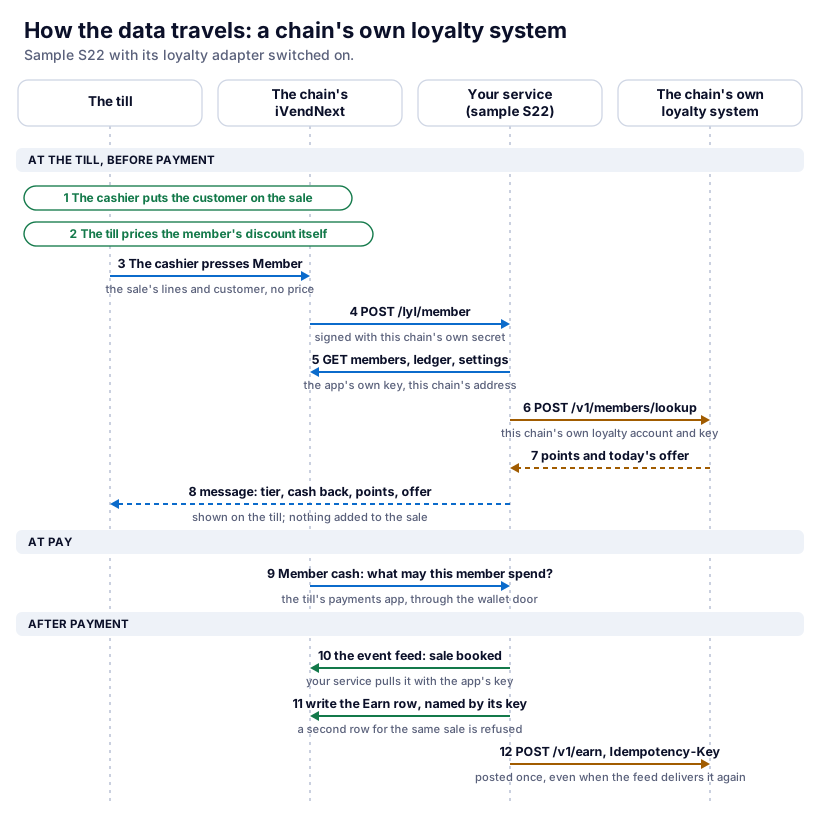
Every hop of the loyalty link
| # | From | To | Endpoint | Data that crosses | Signed with | Kept where |
|---|---|---|---|---|---|---|
| 1 | Your service | The chain's iVendNext | POST /api/method/ivendnext_mpos.api.feed.events (the event feed's door, pulled every 30 seconds or each minute) |
the chain's new customers, sales and returns, as events | the app's own user's key (Authorization: token …) |
your note of handled events (a cache); the records stay in the chain's iVendNext |
| 2 | The till | The chain's iVendNext | the till's own call when the cashier presses Member | the sale's lines, the customer | the cashier's session | nothing |
| 3 | The chain's iVendNext | Your service | POST https://<your service>/lyl/member (a remote till key) |
sale_ref, store, POS Profile, company, currency, the cashier's login, the customer's id, each line's item code, quantity and unit. No price, no payment |
X-iVendNext-Signature: HMAC-SHA256 with this chain's key secret, made at install |
nothing |
| 4 | Your service | The chain's iVendNext | GET /api/resource/PP LYL Member/<customer>, the ledger and plans lists, GET /api/resource/PP LYL Settings/Default |
the member, the balance, the plans, the chain's loyalty system's address and key | the app's own user's key | the chain's iVendNext (its own records) |
| 5 | Your service | The chain's loyalty system | POST <its address>/v1/members/lookup (the stand-in's names; a real system has its own) |
the customer's id | this chain's own loyalty key, read in hop 4 | the loyalty system |
| 6 | Your service | The till (through the chain's iVendNext) | the answer to hop 3 | {"message": {"title", "body", "level"}}: the tier, the cash back, the customer's points, the offer |
— (the answer to a signed call) | shown on the till; nothing on the sale |
| 7 | The chain's iVendNext | Your service | POST https://<your service>/paygw/1/preview and /authorise (the wallet door, Member cash) |
the member, the amount due, the payment's reference | the wallet's own secret | a Redeem ledger row in the chain's iVendNext |
| 8 | Your service | The chain's iVendNext | hop 1's feed brings sale booked; GET /api/resource/POS Invoice/<sale>, then POST /api/resource/PP LYL Ledger |
the sale's totals and lines; the Earn row, named POS Invoice:<sale>:earn |
the app's own user's key | the chain's iVendNext (the ledger) |
| 9 | Your service | The chain's loyalty system | POST <its address>/v1/earn with Idempotency-Key: POS Invoice:<sale>:earn; a return or a cancellation posts what it takes back, under its own row's key (…:<return>:return, …:<sale>:cancel) |
the customer, the sale, its value, the cash back earned (negative for a return or a cancellation), the currency | this chain's own loyalty key | the loyalty system |
The member's discount (step 2) crosses no hop: it is a promotion in the chain's iVendNext, priced by the till.
The loyalty account for each chain
The chain keeps its loyalty system's address and key in its own iVendNext, in the app's settings record (PP LYL Settings, record Default: Your own loyalty system's address and key). Only the System Manager and the app's own role read that record; a cashier never does. Your service reads it at the moment of each call, with the key of the chain whose signature the call carried, at that chain's own address.
Why one chain's account is never used for another: your service never chooses an account. The call names its chain and is signed with that chain's secret; the chain's record in your shops store gives that chain's address and key; that key can only read that chain's settings, which hold that chain's loyalty account. There is no path from a call of chain A to chain B's account.
Two chains, same app, same second
Two cashiers at two chains press Member in the same second. They are two separate calls, answered by two copies of your service at once (a hosted function runs up to 10 copies). What differs per call:
| Chain A's press | Chain B's press | |
|---|---|---|
The site the call names (X-iVendNext-Site) |
chain A's | chain B's |
| The secret that signs it | chain A's Member key secret | chain B's |
| The key your service reads iVendNext with | chain A's app user's key | chain B's |
| The loyalty account used | chain A's (its own settings) | chain B's (its own settings) |
| The address the answer goes back to | chain A's till, as the answer to chain A's call | chain B's till |
What the service holds between calls: nothing about a sale or a member. It keeps the shops store (one row per chain: its address, the secrets its install handed over, its app user's key) and each chain's note of handled feed events, in a folder per chain. Everything else is read again at each call. S22's own tests hold this with two chains sharing a customer's name (One service for many retailers).
When the loyalty link fails
- The loyalty system is slow or down. The Member key answers anyway (S22 waits at most 0.8 seconds for it, inside the till's 3), with the tier and cash back from the chain's iVendNext and "The loyalty system is not answering." Nothing on the sale changes: the discount was the till's. After payment, the post of the earning fails, so the feed event stays undone and is tried again on the next pass, with the same idempotency key.
- The till is offline. The member's discount is still priced (the promotion is on the till). The Member key and Member cash are dimmed. The sale syncs when the till is back, and the feed then brings it to your service like any other.
- The loyalty system answers after the sale is already paid. Nothing waits for it: the sale was never held for it. The earning reaches it on a later pass; the idempotency key makes a late or repeated post count once.
- Posting the earning fails after payment. The Earn row is already in the chain's iVendNext (the ledger is the record). If the loyalty system did not answer, the post is tried again on the next pass, with the same key. If it refused for good (it does not know the member, or the key was withdrawn: a refusal other than too many requests), the refusal is written to your service's log by its status code and the event is done; it is not retried every pass. Fix the cause, then post the sale again from the ledger.
Run the loyalty example yourself
The tests run the chain's loyalty system as a stand-in web server on your laptop:
python3 -m unittest discover -s samples/s22_customer_loyalty/tests -p 'test_*.py'
tests/test_adapter.py runs the chain's loyalty system as a stand-in web server on your laptop (tests/standin_loyalty.py) and drives the Member key and the earning through it: switched off, nothing is called; switched on, the customer's points and offer appear and each sale is posted once; with the loyalty system down, the key says so and the feed retries. The canaries break each rule and expect a test to fail:
python3 samples/s22_customer_loyalty/tests/canaries.py test_adapter
To watch the hops against your own test site: start the stand-in (port 8156, key chain-loyalty-key), put http://127.0.0.1:8156 and that key in PP LYL Settings (Your own loyalty system's address and key), and run S22's service in local mode (IVN_LOCAL=1: plain http is accepted only to this machine, and only then), as its README says:
python3 samples/s22_customer_loyalty/tests/standin_loyalty.py
IVN_LOCAL=1 python3 samples/s22_customer_loyalty/service/app.py samples/s22_customer_loyalty/service/.env.local
Example 2: a phone retailer's mobile plans from a telecom company
A phone retailer sells mobile plans from a telecom company. The plans and their prices are the telecom company's, and each retailer has its own account with it, at its own prices. The cashier must see the plans for the phone being sold, the plan's price must be a line on the sale before payment, the telecom company must confirm the plan for this customer before money moves, and after payment the plan must be activated and its number written back.
Built on sample S52 (phone plans from a telecom company), with a stand-in telecom company that runs on your laptop.
The steps
- The cashier scans the phone and opens the plan sheet (the Plans key).
- Your service asks the telecom company's API for the plans and prices for that phone and that customer, with this retailer's own telecom account, and the till shows them. Nothing is added to the sale.
- The cashier adds the chosen plan as its own item, priced from a price list your service keeps in step with the telecom company. No till door adds a priced line by itself: the till key, the capture at the scan and the partner page carry no money, and the price door only takes money off. So the plan is an ordinary item of the retailer's, and its price comes from the retailer's own price list, written by your service from the telecom company's prices for this account.
- At Pay, the app's check confirms the plan and its price with the telecom company for that customer: the plan fits a phone on the sale, the customer may take it, its price still holds. If they no longer hold, the sale is refused in plain words, and the cashier reads why. A sale the cashier rang with no customer reaches the check with the store's walk-in customer on it (the till puts its POS Profile's default customer there); the retailer names its walk-in customers in the app's settings, and a plan for one is refused: "A phone plan needs the customer on the sale. Add them, then press Pay."
- After payment, your service activates the plan with the telecom company and writes the activation number back: to a PP TEL Activation row of the app's own, named by the sale and its line, linked to the sale and the customer. Staff find it in the PP TEL Activation list, filtered by Sale (below), and in the sale's and the customer's Connections, Phone plans, where those forms open for them.
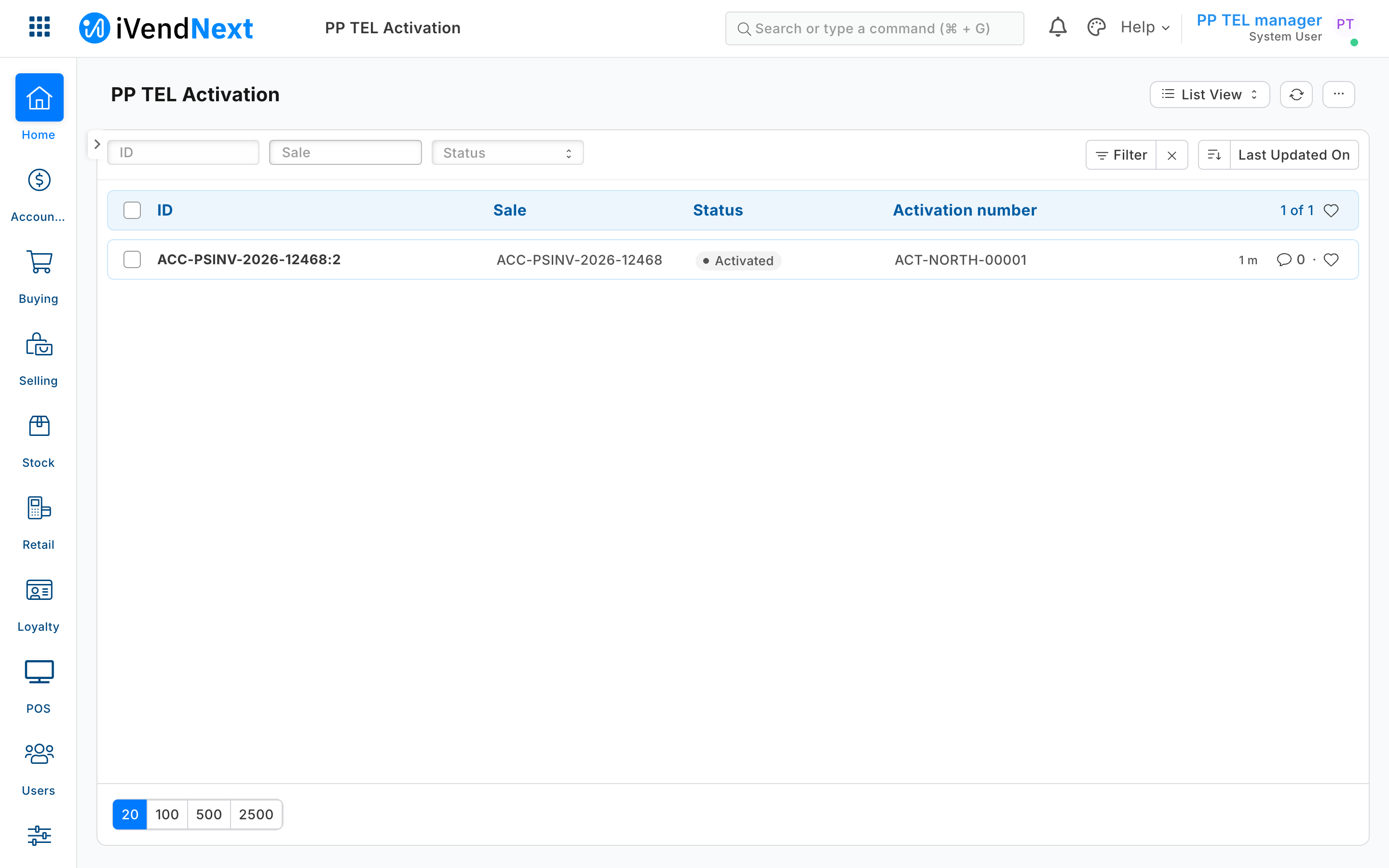
The picture
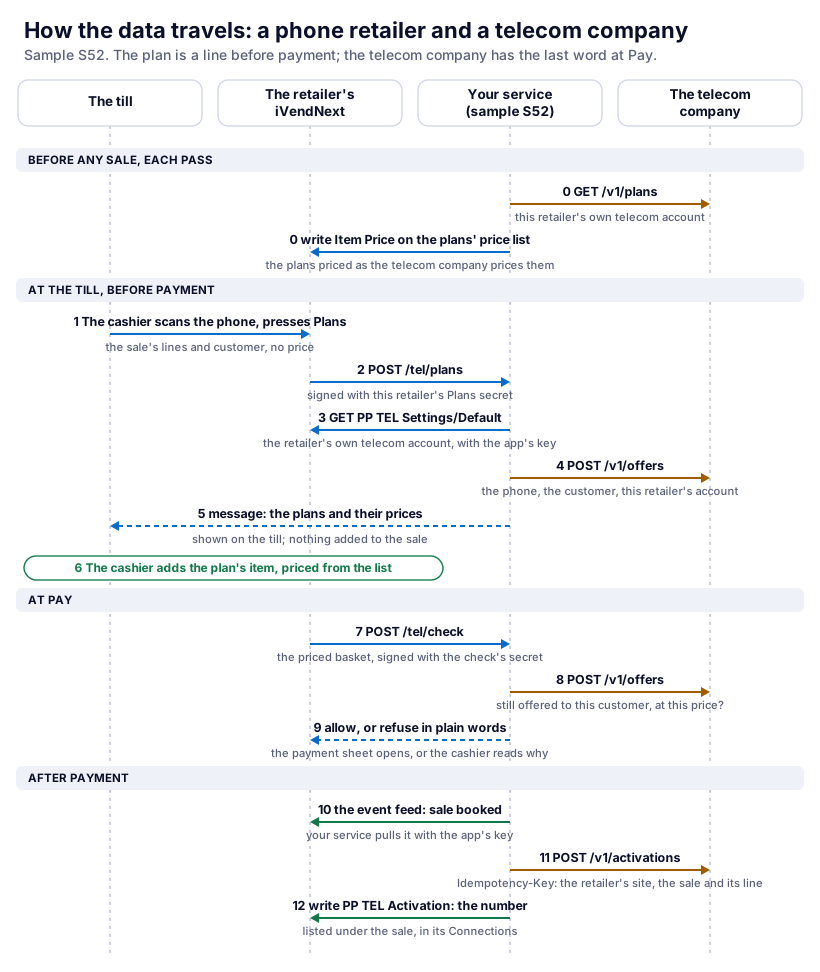
Every hop of the telecom link
| # | From | To | Endpoint | Data that crosses | Signed with | Kept where |
|---|---|---|---|---|---|---|
| 0a | Your service | The telecom company | GET /v1/plans (each pass: a minute on hosting) |
the account's plans: code, name, price, the phones each fits | this retailer's telecom account and key | the telecom company |
| 0b | Your service | The retailer's iVendNext | GET and PUT/POST /api/resource/Item Price on the settings' price list |
each plan's price, where it differs | the app's own user's key | the retailer's price list |
| 1 | The till | The retailer's iVendNext | the till's own call when the cashier presses Plans | the sale's lines, the customer | the cashier's session | nothing |
| 2 | The retailer's iVendNext | Your service | POST https://<your service>/tel/plans (a remote till key) |
sale_ref, store, POS Profile, company, currency, the cashier's login, the customer's id, each line's item code, quantity and unit. No price |
HMAC-SHA256 with this retailer's Plans secret | nothing |
| 3 | Your service | The retailer's iVendNext | GET /api/resource/PP TEL Settings/Default |
the retailer's telecom account and key, the plans' item group, the price list | the app's own user's key | the retailer's iVendNext |
| 4 | Your service | The telecom company | POST /v1/offers |
every item code on the sale (the telecom company says which are phones), the customer's id | this retailer's telecom account and key, read in hop 3 | nothing |
| 5 | Your service | The till (through the retailer's iVendNext) | the answer to hop 2 | {"message": …}: each plan's name, price and code |
— | shown on the till; nothing on the sale |
| 6 | The till | — | the cashier adds the plan's item | the plan, priced from the price list (hop 0b) | — | the sale, as a line |
| 7 | The retailer's iVendNext | Your service | POST https://<your service>/tel/check (the check before payment, check/1) |
the priced basket: each line's item code, item group, quantity, unit, price, amount, discount and captured values; the sale's totals; the customer and customer group; the store, POS Profile, POS day and terminal; the cashier's login; the price list, coupons and the tenders offered; the currency. No card data | HMAC-SHA256 with this retailer's check secret | the retailer's iVendNext stores the answer against the basket's fingerprint (your service keeps nothing): a basket changed after it is asked again |
| 8 | Your service | The telecom company | POST /v1/offers |
every item code on the sale other than the plans (the telecom company says which are phones), the customer's id | this retailer's telecom account | nothing |
| 9 | Your service | The retailer's iVendNext | the answer to hop 7 | {"verdict": "allow"} or {"verdict": "refuse", "reason": "…"} |
— | the till: the payment sheet, or the reason |
| 10 | Your service | The retailer's iVendNext | the event feed's door, then GET /api/resource/POS Invoice/<sale> |
sale booked; the sale's lines, item groups, serial numbers, customer | the app's own user's key | your note of handled events (a cache) |
| 11 | Your service | The telecom company | POST /v1/activations with Idempotency-Key: <retailer's site>/<sale>:<line> |
the plan, the phone, its serial number (each plan its own phone's, on a line of several), the customer, the sale's name | this retailer's telecom account | the telecom company |
| 12 | Your service | The retailer's iVendNext | POST, then PUT /api/resource/PP TEL Activation/<sale>:<line> |
Pending, then Activated with the number (or Failed with the telecom company's sentence) | the app's own user's key | the retailer's iVendNext, under the sale |
The telecom account for each retailer
The retailer keeps its telecom account and key in its own iVendNext, in the app's settings record PP TEL Settings (record Default), with the item group its plans are in and the price list they are sold from. A System Manager types them in Desk. Only the System Manager and the app's own role (PP TEL Integration) read the record; a cashier never does. The key is an ordinary text field, readable whole by those two roles: the app adds no encryption of its own. Your service reads it at the moment of each call (hop 3) with the key of the retailer whose signature the call carried, at that retailer's own address.
This is the route proved on the programme's test bench (run pp-20261028T170105Z-24298, the Technical notes): the app's own user, made by the install and holding only its own role, read the account and key whole through the record API, and a cashier could not read the record. Two routes that look shorter do not work: a password field read through the record API comes back masked, and reading a password whole (get_password) is for a System Manager, which the app's own user never is. The secrets the install hands your service at connect are the install's own (the till key's, the check's and the app user's key); a retailer cannot add its telecom key to them.
Why one retailer's account is never used for another: your service never chooses an account. The signature covers the call's body; the site header only picks which chain's secret checks it, so a call that names another chain's site fails the check. The account comes from the settings record, read with the key of the retailer the call's signature matched, at that retailer's address. The activation's idempotency key starts with the retailer's site, so the same sale name at two retailers is never one activation, however a telecom company scopes its keys.
Two chains, same app, same second
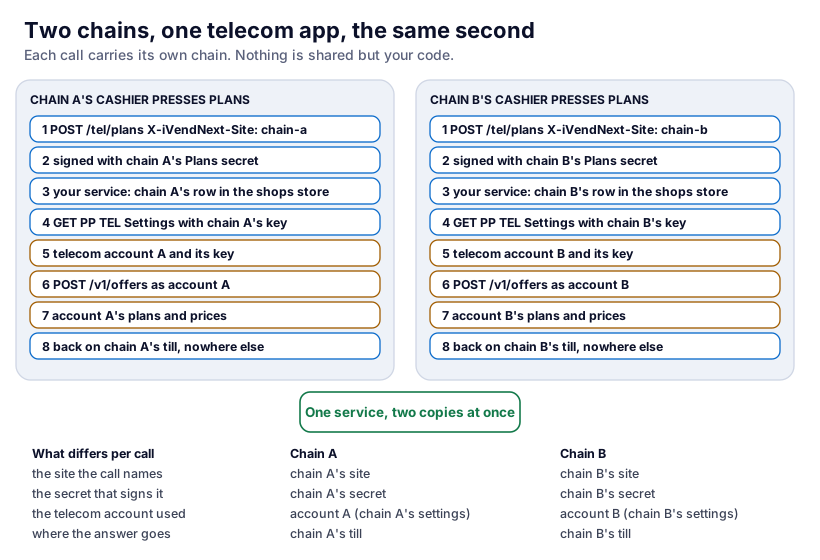
| Chain A's press | Chain B's press | |
|---|---|---|
The site the call names (X-iVendNext-Site) |
chain A's | chain B's |
| The secret that signs it | chain A's Plans secret | chain B's |
| The key your service reads iVendNext with | chain A's app user's key | chain B's |
| The telecom account used | account A, from chain A's own settings | account B, from chain B's own settings |
| The address the answer goes back to | chain A's till, as the answer to chain A's call | chain B's till |
What the service holds between calls: the shops store (one row per chain: on CitiXsys App Hosting the app's own encrypted table, on your own server a file only the app's user reads) and each chain's note of handled feed events. No account, price or sale is kept: a retailer that changes its telecom account in Desk is answered with the new one at its next press. S52's tests run two retailers at the same moment, 24 calls on threads released together, and check that every answer carries only its own account's prices and that the telecom company saw each account exactly as often as its own retailer called (tests/test_service.py, TwoRetailersAtOnce).
When the telecom link fails
- A wrong or withdrawn telecom key. Plans says the telecom company is not answering, Pay refuses a sale with a plan, and after payment the activation waits (Pending) and is tried again on every pass until the retailer fixes its key in PP TEL Settings; it is never written Failed for it.
- The telecom company is slow or down. Plans says "Telecom company not answering … Nothing was added to the sale." At Pay, a sale with a plan is refused in plain words ("The telecom company is not answering, so the plan can't be confirmed. Try again, or take the plan off the sale."), inside the till's 3 seconds. A sale without a plan is never held up: the telecom company is not asked.
- Your service is down, or the till is offline. The till cannot ask the check, so it applies the check's declared down answer to every sale on that till. S52 declares allow and flag: sales go on, and every sale on that till in that time is flagged on the Sales to review report, plan or not. The activation after payment still asks the telecom company. The Plans key is dimmed offline. (A check whose down answer is refuse stops every sale on the till while it cannot be asked: do not choose it for a check that only some sales need.)
- The telecom company's price moved after the price list was written. The check refuses with the new price; the price list follows on the next pass (a minute on hosting); the cashier takes the plan off and adds it again after that. The price is the account's, the same for every customer of this retailer: the check confirms with the telecom company that this customer may take the plan, and at this price. A telecom company that prices each customer differently needs its price on the line some other way: an extension point to request.
- The telecom company answers after the sale is already paid (an activation whose answer was lost or came too late). The activation row stays Pending and the feed event stays undone; the next pass asks again with the same idempotency key, and the telecom company answers with the same number. One activation, never two.
- The activation fails after payment (the telecom company refuses it). The row says Failed with the telecom company's sentence, listed under the sale, and nobody retries it. The money is not undone by the app: the store sorts it out with the customer (a return refunds the plan's line).
- A return, or an exchange. A return is not sent to the telecom company: cancelling a plan is the telecom company's own process. A plan sold in an exchange (a return that also sells new lines) is refused at Pay: "Sell a plan on its own sale, not in an exchange."
Run the telecom example yourself
The tests start the stand-in telecom company as a web server on your laptop and call the service the way the till signs its calls:
python3 -m unittest discover -s samples/s52_phone_plans/tests -p 'test_*.py'
python3 samples/s52_phone_plans/tests/canaries.py
The stand-in telecom company on its own (port 8154, two accounts, standin/accounts.json), then the service against your own test site, one retailer (the env file's names are in the sample's README):
python3 samples/s52_phone_plans/standin/telecom_api.py
python3 samples/s52_phone_plans/service/app.py samples/s52_phone_plans/service/.env.local
For two retailers on your laptop, run the service in the app template's local mode (IVN_LOCAL=1, the template's README) and connect two local sites.
What both outside systems share
- The till never calls the outside system. The chain's iVendNext calls your service; your service calls the outside system; the answer comes back the same way.
- Money enters the sale before payment, through the till's own pricing: a promotion (loyalty) or a price list your service keeps in step (telecom). Your answers carry messages and verdicts, never money.
- The outside account is the chain's, kept in the chain's own iVendNext and read with that chain's key at the moment of each call.
- After payment is the event feed's job. Your service pulls the sale, does the outside work once (an idempotency key it derives from the sale), and writes the result to the chain's own records. S52's key also names the retailer's site, because one telecom company serves many retailers; S22's names the ledger row only, because the loyalty system is the chain's own and hears from one chain. A loyalty service shared by several chains would need the site in its key too.
Next: What you can use, the developer's map of every endpoint, record type and screen.
Technical notes
- The doors: a remote till key (contract): no price is sent and no answer carries money; the check before payment (contract): the server prices the basket, the answer is stored against its fingerprint, the down answer applies when the service cannot be asked, offline included; the wallet door (contract); the event feed (contract); the price door only takes money off (contract); the capture and the partner page carry no money (capture, partner page).
- The settings route: a field limited to roles (
read_roles, chapter 7) would narrow it further; S22 and S52 give the whole settings record to the System Manager and the app's own role only, which the record's own permission rows do. - The bench run (the programme's test bench, POS app 2.1.0 at the till app's commit
60147699c, 2026-10-28, runpp-20261028T170105Z-24298): S52's manifest installed, its check switched off until consented and its Plans key ready with the install's consent; the install made the app's own user,pp_tel@integration.invalid, holding only PP TEL Integration; that user read the telecom account and key whole from PP TEL Settings, and a cashier could not read the record; the service wrote the plans' prices (25.00, 35.00, 50.00) for account North; the Plans key, pressed through the till's own call and answered over HTTPS, listed S and M for the phone and not L; a sale of the phone and Plan S at 25.00 was confirmed at Pay, its card push passed and it booked (ACC-PSINV-2026-12468); the check refused a plan on a sale with only the walk-in customer, a price the telecom company had moved by 0.50 ("M 50 GB is now ZAR 35.50 …"), and a telecom company that was down, while Plans said it was not answering; after payment the service read the real event feed and wrote Activated,ACT-NORTH-00001, to the sale's PP TEL Activation row; every POS day opened was closed (0 open). The run's first try found that a till puts its walk-in customer on a sale that has none, which the walk-in customers setting now covers. The till's own screens (the plan sheet, the plan's line) were not photographed on this run. - S22's adapter has run on the laptop only (its tests and canaries, against the stand-in); S22's own bench proof (2026-10-09) predates it.
- The install on the bench used the product's own installer, called in the bench's console (the same code
tools/deployreaches through the site), nottools/deployitself. - The samples: S22 (its adapter:
service/outside.py,tests/test_adapter.py) · S52. The template's handshake: chapter 14b.