
13. AI on iVendNext — bring your own
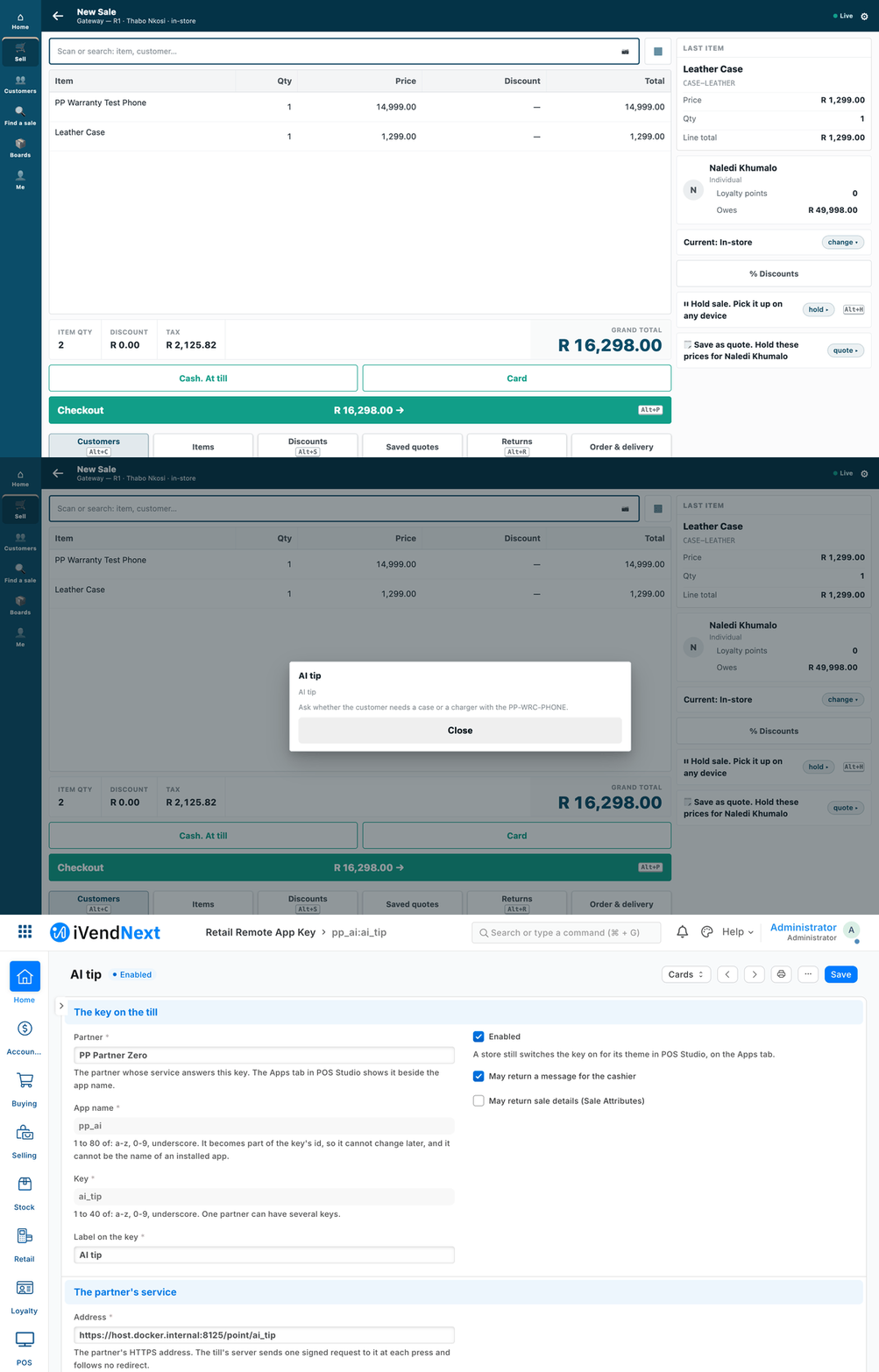
A cashier presses AI tip on a sale; a short hint appears in the till's own sheet. In this walk a stand-in answered; a real AI model has not been tried.
Add a short AI hint to the till, or give a manager an AI assistant that answers questions about the shop and, after a yes, changes a promotion or a price. The customer brings the AI; you bring the service that connects it.
For: a builder who wants an AI hint at the till, or an AI assistant for a manager, working with a customer's iVendNext.
Reference implementation: A till key that asks an AI model with ../samples/s6_ai_till_key/ · A manager's AI assistant with ../samples/s10_ai_manager/ · our MCP server ../tools/mcp_server/.
When to use it
When a customer wants AI at the counter or in a manager's hands, on a model it chooses and pays for.
The rule: bring your own AI. The customer uses an assistant it already pays for, or a free open-weight model on its own machine (the recipe names Ollama, llama.cpp and vLLM). We pay for no model, ship none and never charge per question. Nothing AI runs inside the customer's site: your service or ours runs outside it, on the customer's own key.
| You want | The shape |
|---|---|
| A short AI-written hint for the cashier during a sale (an add-on to suggest, a care note) | an AI till key: a till key (chapter 6) whose answer is a message |
| A manager who asks the shop a question, and, with a yes, changes a promotion or a price | our MCP server, on the manager's own key |
| An agent that reacts to what happens in the shop | an outside app on the event feed (chapter 5). The kit has no agent sample yet: not covered |
Steps: an AI hint at the till
-
Pick the provider and run the service. The sample keeps its logic in
core.py, the provider inproviders.pyand the HTTP service inservice.py: about a hundred lines of standard-library Python. Set these in its environment:PP_POINT_SECRET: the signing secret you will give the shop;PP_AI_PROVIDER:stub(no AI at all) orchat;- for
chatonly:PP_AI_URL(any service that speaks the chat-completions request),PP_AI_KEY(the customer's own key, if it needs one) andPP_AI_MODEL.
Put it behind HTTPS. The till calls HTTPS only.
-
Register the key in the shop. A System Manager opens Retail Remote App Key in Desk and adds a record with:
- your name, an app name, the key and its label;
messageas the only thing it may return;- your HTTPS address (the service's route is
…/point/ai_tip) and the signing secret; - the time to answer: 3 seconds unless raised; at most 10 on this record, at most 5 if a manifest declares it. Design for 3 (chapter 6).
Tick the customer's consent and paste the consent text the sample prints. The sample builds that text from the same list of fields it builds the prompt from, so the words and the data cannot drift apart.
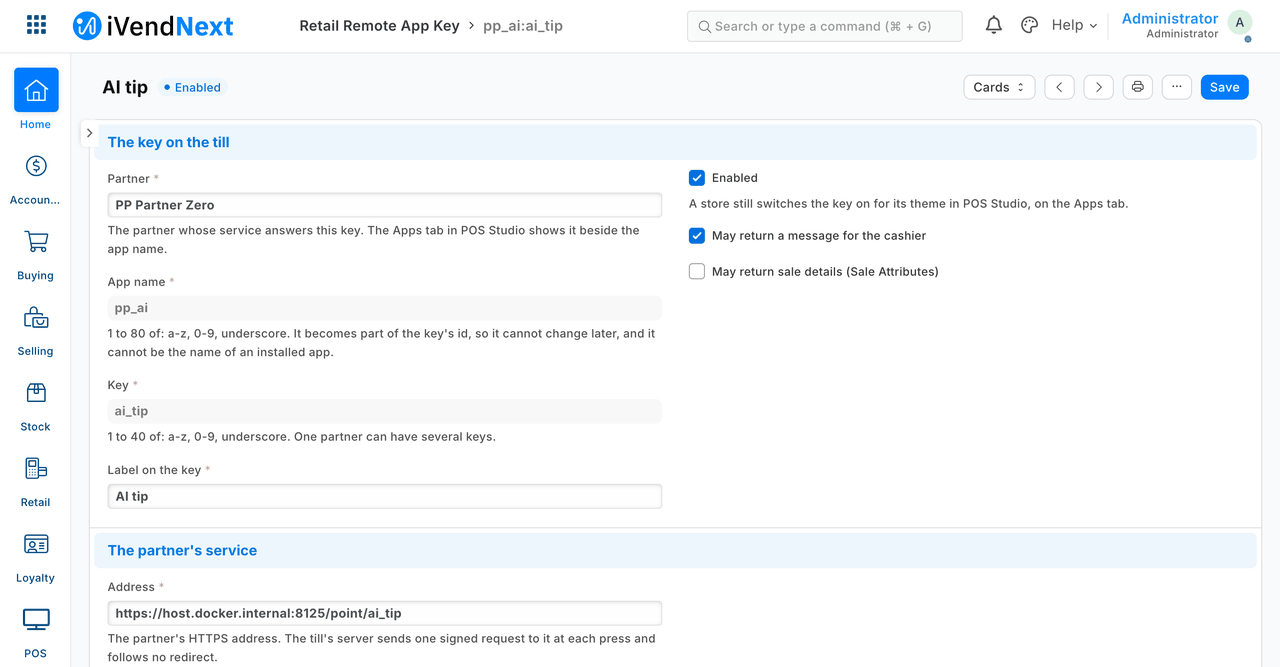
The key's record in Desk, cut above the signing secret.
-
Switch the key on in the store: POS Studio → the theme → Apps → tick the key → Save, as for any till key.
-
Choose a model that answers in time, or raise the time to answer to what the counter can bear. Use a small model and a short prompt (the sample asks for at most 40 words).
What is sent, and to whom.
- Till to your service, on every press: the item codes, quantities and units, the store, the customer on the sale and the cashier, the sale's reference, the register's profile, the company and the currency. No prices, totals or payment details. The shop consents to this when it ticks the box.
- Your service to the model: only the item codes with quantities and the store's name. The customer and the cashier stop at your service. A basket over 30 lines is cut.
Steps: a manager's AI assistant
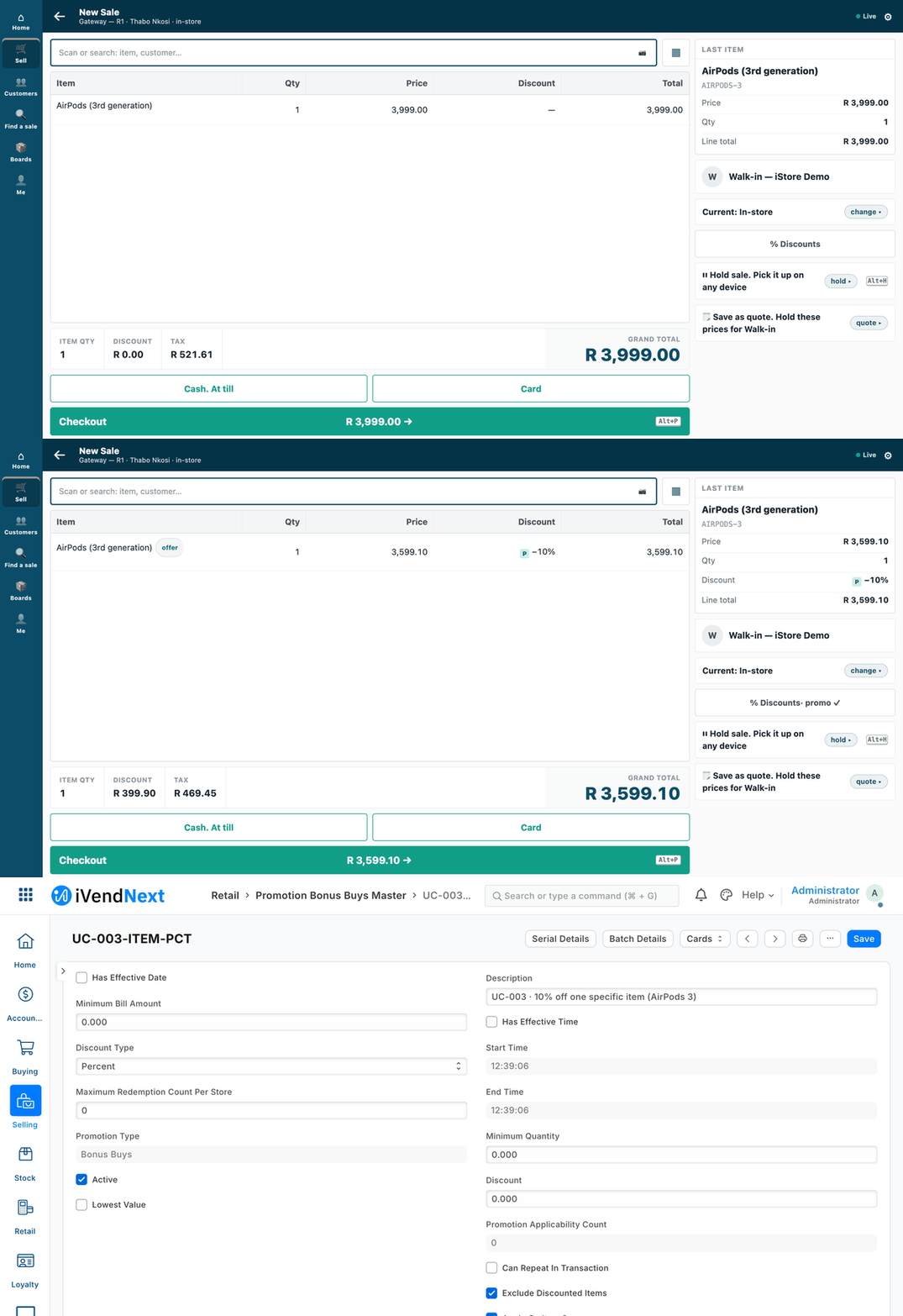
The manager says yes to the 10% off AirPods promotion: the till's price drops from R 3,999.00 to R 3,599.10, and Desk shows the promotion as Active.
-
Give the manager a key with only the rights they need: read on sales, closings, stock, profiles, items, prices and promotions; write on promotions and price rows only if they may change them. The server can never give more than the role has: if a reader's key says yes to a change, the change is refused by the shop (
403). Keep the role narrow for privacy too: the assistant's read tools return any field the manager's key may read, so a customer's name on a sale can reach the AI provider. -
Pick a profile and start the server outside the shop.
profile_read.jsonlets the assistant look: 6 tools, 3 record types, and no write exists in it.profile_writes.jsonadds one write: switching a promotion on or off, or changing a price-list row. It names the one field of each type that may change.
A profile can only take away from the server. Put HTTPS in front of it before anyone else reaches it.
IVN_BASE=https://shop.example python3 tools/mcp_server/server.py --http 127.0.0.1:8130 --profile samples/s10_ai_manager/profile_read.json
IVN_BASE=https://shop.example python3 tools/mcp_server/server.py --http 127.0.0.1:8130 --profile samples/s10_ai_manager/profile_writes.json --writes
Over HTTP, each request brings the manager's own
Authorization: token <key>:<secret>. The server forwards it to the shop and never stores it. An AI desktop app that starts its own tool servers runs the same command without--http, withIVN_BASE,IVN_KEYandIVN_SECRETin its environment. -
Connect the assistant. Any assistant that speaks the Model Context Protocol will do. The profile's words tell it to add sales up in the shop rather than list them, and to show a preview and ask before any change.
-
Test with the scripted assistant before a person uses it. It plays the manager's sentences with fixed rules, so the whole path runs with no AI account:
python3 -m unittest discover -s samples/s10_ai_manager/tests.
How a write is guarded.
- On a read-only server no write tool is even listed.
- The first call has no
confirm. Nothing is sent. The server returns a preview of the exact change, for the assistant to show the manager. - Only after a yes does the assistant call again with
confirm: true. The shop then checks the manager's rights. - One confirmed write is one line on the audit log, with a fingerprint of the manager's key, never the key or a value.
⚠ The server cannot see a person. confirm is the assistant's promise that the manager said yes. Use an assistant that asks before it calls a tool marked as changing things, and read the audit log.
What is refused, and why
- An AI app inside the customer's site, or a key of ours that pays for a model.
- Anything but a message from the till hint. The title is up to 60 characters and the body up to 280. A price, total, payment or stock figure cannot be changed this way, and the till refuses any other answer whole.
- A write without a yes, or beyond the manager's own role, as above. The profile also fences the record types and, for a write, the one field.
- Secrets in logs. The service logs a request id, a status and milliseconds, never the prompt, the sale, the reply or a key. A failure logs only the error's class. The provider call follows no redirect, because a redirect would carry the customer's key to another host.
When your service is down, and when the till is offline
| What happens | The cashier reads |
|---|---|
| The model is slow, past the time to answer | AI tip did not answer in time. Nothing was added to the sale. |
| The model is down, errors or answers nonsense | AI tip could not finish. Nothing was added to the sale. The service never invents a tip |
| The answer breaks the message rules | AI tip answered in a way this till cannot use. Nothing was added to the sale. |
A service that is down, or a wrong secret, is refused whole, with nothing added to the sale. A till key is online only; offline, the sale goes on without it. The manager's assistant needs the shop; offline was not tested, and the MCP server being down is not covered by the kit yet.
Technical notes
What the kit has proven
- The till hint, with no AI account: the prompt carries only what the consent lists; a good answer through the stub and through the chat provider; a wrong or old signature refused; a failing provider gives no tip; a slow one gives the did not answer in time sentence at the 3-second limit; no secret or prompt text in the service's own log; no redirect followed with the key. On the test shop, with the real context built by the till, the till's own validator accepted every answer and refused a 61-character title and a 281-character body; a test fails if the till ever sends a field the consent text does not name.
- The manager's assistant: the answer to what sold in a store yesterday equalled the shop's own closing total, with the same count of sales, added up in one call; an unconfirmed write sent nothing and returned its preview; a no sent nothing; a yes landed once, with one audit line carrying the manager's key fingerprint, and the till's own preview of one item dropped by exactly 10%, then returned when switched off; a reader's confirmed write was refused by the shop; a customer record, a sale, a customer list, a stock entry and a promotion's discount field were all refused by the server itself; the audit log held no key, secret or value.
- A press on the till's own screen, through the released key, walked once (our test bench, 2026-10-07, row SHOTS2, run
pp-20261007T105308Z-98631: S6's AI tip, pressed by a cashier on the till, the iVendNext POS app at8dc36aab8in a desktop browser, frame/pos?frame=terminal; answered over HTTPS, the bench's server trusting a throw-away certificate for the run; the hint showed in the till's own sheet;recipes/ai_till_key.md).
What it has not
- A real AI model. A stub and a scripted assistant stand in; the chat provider ran only against the stub's endpoint. That a given assistant really asks before it sets
confirmis a promise the server cannot check. - More than one press on a till, and a physical till device. The press above is one press, from the till app in a desktop browser; the other cases ran through a stand-in caller following its published contract. A certificate a shop's server trusts by default was not run.
- The could not use sentence end to end, offline behaviour, and logs other than the service's own (the stub's, the console's, the real key's on a refusal).
- A privacy bound: the profile fences the general record tools, but the named read tools return any field the manager's key may read, so a customer's name on a sale can reach the AI provider. Narrow the role in the shop.
- The till app's version: the preview check (a promotion dropping a price by 10%) was taken at the test shop's pinned version; later changes to cart, tender and discount are not re-checked.
- More than one manager, HTTPS in front of the server, and the write path through an assistant's own tool-approval prompt.
- Agents on the event feed: no sample; chapter 5's client is the starting point.
The pictures
Both flows were walked on our test bench on 2026-10-07, iVendNext POS app at 8dc36aab8: S6's till frame is /pos?frame=terminal, 1440 wide, then Desk; S10's is the same till frame, then Desk. Every S6 frame is cut above the record's signing secret; every S10 frame is cut above the till's key row. The S10 conversation itself is text, in the sample's README.
See also
3. The ladder and the four rules · 5. Outside apps and the event feed · 6. Till keys