
5. Outside apps and the event feed
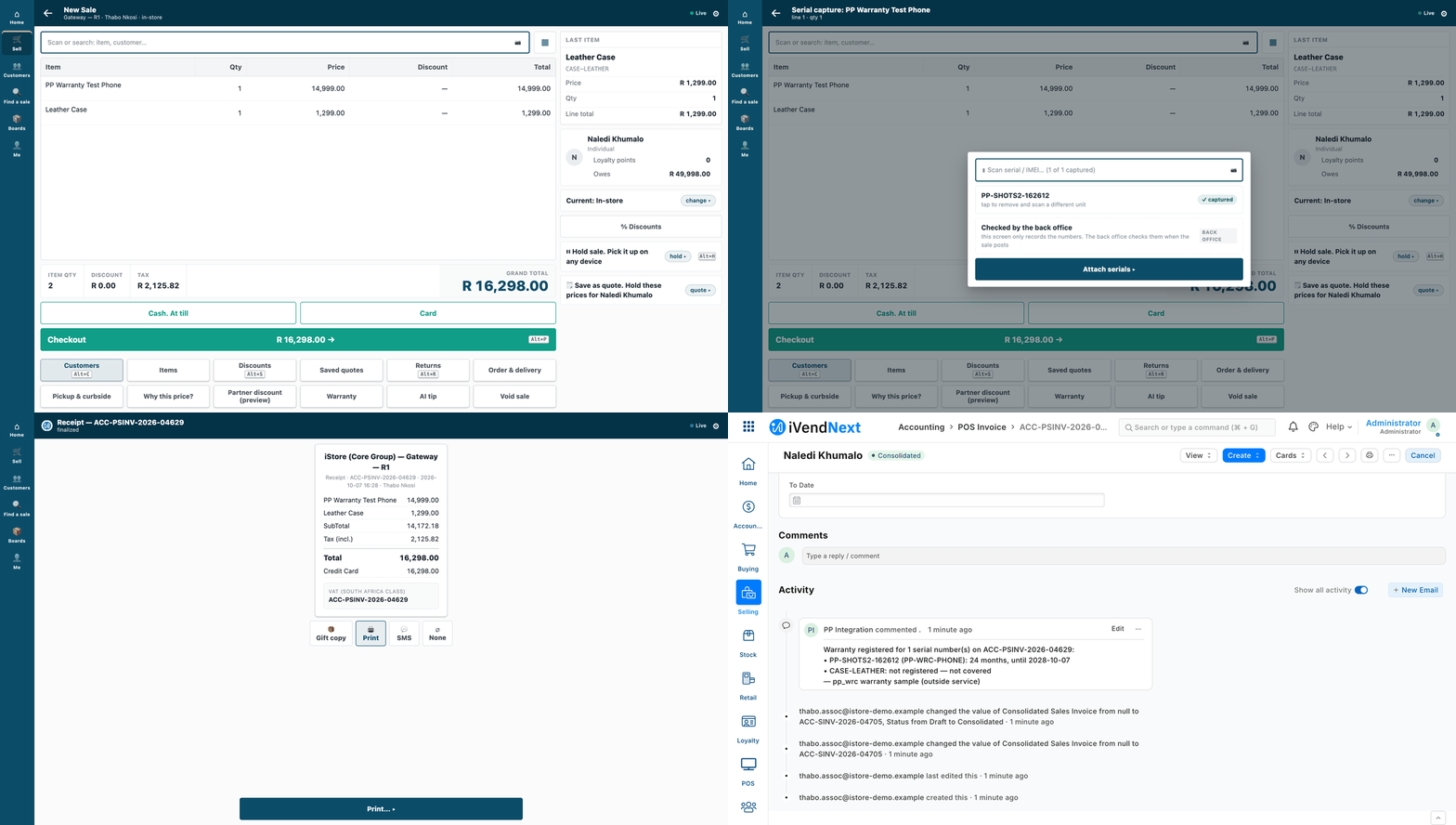
A cashier sells a covered phone; seconds later a partner's own warranty service, running on its own server, has written a comment on the sale in Desk (sample S1).
Your service runs on your own server, in any language. It reads a customer's iVendNext, writes to it and reacts to what happens there. This chapter is for a developer building that kind of connected app.
Reference implementation: Building a connected app · Making the integration user · Reading iVendNext's events reliably with the client ../tools/feed_client/ · Receiving webhooks safely (the nudge only) · the samples ../samples/s1_warranty/service/ and ../samples/s2_bins/service/. Every call the samples make is in ../api/collection/.
When to use it
Rung 2 of the ladder (chapter 3), after configuration (chapter 4): anything that can happen before a sale (prepare data) or after it (react to a sale, sync a system, set a status). If the cashier must see an answer during the sale, add a till key (chapter 6). If you need your own record types inside the shop, ship them in a manifest (chapter 7).
Steps
-
Get a key. The shop makes one integration user for your app, holding one narrow role (chapter 2; the recipe lists the role the bin sample needs). One app, one user. ⚠ On a product before 2026-09-30 that key can do what an administrator can: there every desk user also holds the Workspace Manager role, and with it a key could put content on a shared workspace that runs in the browser of whoever opens it. Since 2026-09-30 only a System Manager gets that role, and the manifest installer refuses an integration user that holds it (chapter 7). Keep the key in a secret store, never in code or chat, and rotate it at any doubt: Generate Keys again, and the old secret is refused at once (
401). -
Make the first calls from the collection, not from a library. Every call is a plain HTTP file;
run.shsends them all withcurlandjq:BASE=http://<shop>:<port> KEY=<api key> SECRET=<api secret> bash api/collection/run.sh -
Read and write records. List with
fieldsandfilters; a list returns onlynameunless you ask for more.PUTchanges only the fields you send. ⚠ A child table sent in aPUTreplaces the record's rows: to add one row, send the existing rows plus the new one. Read a stock balance (Bin.actual_qty) from the shop; never keep your own copy. -
Book a stock movement by asking the shop to book it. One call creates and books it. Send
purposeas well asstock_entry_type: over the API the purpose is not filled in for you.POST /api/resource/Stock Entry {"stock_entry_type": "Material Transfer", "purpose": "Material Transfer", "company": "<company>", "docstatus": 1, "items": [{"item_code": "<item>", "qty": 4, "s_warehouse": "<back room>", "t_warehouse": "<till's warehouse>"}]}Book the movement first, then update your own records with its name as the reason. ⚠ A booking call that times out may still have booked: look for it (a reference in its remarks, say) before you send it again.
-
Learn what happened from the event feed, not from webhooks. The shop's administrator registers your application: its name, the user your service reads as, and the record types you follow. From then on every change to a followed record adds one row to your queue, after the change commits. Your own writes are not sent back to you. Nothing is pushed, so nothing is lost while you are down: the rows wait. Your loop, in this order:
- ask for the oldest events not yet done;
- for each, skip it if you have seen it; otherwise, in one transaction of your own, act on it and record its id in your seen-set;
- mark the page done.
An event fetched and not marked done comes back. So a crash between acting and marking does no harm: the seen-set skips it. A write you make somewhere else (back into the shop, or to a third system) cannot share your transaction. Make that write idempotent too: key it on the record the event names and treat "already exists" as done.
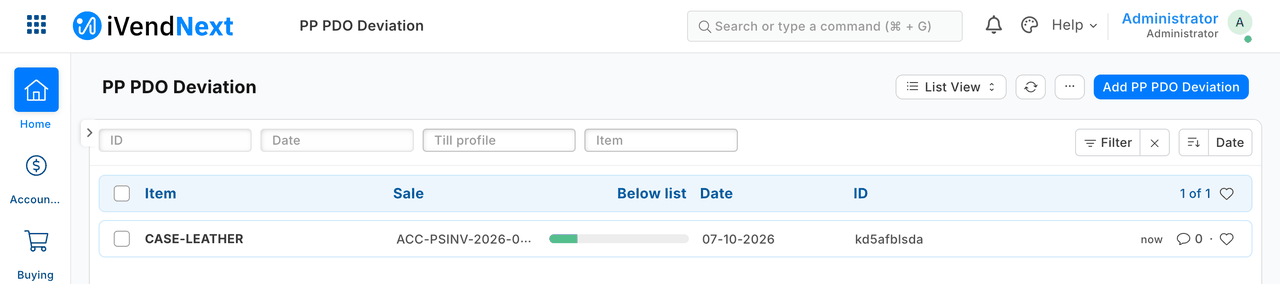
After a sale, a partner's service read the sale's event, read the sale over the API, and recorded the one line sold more than 10% below list (sample S3, reading our own stand-in for the feed; the product's feed is not yet tried).
-
Know what an event is. It names which record changed and how (
sale.booked,return.booked,customer.created, and so on, a published table of labels). It carries no content, so read the record over the API when you need it.- Expect several events per sale (six measured for one till sale): act on the label you need and mark the rest done.
- Events can lag the sale (58 seconds measured with the shop's one background worker busy).
- A sale rung offline produces its events when the till syncs, possibly hours later.
- The day's close merges till sales into a back-office invoice with
is_consolidated = 1: skip it if you follow both, or you count every sale twice. - Mark every row done. The shop clears only done rows (after 30 days), so an application that never marks done grows its queue for ever.
- An application you stop using keeps its rows waiting: disable or delete its registration.
-
Run the reference client instead of writing the loop. It is one file, Python standard library only. Copy it and replace
sample_handlerwith your own, which receives the event and an open transaction of yours. Today, run it on the shop's own sync log (--transport engine):FEED_KEY=… FEED_SECRET=… python3 tools/feed_client/feed_client.py run --base https://shop.example --transport engine --app "<your registered application>" --state state/feed.sqlite --watch 30The key comes from the environment, never the command line, and the client follows no redirect. Two warnings for this transport:
- ⚠ It cannot be scoped to one application. Its key needs read and write on the shop's Integration Sync Log, so one application's key can read another's rows and mark them done. The client filters to its own rows, but that is a convention, not a control: use it where your service is the shop's one consumer.
- Give the key read on the whole record type you follow. On this transport a POS Invoice the key cannot read is labelled
pos_invoice.deleted, notsale.booked, and a handler that acts only onsale.bookedwould skip it.
The scoped feed (
--transport door, the client's default) has shipped as the event feed extension point (chapter 9), but the kit's client has not been run against it: until it has, do not rely on it. -
Reconcile every night, and after any long outage. The reconciliation lists the records created in a window that your service never saw an event for, and keeps no state:
FEED_KEY=… FEED_SECRET=… python3 tools/feed_client/feed_client.py reconcile --base https://shop.example --transport engine --app "<your registered application>" --state state/feed.sqlite --since "2026-10-04 00:00:00" --doctype "POS Invoice"Run it after a pass that ended with nothing left in your queue. Act on what it names through a handler keyed on the record, so acting twice changes nothing.
-
A webhook is only a doorbell (optional). If you want to pull now rather than on your next poll, the shop may send a thin signed nudge. Check the signature over the raw body, before parsing, comparing in constant time. Refuse a bad one with
401. Keep a seen-set so a replayed call does nothing. Answer quickly. Never treat the nudge as the event: it can be lost, delayed or repeated. -
Handle errors by their status:
401: a wrong or rotated key (alert, do not loop);403: outside your role;404: absent;417: the shop refused the record (read the message, do not retry unchanged);- a timeout or
5xx: retry later, idempotently.
The same shape (a cursor, a map of record ids, an idempotency key, a reconciliation that reports and never fixes) carries the large-scale recipes in chapter 10.
What is refused, and why
- Code inside the shop. Your server runs your logic; server scripts are switched off for partners. Logic during a sale means a till key answered by your server (chapter 6) or a sandboxed function (chapter 8).
- Changing money. Prices, discounts, taxes and totals come from the shop's own data; a connected app never writes them onto a sale.
- Your own copy of stock. Your records may say where stock sits, never how much the shop owns.
- A shared key, or an API-only user. Every app has its own desk user, which is how it is meant to be counted and switched off. There is no sign-in grant between servers and no scoped key today: the role is the boundary, so keep it narrow.
When your service is down, and when the till is offline
- Your service is down: the shop keeps selling and your events wait in your queue. Restart and the loop catches up, then run the reconciliation. A webhook is tried three times within a few seconds and then dropped, which is why it is only a nudge.
- The shop is busy or down: your calls time out; retry later with the same idempotency rules.
- The till is offline: its sales reach the shop when the till syncs, and their events appear then. Do not count on webhooks for till sales: they have not been tested.
Technical notes
What the kit has proven
- The feed: with the client stopped and sales and a customer booked, then restarted, every event was collected once and none from another application, on both transports (on the engine transport only because the client filters to its own rows). A crash after three handled events and before marking done: the restart skipped exactly those three. With one sale's event deleted on purpose, the reconciliation named exactly that sale.
- A connected service: the bin service's own tests passed (putaway, pick, a sale, a forged webhook refused, a replay ignored, a fresh event for a handled sale changing nothing, three failed deliveries recovered once by the reconciliation), and the collection ran green end to end.
- The key: a call inside the role answers
200, one outside it403, none403; rotating the key refuses the old secret at once. - The engine feed's scope: measured on the test shop, one application's key read 24 of another's rows and marked one done.
- Workspace Manager (step 1): on the earlier bench pin (
ivendnext_pos457ba607d, without that commit; 2026-10-03) every desk user held it, and a key carrying it planted content that ran in the administrator's browser (measured on 2026-10-03). Since engine commitd52056c(2026-09-30) a desk user gets it only as a System Manager (ivendnext_pos/doc_events/user.py, read at the bench's engine pinf7afcfb61); the installer's refusal of an integration user holding it was proven on the bench with the older engine simulated (row KINDS, runpp-20261007T033429Z-67655). Not measured: whether a key without that role can reach an administrator's browser another way.
What it has not
- The scoped feed (
--transport door) was run only against the programme's stand-in, never the shipped door: unproven against the product. - The nudge (a webhook that tells you to pull) was not run; only its signature check was.
- Till-sale webhooks were not exercised, and disabling an app's user to switch it off was not run (rotation was).
- Volume: a few sales per run. Chapter 10's recipes ran larger, still sequentially. Nothing is measured near a large retailer's day.
- The licence count: whether the shop's user count counts an enabled app user is not confirmed.
- The sample bin service's
/pickis not retry-safe when its booking call times out; check first, as step 4 says.
The pictures
- S1 (under the title): walked in a real browser on our test bench on 2026-10-07, iVendNext POS app at
8dc36aab8; the till frame is/pos?frame=terminal, then Desk. S1's connected leg is nudged by a signed webhook, with a reconciliation pull; it does not read the event feed. - S3 (step 5): walked on our test bench on 2026-10-07, iVendNext POS app at
8dc36aab8. S3 read the feed through the programme's stand-in for the event feed extension point, not the shipped one (unproven against the product, as above).
See also
2. Getting started · 3. The ladder and the four rules · 6. Till keys · 7. Manifests · 10. Integrations · 16. Possible, not possible, limits