
S54 — Sell-through by size (pp_sst): which sizes and colours sell, store by store
Start from this sample: python3 tools/manifest/start.py s54_sell_through --prefix "ACME STR" copies it into apps/ of your repository under your own prefix (your company's first word, then a short name for the app) and checks it (how).
A fashion retailer's buyer wants to know which sizes and colours of each style sell out and which sit on the shelf, store by store, so the next order and the next transfer follow the sizes that sell. A buyer names a range, the stores and a start date, and presses a button: the app writes, for each style, colour, size and store, the units sold at the till since that date, the units still in stock, and the sell-through. It is the worked sample of the recipe reading the retailer's own reports: both figures come from the retailer's own reports, never from a copy.
When to use it: the retailer sells styles in sizes and colours (clothing, footwear, sportswear) and wants sell-through per size in each store, from its own till sales and stock.
What happens
| When | What happens |
|---|---|
| A buyer makes a run | A title; the item group (its own items, not its sub-groups) or one style in it; Sold since; the size attribute (such as Size) and the colour attribute (such as Colour, or none); one to 20 stores |
| The buyer presses Work out sell-through | The service reads the run, the two attributes' own order of values, the group's items with their size and colour, and for each store the retailer's POS Sale Report and Stock Projected Quantity. It writes one row per style, colour, size and store that sold or holds stock, and a summary line, and says how many rows it wrote |
| A row | Sold: the till's units sold since the date, returns taken off. In stock: today's stock, less any till sale whose stock has not left yet (the report's Reserved for POS). Sell-through %: sold divided by sold plus in stock. None left: in stock is 0 or less |
| The order of the rows | By style; colours and sizes in their attribute's own order (XS, S, M, L as the retailer listed them, never the alphabet's); stores in the run's order |
| The buyer presses again | The rows are replaced with today's figures |
| A run without a store, a start date after today, more than 20 stores | Said in words; nothing is read or written |
| A group with no variants carrying the size attribute | Said in words; nothing is written |
| More than 1,000 rows | Said in words (name one style, or fewer stores); nothing is written |
| Reads that take the press's time | Said in words (name fewer stores): a style narrows the item read only, while each report reads every item the store sold or holds; nothing is written |
| A report refuses the app's user, or is switched off | Said in words, naming the report: check the app's role is on it, every right the setup names, and that the report is on |
| A report moved to the background (a prepared report) | Said in words, naming it: untick Prepared Report on it |
| The app's user refused by the retailer's iVendNext | Said in words: check the app's user, its role and the report rights |
| The service down | The button's own words: Work out sell-through did not answer in time. Check the record before you try again. Nothing is written |
| What the buyer sees (on a demo site, 2026-10-29) | |
|---|---|
| What the install will change, read before you consent | 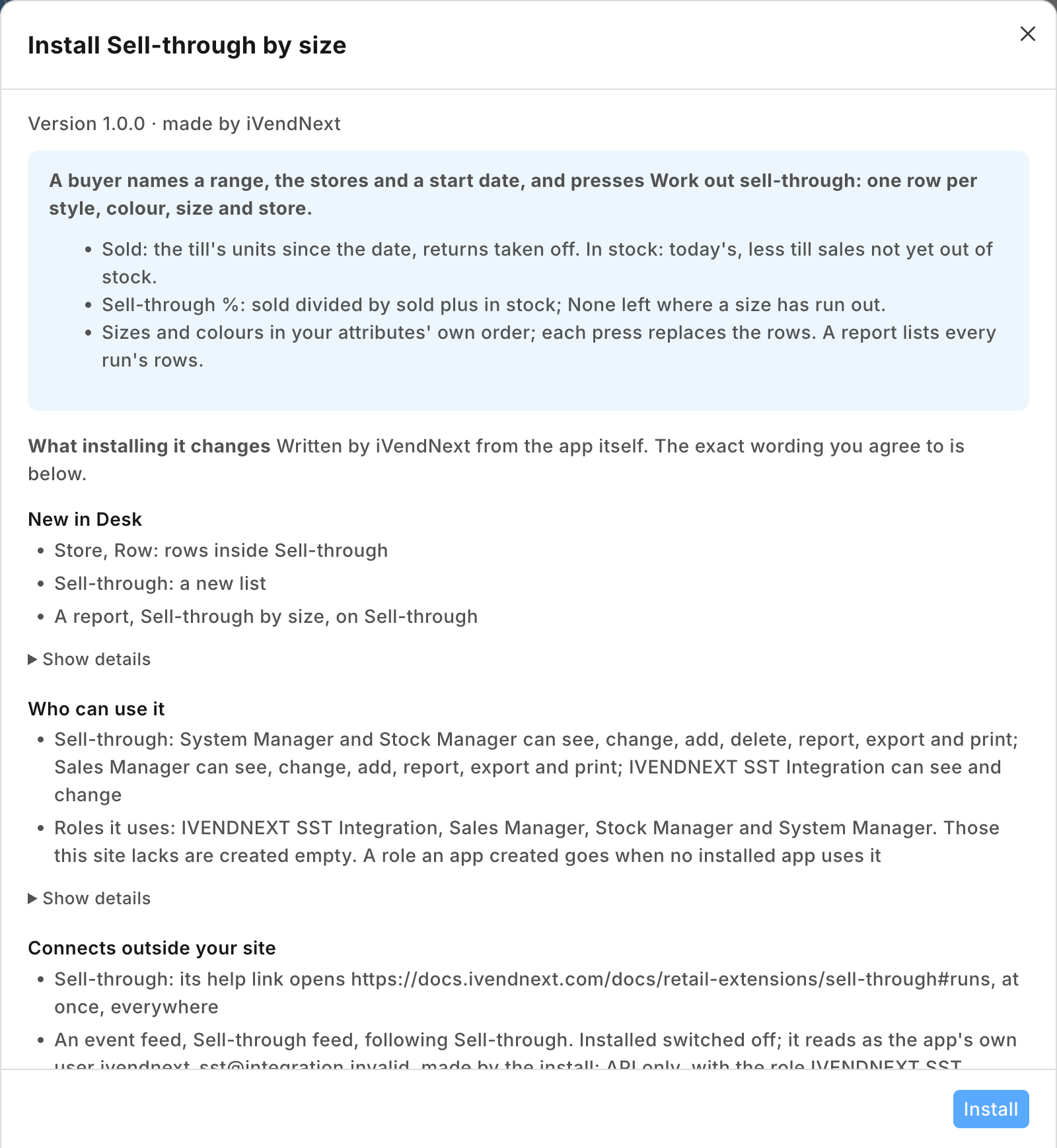 |
| A run for two stores after a press: the sizes in their attribute's order, the till's sales at one store against the stock in both | 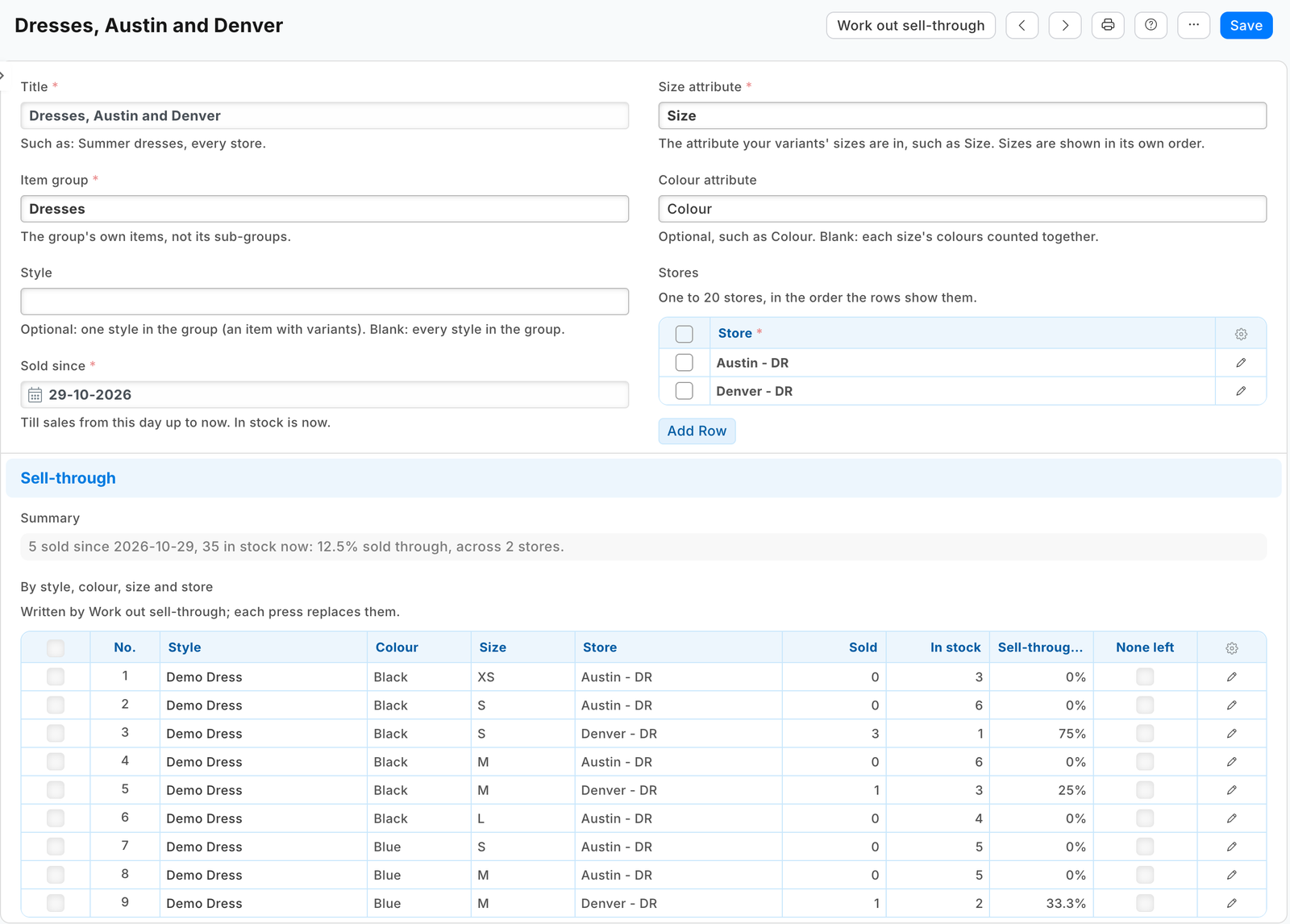 |
| The report of every run's rows | 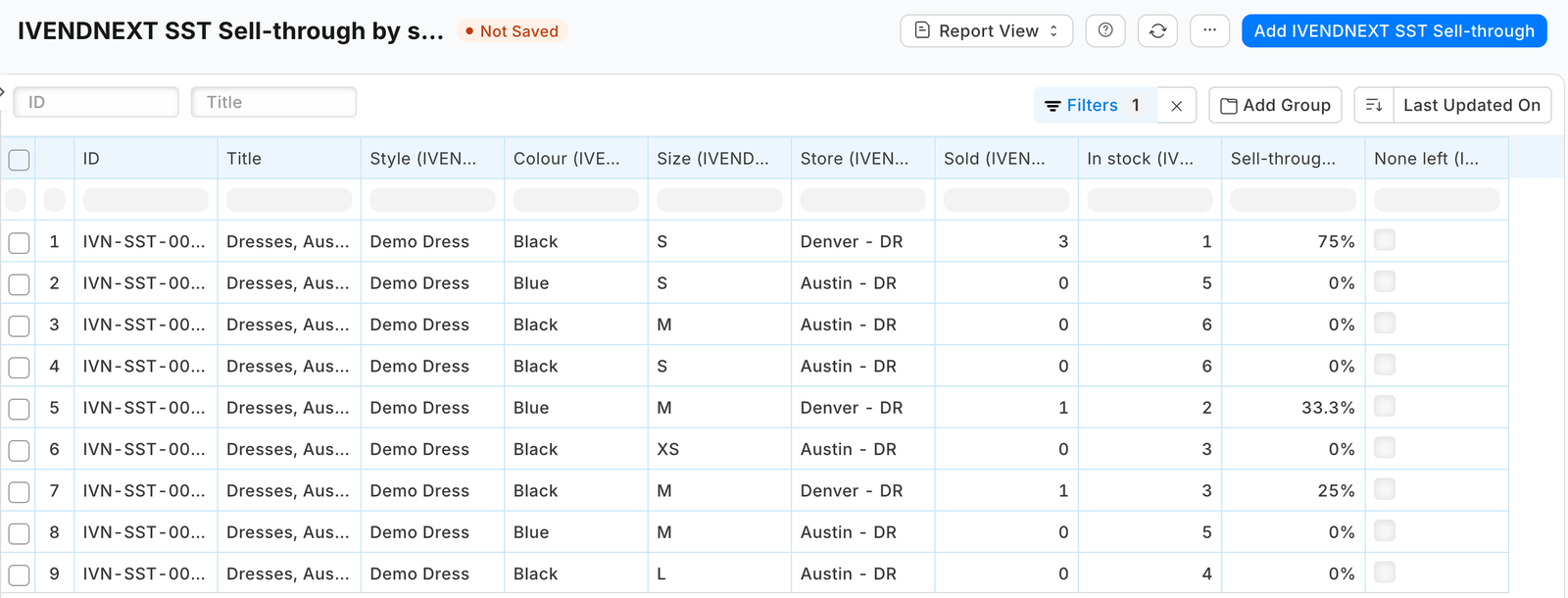 |
What iVendNext does
- Install the app from the App library (or paste its manifest into Retail Extension Package in Desk), read what it will do and consent. It comes in switched off: its service has no consent and is off, and its button is off. The install adds the record type PP SST Sell-through (with its tables of stores and rows) and the report PP SST Sell-through by size, and makes the role PP SST Integration.
- Give the app's user its reports and reads. From POS 2.1.0.667 the install made the app's own user,
pp_sst@integration.invalid, and named it on PP SST Sell-through feed. It holds the role PP SST Integration alone and works through the API only; give it no User Permissions. In Role Permission for Page and Report, add that role to the reports POS Sale Report and Stock Projected Quantity. In Role Permissions Manager, give it Read and Report on POS Invoice; Read on Item, Item Attribute, Warehouse and UOM; and Select only on POS Profile, Item Group, Customer and Customer Group: a new row in Role Permissions Manager comes with Read ticked, so untick it there (Read on Customer would let the app's user read every customer). A report checks its reader's rights on every record type its filters and lookups name, and these are the least both reports answer with (measured on our test bench, one right at a time). The install gives the role its rights on the app's own record types. A service for one retailer: press Generate Keys on that user (User, API Access) and put the key in the service's settings. A service for many retailers is handed the key by the retailer's site itself; press Connect again on the app's record only if the site could not reach the app, or a key was lost or changed. - Your buyers are your Stock Managers and Sales Managers: they keep the runs and press the button (a System Manager too). In Role Permissions Manager, give both roles Select only on Item Attribute and Warehouse (untick the Read a new row comes with): the run's size and colour attributes and its stores are picked from those, and neither role has them by default (measured on our test bench: the form's search refused both to each role alone).
- Switch the service and the button on: Retail Extension Subscription, the record Sell-through: read what it is sent, tick the consent, switch it on. Then Retail Desk Action, the record Work out sell-through: switch it on.
- Test it: make a run for one item group, one store and the first of this month, and press Work out sell-through. The rows must match what POS Sale Report (report type Item) and Stock Projected Quantity show for that store.
Where it shows. In Desk: the runs' list and form, with the button on the form; the report PP SST Sell-through by size. At the till: nothing new.
What leaves the retailer's iVendNext. On each press, the retailer's server sends the service the pressing user's login and language and the run's name. The service then reads, with the app's user's key: the run, the size and colour attributes, the group's items (code, style and attributes), and for each store POS Sale Report (store, item, the sale amounts and units sold; the service keeps the units only) and Stock Projected Quantity (the item's stock figures). It writes the rows and the summary on the run. No customer is read. It keeps nothing of a call. A hosted copy holds each retailer's press secret and the API key of the app's user until the retailer removes the app. Say so on your card.
The files
| File | What it is |
|---|---|
manifest.json |
the record type PP SST Sell-through (numbered SST-#####) with its tables PP SST Store and PP SST Row (the rows are read only: the integration role writes them), the report, a help address, a feed registration (it names the app's one integration user), one desk_action service and the button Work out sell-through on the run's form for Stock Manager, Sales Manager and System Manager; installed switched off |
sst.py |
the pure core: the press's signature (verify) and run (run_of_press), a run (run_of), an attribute's order (order_of), the group's variants (variants_of), the two reports' answers read by their column names (sold_of, stock_of), the rows (rows_of), the sell-through (sell_through), the summary (summary_of) and the press's answer (message) |
service/app.py |
the service, standard library only: POST /sst/work (the press), GET /health, and the app template's handshake for many retailers; one handle answers the web server and the function entry (lambda_handler) alike |
Dockerfile · app.json |
the settings file for hosting ("runs": "function": on CitiXsys hosting it is a function, paid per call) and an image for your own server (built from the kit's root) |
tests/ |
the core, the service over the wire with signed presses (one retailer and many), iVendNext's reads and writes against a stand-in iVendNext, the manifest; canaries.py breaks each guarded rule and expects its test to fail |
Run it
python3 -m unittest discover -s samples/s54_sell_through/tests -p 'test_*.py'
python3 samples/s54_sell_through/tests/canaries.py
python3 samples/s54_sell_through/service/app.py samples/s54_sell_through/service/.env.local
Settings, one retailer (service/.env.local, never committed): IVN_WORK_SECRET (handed back at install as pp_sst:sub:work), IVN_SHOP_URL, IVN_SHOP_KEY (<api key>:<api secret> of the integration user), PORT. SST_PREFIX names the record types (default PP SST).
Before you install: every host.docker.internal address in manifest.json (in allowed_urls, and where the manifest calls it) is our test bench's own address for the sample's service, and it resolves only where Docker provides it. Replace it with your own service's address first, or iVendNext's presses never reach your service; if this manifest is already installed, raise its version and install it again (the manifest recipe, step 6).
Many retailers, hosted
The service is the app template's shape: set IVN_LIBRARY_APP and a store (IVN_SHOPS_TABLE on CitiXsys hosting, else IVN_SHOPS_FILE). Each retailer connects itself after its install and hands over the press's secret and the key of the app's own user (Connect again is only for when the site could not reach the app, or a key was lost or changed). Until the key arrives a press is answered in words. Every press names its retailer's iVendNext (X-iVendNext-Site), so each retailer is read with its own key.
Make it your own
What a partner usually changes:
- the figures: stock turn or weeks of cover beside the sell-through (Stock Balance's opening and closing, read the same way), or a size curve the buyer planned, to compare each size's share with;
- the sales: the online store's or wholesale orders as well as the till's (read Item-wise Sales Register too, and give the role its report);
- what follows: a transfer request for a size sold out in one store and held in another, or a markdown list for sizes that sit;
- the prefix:
tools/manifest/rename.pymakes your copy under your own reserved prefix in one step; the service takes its prefix fromSST_PREFIX; - its records:
tools/deploy/copy_records.pymoves the runs between a test site and the retailer's iVendNext.
Before you copy it
- The retailer's reports are the source. The service never rebuilds a figure from records: a change to how iVendNext counts a sale or stock reaches the app with it. If a report's columns change, the press says so and writes nothing.
- Report rights are the retailer's to give. POS Sale Report belongs to the accounting roles and Stock Projected Quantity to the stock roles: adding the app's role to both lets its user read every store's figures in them. The rights the reports ask for go further: Read on POS Invoice lets the app's user read the till sales themselves (their customer included), and Select on Customer lets it list customers' names. The service reads neither; say both on your card.
- The engine's stock report. iVendNext switches the standard Stock Projected Qty off at install and ships Stock Projected Quantity with the same filters and columns: read that one.
- A report moved to the background stops the press. iVendNext makes a script report a prepared report once a run of it takes more than 15 seconds (Stock Projected Quantity is one; POS Sale Report is a query report and is never moved), and a prepared report answers this app only with a run its own user prepared, which the service never asks for. The press then says so and writes nothing; the cure is to untick Prepared Report on the report. Many stores pressed at once on a large catalogue are what can take that long.
- Today's stock. In stock is now, so a run reads from its start date up to today. A till sale whose stock has not left yet is in the report's Reserved for POS, and the app takes it off, so a plain till sale counts once, before and after its day closes (measured on our test bench, where the till's sales left stock at once and Reserved for POS read 0).
- A press, not a schedule. The rows are worked out when a buyer presses. On CitiXsys hosting a function has no schedule yet; when it has one, the same press handler runs on it unchanged.
Technical notes
Why it is built this way
| Option | Cost | Verdict |
|---|---|---|
| Do nothing | 0 | the buyer exports two reports and joins them by hand, by item code, with no size order |
| Stock Balance with Show Variant Attributes, by store | configuration | stock by size per store, but its Out Qty counts transfers as sales, and there is no sell-through |
| A manifest report only | — | a manifest's report reads one record type: no join, no sum, no ratio |
| A container recomputing every night | about the same code, and a container's monthly cost | a press when the buyer asks does the same at no standing cost |
| A press that reads the retailer's two reports and the items, and writes the rows on the run | about 400 lines of core and service with their docstrings, and about 600 of tests | picked: kit doors only, a function paid per call; S49's press shape reused |
The answer, exactly
- The press's reads, side by side (eight at a time), each with its own timeout inside the press's 7 seconds:
GET /api/resource/<prefix> Sell-through/<run>;GET /api/resource/Item Attribute/<size attribute>(and the colour attribute's);GET /api/resource/Itemwithfields["name","variant_of","attributes.attribute","attributes.attribute_value"],filters[["item_group","=",<group>],["variant_of","is","set"],["disabled","=",0]](and["variant_of","=",<style>]),limit_page_length5000; for each storePOST /api/method/ivendnext_mpos.api.v1.run_reportwithreport_namePOS Sale Report andfilters{"report_type":"Item","warehouse":<store>,"from_date":<sold since>,"to_date":<UTC's tomorrow>,"pos":"","item_group":"","item_code":"","customer":"","customer_group":""}(its columnsitemandunit_soldsare read), and with Stock Projected Quantity and{"warehouse":<store>,"item_group":<group>}(no company: the store decides it) (its columnsitem_code,warehouse,actual_qtyandreserved_qty_for_pos). A read past the press's time writes nothing. - The write: one
PUT /api/resource/<prefix> Sell-through/<run>withrowsandsummary, given 4 seconds, and only with a second of the press left. - The rows: a variant's size and colour are the values of the run's attributes on the item; an item with no size is left out; without a colour attribute, a size's colours are one row. A row is written only where the store sold or holds that size and colour.
Bounds, stated
- The till's sales only, as the report counts them. POS Sale Report counts every submitted till sale (POS Invoice), returns taken off, by the units on the sale's line; it has no filter by kind of sale. A till order not yet delivered is counted sold while its unit is still in stock, and a pack unit is counted in packs while stock is counted in the stock unit (measured on our test bench with plain sales in the stock unit only).
- An item past its end of life keeps its sales, but Stock Projected Quantity leaves it out, so it reads as none left.
- A store is one warehouse. POS Sale Report matches the store exactly, and the app keeps only that warehouse's own stock: a group warehouse chosen as a store reads as nothing sold and nothing in stock.
- A disabled variant is left out of the run, sales and all.
- Dates: the sales are read from Sold since to UTC's tomorrow, so a store ahead of UTC never misses today's sales; no sale is dated later. The service writes no time: the run's own activity shows when it wrote, in the site's time zone (a time it wrote in UTC would read hours wrong there, measured on our test bench).
- At most 20 stores, 5,000 item attribute rows and 1,000 rows a run.
- Where it runs: the App library's copy runs in CitiXsys hosting's US region. The first press after a quiet spell starts the function (1 to 2.5 seconds, measured on earlier apps), inside the button's 10.
- It logs one line per call: the route, the status and the milliseconds, never a body or a key.
Needs this serves
- Our service runs one of the retailer's reports, with filters, and reads the rows — Ready, with limits (4)
- Which sizes and colours of each style sell out and which sit, in each store, against the stock still there — Ready, with limits (4)