
S33 — Click and collect (pp_ccb): a Desk board for web orders
A store's board for the web orders it must pick and hand over, in Desk, from a manifest alone. A report lists the web orders still to pick; two fields on the delivery note record the hand-over, and the Delivery Note list filtered on one of them lists the orders waiting for their customer. Nothing leaves the shop: no service, no outside address.
It uses the manifest's custom_fields, reports and workspaces. When to use it: a shop sells on the web and its customers collect in store, and you want every store to see the same lists without building a screen.
What the shop does
- Install the app. It adds two fields to Delivery Note, a report and a workspace, Click and collect. It adds no record type and no role.
- Open the workspace (search Desk for Click and collect). It opens the sales orders and the delivery notes, and says where the two lists are. Web orders to pick (search Desk for it) lists the submitted sales orders still to deliver that carry a web order number; filter it to your store's warehouse. Anyone who can read sales orders can open it. Delivery notes, filtered on Status To Bill or Completed, Is Return No, % Returned less than 100, Handed over No, Customer's Purchase Order No is set, Set Source Warehouse your store's warehouse, and Date on or after the day you install, lists the orders waiting for their customer; save that filter once as Waiting for collection (a saved list filter is each user's own: each person who hands orders over saves it once). Each filter matters: without Status a draft or canceled note waits, without Is Return a return waits, without % Returned an order returned before collection waits, without the order number the store's other deliveries wait.
- Pick an order the usual way: from its sales order, make and submit its delivery note. A WooCommerce web shop then tells the customer Ready to collect (the connector does that on the delivery note's submit, not this app). The order leaves the pick list and its note is waiting.
- Hand it over. When the customer comes, open its delivery note from Waiting for collection, and on its More Info tab open Customer PO Details; tick Handed over and write Collected by (the name on their ID), and save. The note leaves the list. Its history (Activity) records who ticked it and when.
| What the store sees (a demo store) | |
|---|---|
| The workspace: the line saying where the two lists are, and the two lists | 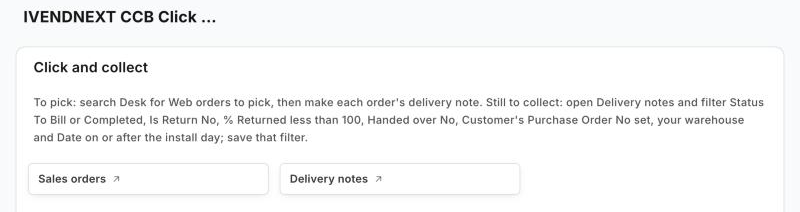 |
| Web orders to pick, with one web order to pick (it opens with the sales order list's usual columns: see Bounds) | 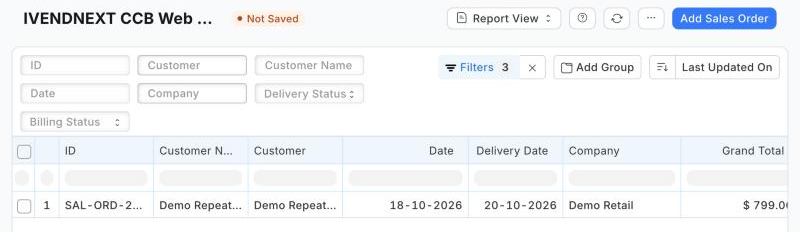 |
| The waiting filter's seven conditions, each added under Filter › + Add a Filter | 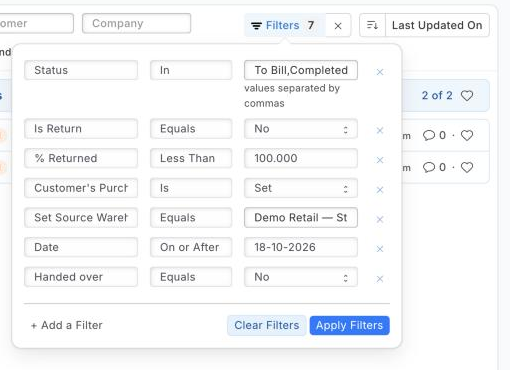 |
| The hand-over on a submitted note: More Info tab › Customer PO Details | 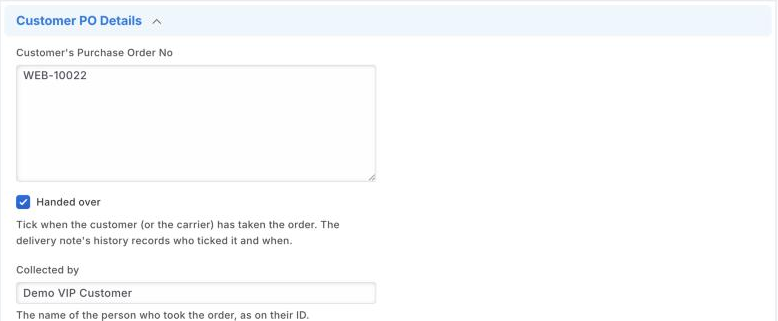 |
| The note's Activity: who ticked it and when |  |
Where it shows. In Desk only: the workspace, the report, and the two fields on the delivery note's form and list (Handed over is a list column and a list filter). Nothing is shown on the till, printed or sent.
What leaves the shop. Nothing: the manifest names no outside address.
The files
| File | What |
|---|---|
manifest.json |
the two fields (on the shop's Delivery Note, settable after submit; Handed over a list column and filter), the Report Builder report (its filters as data), the workspace (the Sales Order and Delivery Note lists, and a line naming the report and the waiting filter) |
tests/test_manifest.py |
the manifest passes the kit's checker with no warning; the fields can be set after submit and carry no default; Handed over is a list column and filter; the report's filters are the list above and name no field the manifest adds; the workspace opens the sales orders and the delivery notes, never its own report; nothing leaves the shop |
tests/canaries.py |
each test goes RED when the rule it guards is broken |
Run it
The tests need nothing but Python:
python3 -m unittest discover -s samples/s33_click_and_collect/tests -p 'test_*.py'
python3 samples/s33_click_and_collect/tests/canaries.py
Install the manifest in a shop through Extension Packages (guide chapter 3), then open the workspace.
What is refused, and why
- A default on the two fields: the checker refuses a default on a field added to a shop's own record type, because the server would apply it on every save of a delivery note.
- A report that runs SQL or code: only Report Builder reports, whose filters are data.
- A report on Delivery Note that names Handed over: the shop checks a report's fields against the record type as it is before the install, so a report cannot use a field its own manifest adds (not fields of Delivery Note). That is why the waiting list is the Delivery Note list with its filter, not a report.
tools/check/check.pyandtools/deploy/deploy.pyrefuse it too (tools/manifest/site_rules.py). - A workspace shortcut to the manifest's own report: the shop makes a workspace before the manifest's reports, so the link cannot be saved (Could not find Row #1: Link To: …). The workspace links the two lists and names the report;
site_rules.pyrefuses such a shortcut too.
Technical notes
What counts as a web order
A sales order or delivery note with a customer's order number (po_no), which our WooCommerce connector fills with the web order's number. So a Desk order typed with a customer's order number shows too, and a web order shipped from a store's own warehouse shows as well (staff tick Handed over when the carrier takes it). The connector marks nothing on the order that says collect: it keeps that in its own import record.
Why it is built this way (R6)
The till's own pickup board (Picking → Ready → Handed over) lists till sales only, so web orders never reach it. A board on a partner page cannot serve the counter: a page key on the till opens only over a sale with an item, and a Desk page has no write-back. So the smallest thing that gives every store the same lists is configuration, shipped as a manifest: the same fields and report a shop could make with Customize Form and Report Builder, installed and removed in one step.
The bench
Proven on our test bench on 2026-10-18 (APPF run 5, final run pp-20261018T121126Z-34614, iVendNext POS at beta's build): the manifest installed (two fields settable after submit, Handed over a list column and filter; the report on Sales Order, given by the shop the roles that read sales orders (seven on our bench); the workspace with the two lists and its line) · a web order (a submitted sales order with a web order number) was on Web orders to pick and a Desk order beside it was not · its delivery note made and submitted: the order left the pick list and its note was on the waiting list (the Delivery Note list filtered as above, read as a Stock User) · a Stock User ticked Handed over and wrote Collected by on the SUBMITTED note: it left the waiting list, and its history named that user and the time · a return of that note (its web order number copied) was never waiting · the uninstall, with the hand-over still recorded, exported the two fields' values to a private file and left the schema as found; the notes stayed · no POS day opened. The same manifest, as the library's app, was rehearsed with developer mode off in an earlier run of the same day (pp-20261018T120803Z-29420): check, install, update, export and uninstall, reinstall, the schema before and after identical. The first two runs found what What is refused now says: a report naming the manifest's own field, and a workspace shortcut to its own report, are refused by the shop.
Bounds, stated
-
A return before collection: On today's iVendNext a delivery-note return does not update its original's % Returned (measured on our test bench), so an order returned before it is collected stays on the list: cancel its delivery note instead of returning it.
-
Who opens the report: the manifest gives it no role list, so the shop gives it the roles that read sales orders when the app is installed; a role given that right later is added to the report in Report › Roles.
-
Notes from before the install carry Handed over No, so a store's older web deliveries would wait too: add Date on or after the day you install to the saved filter.
-
A return or an amended note copies Handed over and Collected by from its original (a manifest cannot mark them not-to-copy); the waiting filter leaves returns out, and an amended note's fields can be cleared by hand.
-
The report's columns: on today's iVendNext the shop does not apply a manifest report's
columns, so Web orders to pick opens with the sales order list's usual columns (seen on a demo store, 2026-10-18); the store adds Customer's Purchase Order No and Set Source Warehouse from the column settings. Asked of the product. -
The titles show the app's prefix in Desk (IVENDNEXT CCB Click and collect); Desk search on the plain name still finds them.
-
The lists are Desk lists: the till does not show them.
-
Who and when of a hand-over are the delivery note's own history, not fields.
-
A web order booked as a sales invoice (the connector's other setting) has no sales order to pick; it shows once its delivery note exists.
-
Web orders to pick shows each order until it is fully delivered; a partly delivered order stays on it.