
S16 — Assign pick route (pp_pck): a Desk action
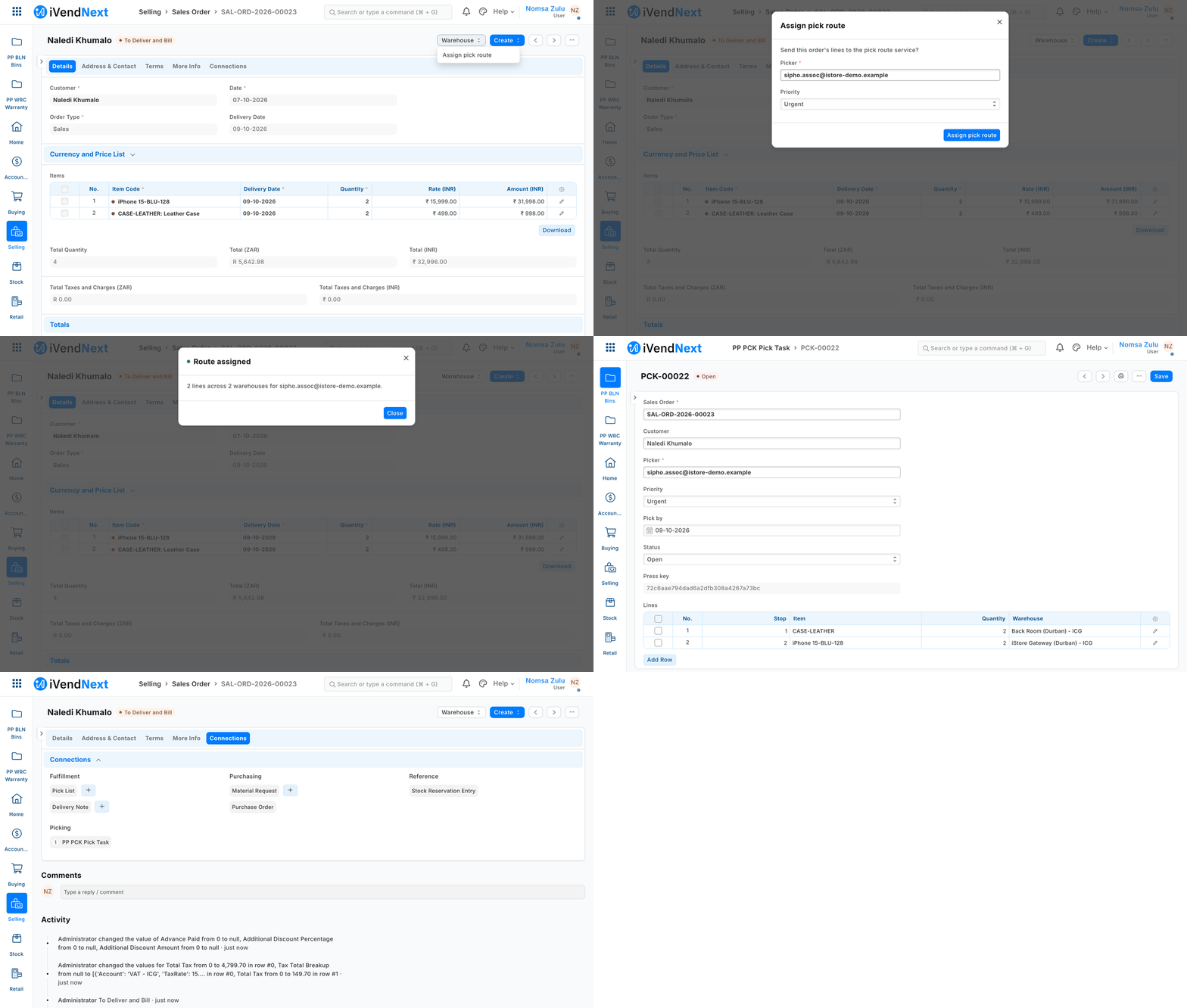
A stock user presses Warehouse → Assign pick route on a Sales Order, picks a colleague and a priority, and the partner's service opens a pick task listed under the order.
A button in iVendNext Desk that hands a record to your own service, which does real work and answers. This sample is for a developer who wants a press in Desk to create something in their system: here, a pick task for a Sales Order.
When to use it: you want a button on a Desk record that sends the record to your service and shows the answer.
What happens
- A stock user opens a submitted Sales Order and presses Assign pick route (menu Warehouse).
- The shop's own dialog asks for a picker and a priority. The user fills them in and confirms.
- The shop sends the order's lines to your service, signed.
- Your service creates a pick task (
PP PCK Pick Task, this app's own record type) over the record API, with its own key, then answers. - The task opens. It is also listed under the order (Connections, Picking).
The Sales Order itself does not change. From the order list, the same button runs on several orders at once (one task each, one message).
What it looks like
The names in the pictures are a demo shop's: a stock user, a customer's order, and a colleague picked as the picker.
| Step | Screenshot |
|---|---|
| 1. A submitted Sales Order: the Warehouse menu holds Assign pick route | 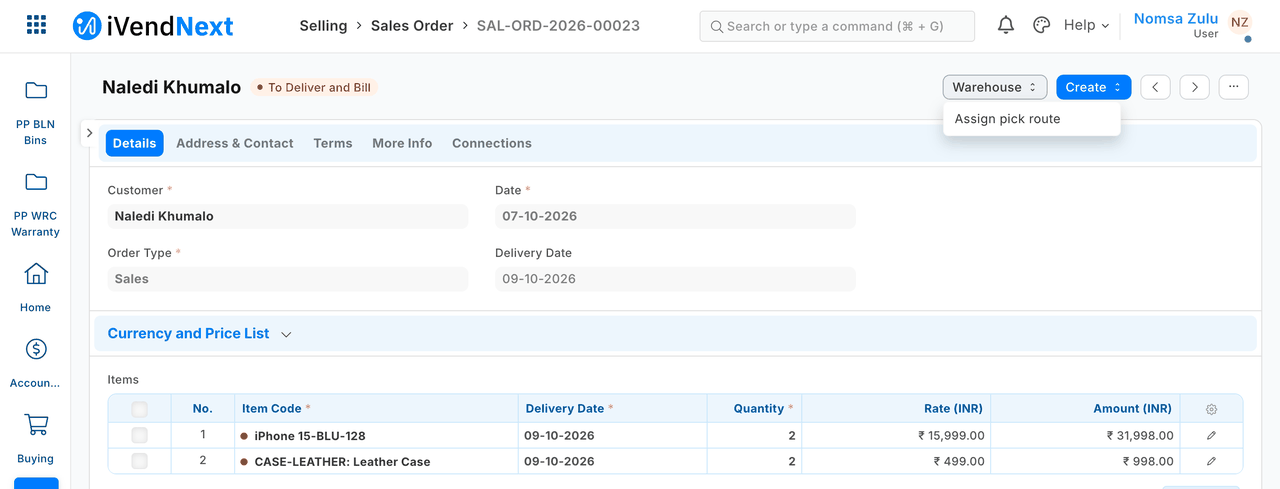 |
| 2. The shop's own dialog: Picker and Priority, filled in | 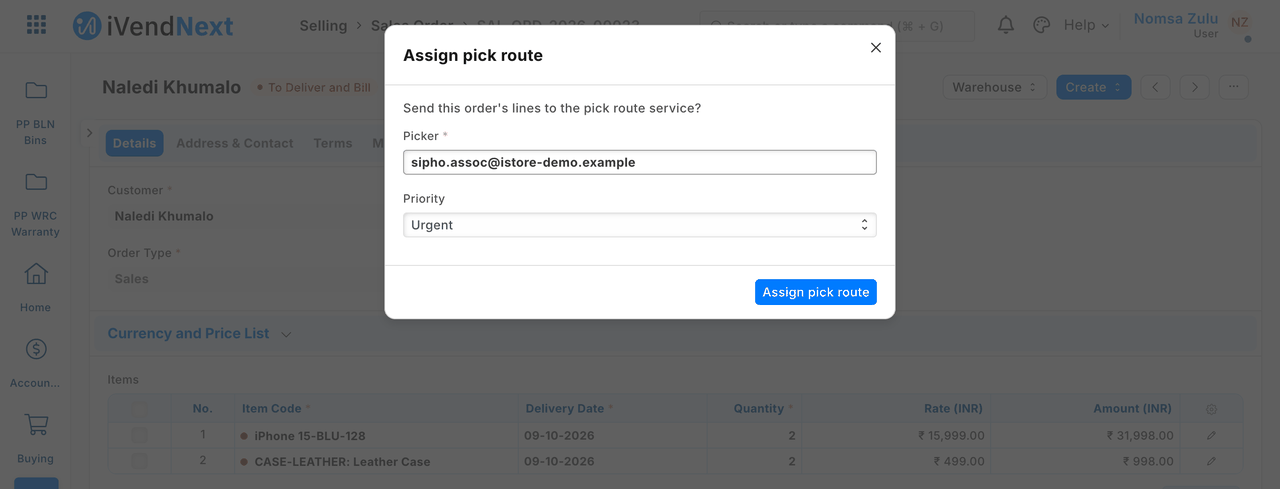 |
| 3. The partner's answer: Route assigned — 2 lines across 2 warehouses | 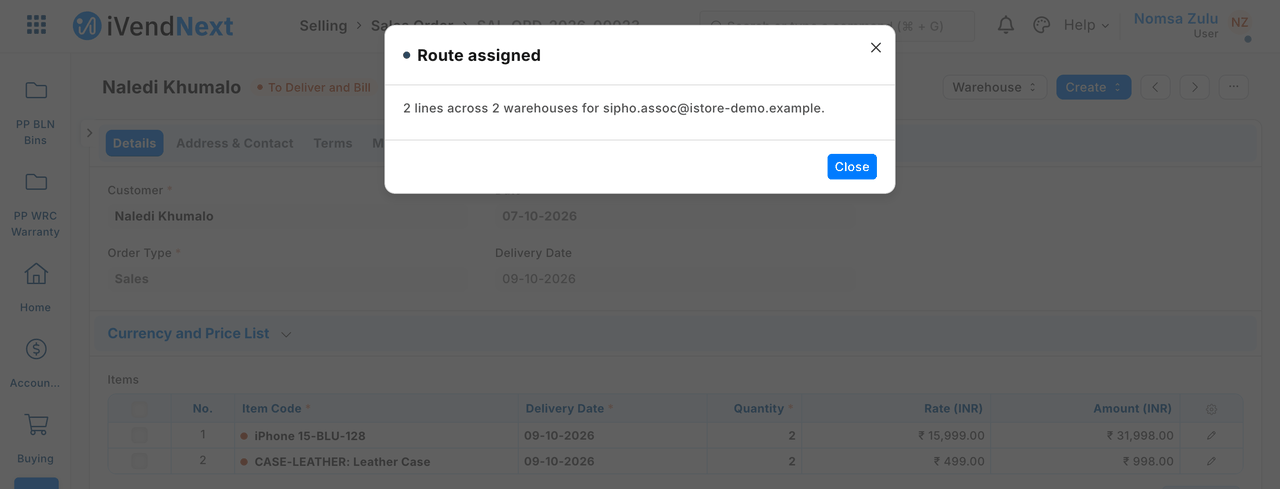 |
| 4. The pick task the service made, opened: the order, the picker, the priority, the lines in walking order | 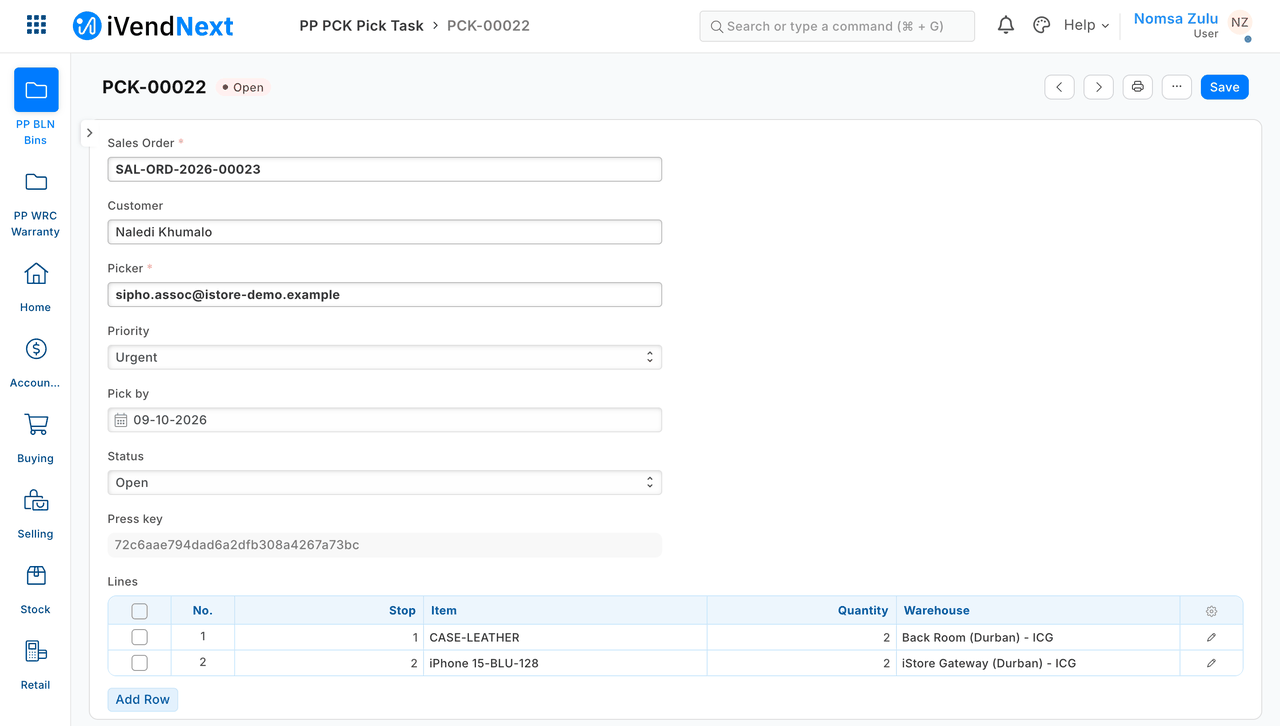 |
| 5. The order's Connections: the task is listed under Picking | 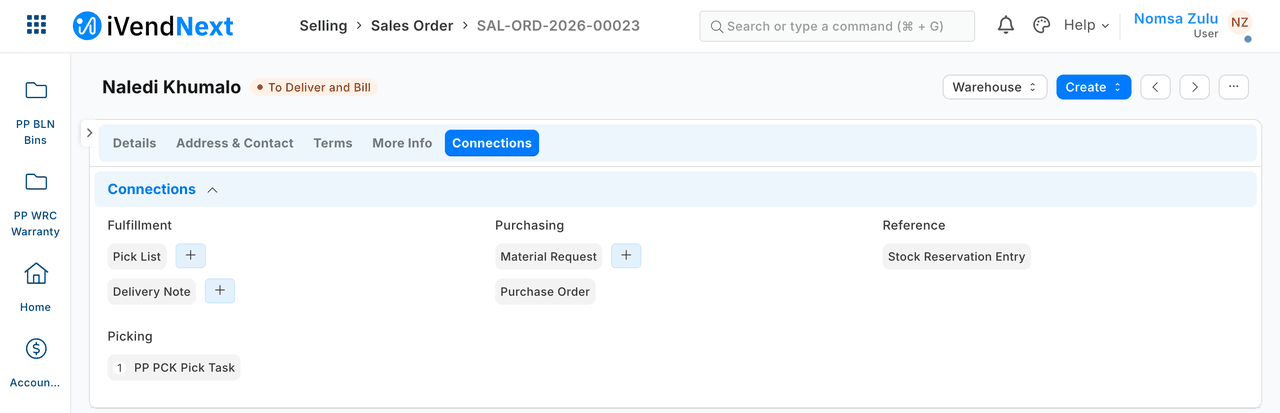 |
The files
| File | What |
|---|---|
manifest.json |
the pick task and its lines, the Connections link, the service (extension_subscriptions, extension point desk_action) and the button (desk_actions), installed switched off |
route.py |
the pure core: the signature check, the press's shape, the task for one order (lines in walking order; quantities arrive in thousandths), the answer |
service/app.py |
the HTTP service (standard library): POST /press/route, GET /health; the record API as the integration user |
tests/test_service.py |
laptop tests: the real service, a stand-in record API, presses signed as the shop signs them |
tests/test_contract.py |
every answer, and every press our test shop recorded, against the published contract (desk_action.v1.schema.json) |
The recipe is recipes/desk_action.md.
How to run it
Start the service on your server, under your own process manager: python3 service/app.py service/.env.local. Install the manifest in the shop. It installs switched off: the shop's System Manager reads what is sent, ticks the consent, and switches the service and then the button on (the recipe has the steps).
Before you copy it
- Order of the lines. The lines are sorted by warehouse, then item, not by bin. If you have bin data (the S2 bin-location sample), sort by bin instead.
- What your service may do. It can read and create pick tasks, and nothing else. It does not read the Sales Order: everything it needs arrives in the press.
- A pressed-twice button makes one task. A retry from the same dialog finds the task already made and answers about that task, even after a restart. This holds for one running copy of the service; run it as a single process.
- One rare double. If the shop saves a task after your service stopped waiting for it (3 seconds), a retry can make a second task. If you cannot accept that, keep a lock in your own database.
- What is sent. The press includes the
customer. The service only copies it onto the task; you can stop sending it and fetch it on the task instead. - Test routes. Delete
/test/modeand/test/receivedfrom your copy. - Your address. Write your own address in
allowed_urls. The shop's server must trust your certificate: a real one for a shop.
Technical notes
What was walked, and where
The GIF: frame: Desk, a 1440-wide window. Walked on our test bench on 2026-10-07, iVendNext POS app at 8dc36aab8. Built from the same screens as the stills, uncropped.
The stills: walked in a real browser on our test bench, 2026-10-07, iVendNext POS app at 8dc36aab8. Frame: Desk, a 1440-wide window. The names are the bench's demo shop: a stock user (Nomsa Zulu), a customer's order, and a colleague picked as the picker (Sipho Dlamini's login, sipho.assoc@…).
On our test bench the real button was pressed through ivendnext_mpos.api.desk_action.run, as a Stock User, on every case in the recipe. tests/test_contract.py checks every press the bench recorded.
Why it is built this way
| Option | Cost | Verdict |
|---|---|---|
| Do nothing (a partner reads the spec) | 0 | the reference apps (quick-commerce hub, 3PL) have nothing to copy |
| One file that answers without writing (a message only) | ~40 lines | shows no real work: the point of a Desk action is that the partner's service does something |
| A pure core + a standard-library service that writes one record over the API | ~250 lines | picked: the smallest thing that shows the whole loop, signature to record, in code any Python developer reads unaided |
Idempotency without a database. The press's idempotency_key is stored on the task (press_key). A retry from the same dialog finds the task it already made and answers about that task (its picker, even if the user changed the dialog), even after a restart. One process serialises presses with a lock, so a retry racing its first try cannot make two.
Bounds, stated
- Aisles. The spec's worked example routes by bin. This sample orders the lines by warehouse, then item, and says "N lines across M warehouses". A partner with bin data (the S2 bin-location sample) orders by bin instead.
- The service's own rights. The pick task's permission rows give the shop's integration role (
PP Integrationon our bench) read and create, and nothing else. The integration user does not read the Sales Order: everything the service needs arrives in the press. - A create that times out but lands later. If the shop's record API commits a task after the service gave up waiting (3 seconds), a retry that looks before it lands makes a second task. Rare; a partner who cannot accept it keeps a lock in its own database.
- What is sent.
send_fieldsfollows the spec's worked example, includingcustomer. The service only copies it onto the task; a partner who wants to send less can drop it and usefetch_from: sales_order.customeron the task's field instead. - The contract test needs the extension-point library's contract files beside it; where they are not (a copy of this kit before the library's files ship in it), it skips and says so.
- Picking a colleague. The shop checks the picker as the user may pick it (the same check as the user's own search). On our bench the button's tests picked the user who pressed; the walk of 2026-10-07 picked a colleague (step 2 above) and the task was made with that picker.
- Test routes.
/test/modeand/test/receivedexist only when the process starts withPP_TEST_MODES=1and the caller sends the admin token. A partner's copy deletes them. allowed_urlsnames the programme bench's HTTPS front (host.docker.internal:8125). A partner writes its own address. The shop's server must trust the certificate: a real one for a shop.