
The labels, the reconciliation and the reference client
Part 2 of 4 · Reading iVendNext's events reliably
Back: Register, pull and read the queueNext: Two patterns built on the feed, and the nudge
4. The published labels
| Record and event | event |
|---|---|
| POS Invoice submitted, not a return / a return | sale.booked / return.booked |
| POS Invoice cancelled | sale.cancelled |
| Sales Invoice submitted / cancelled | invoice.booked / invoice.cancelled |
| Sales Order submitted | order.booked |
| Customer inserted / updated | customer.created / customer.updated |
| Item inserted / updated | item.created / item.updated |
| Stock Entry / Purchase Receipt / Stock Reconciliation submitted | stock.moved / goods.received / stock.counted |
| anything else | <record type>.<raw event> (lower case, spaces as _); a record deleted since reads <record type>.deleted |
⚠ With --transport engine the client decides the label by reading the record with your key: a POS Invoice your key cannot read (a user permission, say) reads as pos_invoice.deleted, where the event feed itself — deciding on the server — says sale.booked. Give the key read on the whole record type you follow.
Expect several events per sale. A till sale followed as POS Invoice produces several rows (inserted, updated, submitted, and more changes). Act on the label you need (sale.booked) and mark the rest done.
Events can lag the sale. Rows are written by the retailer's background worker after the sale commits. When the worker is busy, a sale's events can take about a minute to appear. Never assume an event exists the moment a sale does; the queue catches up.
Offline sales arrive late. A sale rung offline produces its events when the till's queue drains — the at time can be hours after the customer left. The day's close merges till sales into a back-office Sales Invoice: if you follow both, skip the merged roll-up (is_consolidated = 1) or you count every sale twice.
5. The nightly reconciliation
Once a night (and after any long outage), list the records booked in a window over the API and compare them with what your seen-set holds:
FEED_KEY=… FEED_SECRET=… python3 tools/feed_client/feed_client.py reconcile --base … --transport engine --app "<your registered application>" --since "2026-10-04 00:00:00" --doctype "POS Invoice"
(This example names the engine transport. --transport door, the client's default, works too and is scoped to your application: leave out --app.) It lists every record created in the window that your service never saw a sale.booked / return.booked for — and, apart from those, the ones whose event is still in your queue (late, or failed and waiting), which are not missing. Run it right after a pass that ended with backlog 0. Act on what is missing through a handler keyed on the record (your seen-set knows events, not records), so acting twice changes nothing. Apart from the one value below it keeps no state: a record you recover is listed again next night while it stays in the window, harmlessly.
If your working folder is lost (a container restarted without a lasting disk, a machine replaced), your seen-set starts empty and no longer holds the sales it handled before. Those sales are listed under unknown, with a sentence saying why, not under missing: a sale you handled cannot be told from one the feed skipped. Look at them in the retailer's iVendNext. A sale created after the new folder began that the feed skipped is still missing. The client notes once, when a seen-set begins, the time of the retailer's newest sale on the retailer's own clock (kept in the seen-set's file), so no clock of yours is involved. run does this before its first poll; if you call poll yourself (as the samples do), call began(api, store, doctype) once before it: without it reconcile takes the marker on its first night, and a folder that has handled events by then takes none, so the old missing list stays. On a lasting disk the list holds only what predates the folder's first start (sales rung before your application was registered, say) and empties as they leave your --since window: keep the folder on a lasting disk if you can. The marker belongs to the folder, not to a record type, so reconcile of every type you follow uses it; it is the time of the newest record of the type run is given, so a record of another type created in the moments between that record and the folder's start reads missing (acting on it twice changes nothing, as above). A key that cannot read the type run is given (--doctype) leaves the folder without a marker, and run carries on.
6. Run the reference client
FEED_KEY=… FEED_SECRET=… python3 tools/feed_client/feed_client.py run --base https://shop.example --transport engine --app "<your registered application>" --state state/feed.sqlite --watch 30
This is --transport engine, the one that works on every retailer today. --transport door reads the live door (add --door-prefix … only if the prefix differs).
The key and secret come from the environment, never the command line. The client follows no redirect (your key never travels to another host). dump prints what the sample handler recorded; backlog prints how far behind you are. Replace sample_handler with your own: it receives the event and an open database transaction of yours.
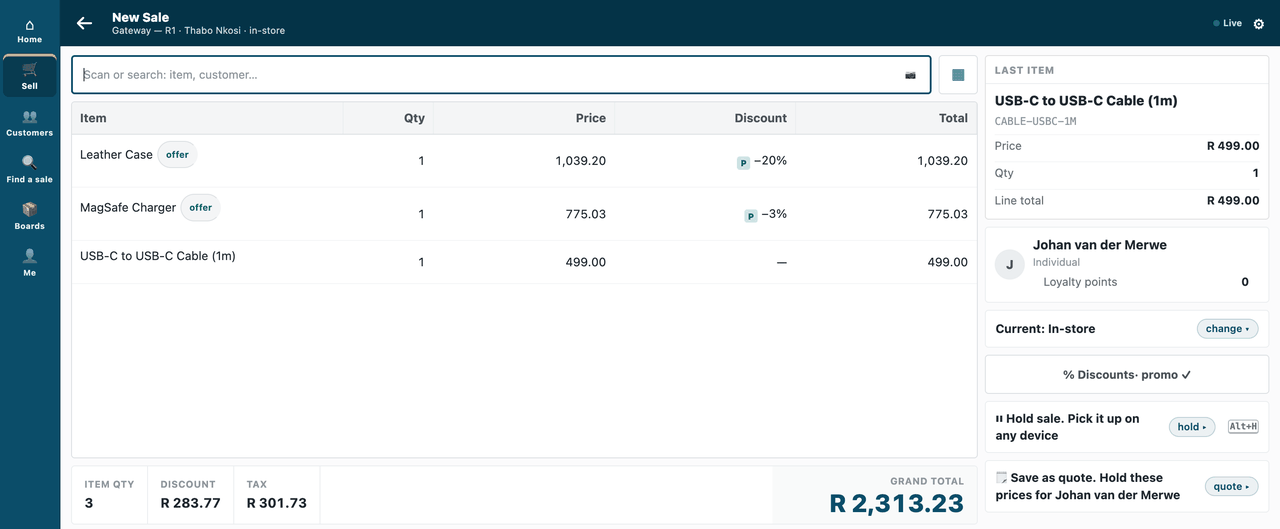
A handler that writes back, end to end (S3, samples/s3_price_audit/outside/). A cashier sells a case, a charger and a cable, two of them on offer:
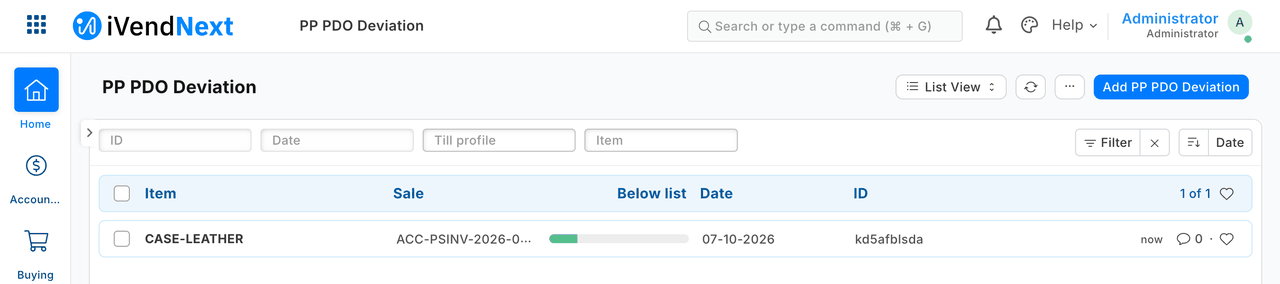
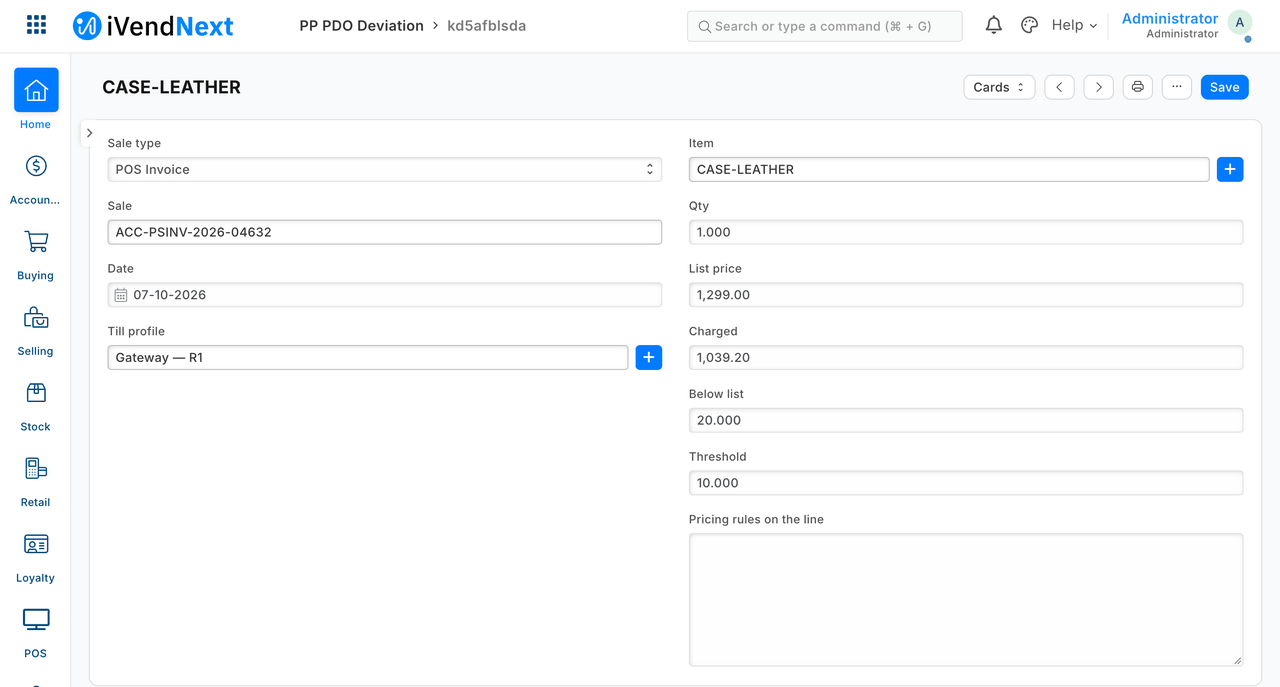
The outside service reads the sale from the feed and records the one line priced too far below list:
Back: Register, pull and read the queueNext: Two patterns built on the feed, and the nudge